How to Add Buttons to Telegram Messages (Without Coding)
Telegram's 13th-birthday update announced Buttons in Messages. You opened your channel, went looking for the setting, and found nothing.
You're not missing anything. Telegram's app has no button option, and it never has. To add buttons to Telegram messages, a bot has to send the post.
That sounds worse than it is. "You need a bot" does not mean "you need to write code." This guide covers three ways to do it — a five-minute setup with no coding at all, a method for people who want more control, and the developer route — plus what the August 2026 update actually changed, and why so many people are confused about it.
Can you add buttons to a Telegram message without a bot?
No. Buttons are part of Telegram's Bot API, which means the message has to come from a bot account.
This applies to both kinds of button: the link buttons that sit underneath a channel post, and the newer buttons that sit inside a block of text.
You also can't add a button to a message you already sent by hand. There's no "edit and add button" option. The post has to be created through a bot from the start.
The workaround is simple: use a ready-made posting bot. You set it up once, and after that you write your posts in the bot instead of in the channel. No code involved.
What Telegram's August 2026 "Buttons in Messages" update actually changed
On 25 August 2026, Telegram turned 13 and shipped an update including Welcome Messages, Buttons in Messages, Inline Documents and Signed Gifts.
The headline made it sound like a feature for everyone. It isn't. Telegram's announcement is explicit that this one is for developers and does require some coding, and it links to the Bot API change log for the technical details.
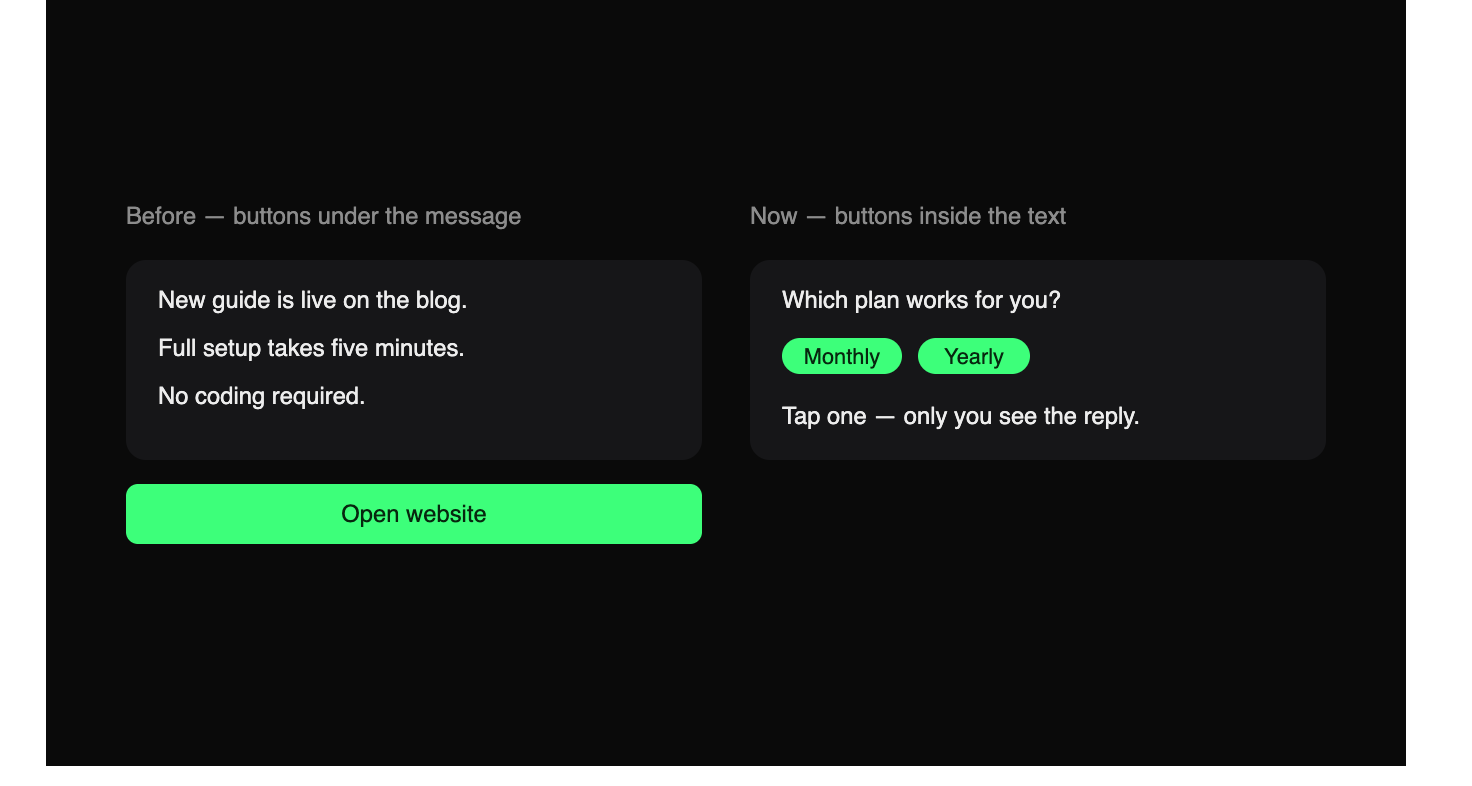
What changed is where buttons can go. Previously buttons sat in rows underneath a message. Now a bot can place multiple buttons inside the text itself, and combine them with ephemeral messages to build flows — surveys, games, horoscopes, or browsing and ordering products — all inside one message.These messages can be posted anywhere, including groups and channels, where any number of people can interact with them at the same time — Telegram's example is playing separate simultaneous games of chess inside a single post.
So the update didn't remove the need for a bot. It gave bots more room to work inside a single message.
Method 1: Add a link button with a posting bot (about 5 minutes, no code)
Best for: channel owners who want a "Join now", "Buy", or "Read more" button under a post.
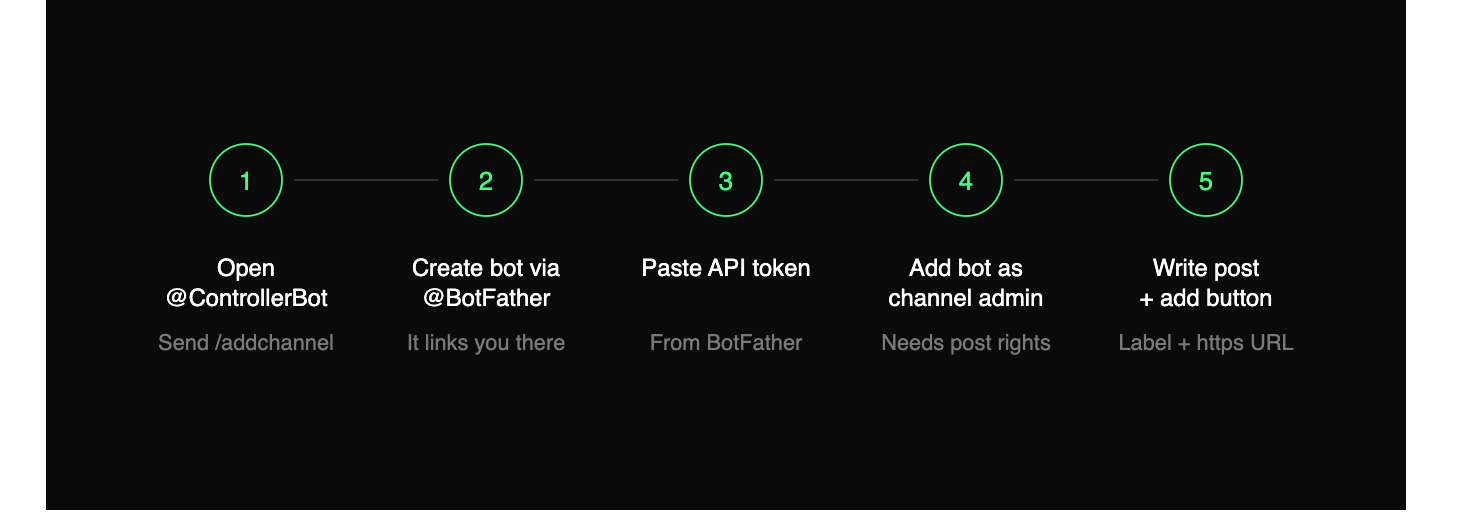
The most widely used tool is @ControllerBot. The setup runs like this:
- Open a chat with @Channel_GuruBot and send
/addchannel. - It sends you to @BotFather to create your own bot. This bot is the account that will publish your posts.
- Copy the API token BotFather gives you and paste it back into @ControllerBot.
- Add your new bot as an admin of your channel, with permission to post messages.
- Write your post inside the posting bot, add the button label and the URL, and publish.
Your post lands in the channel with a tappable button under it.
Three things worth knowing before you start:
- The URL must begin with
https://or the button won't save. - Once a post is published this way, you edit it through the bot — not by long-pressing it in the channel.
- The bot becomes the author of the post, so anything tied to your personal posting behaviour changes slightly.
works similarly — you make it a channel admin, send /channel_button, then forward it the post you want a button added to. Pick whichever you find easier; the underlying mechanism is identical.
Method 2: Post through your own bot
Best for: anyone who already runs a bot, or wants the button to do something rather than just open a link.
There are two button types, and the difference matters:
URL buttons open a web page. That's all they do. Fine for a signup page, a shop, a docs link.
Callback buttons send a signal back to your bot when tapped. The bot can then reply, edit the message, show a new set of buttons, record a vote, or move someone through a sequence. This is how quizzes, menus and multi-step flows are built.
If you're using a no-code bot builder, both types are usually available in the post editor. If you're writing the bot yourself, both are handled by the same reply_markup field on the message.
Method 3: Build a flow inside the message (developers)
Best for: teams building an actual mini-experience inside a channel post.
This is the part the August 2026 update unlocked. Instead of a static row of buttons under a post, your bot can place buttons within the text and use ephemeral messages — messages visible only to the person interacting — so several people can use the same post independently without cluttering the chat.
Practical uses: a product picker where each reader browses their own selection, a quiz where everyone sees their own score, a Terms of Use acceptance flow, an order form.
The full specification lives in the Bot API changelog for 24 August 2026. Everything is standard Bot API work — no special permissions or approvals needed beyond your bot being an admin where it posts.
Why is my Telegram button not showing?
Most failures come down to five things.
The bot isn't an admin, or can't post. Check the channel's administrator list and confirm the "Post messages" permission is on.
The URL is missing https://. Telegram rejects the button silently in some clients.
You're trying to add a button to an existing post. Not possible. Delete it and republish through the bot.
You're posting from a personal account, not bot mode. Link buttons only work on bot-sent messages. Some forwarding tools have both modes and default to the wrong one.
Your app is out of date. Telegram now shows a placeholder when an outdated app can't render a new feature, with a button to download the update. If you see a grey placeholder instead of buttons, update the app.
Do buttons work in groups as well as channels?
Yes. Both link buttons and in-message flows work in groups and channels. The bot needs to be present and permitted to post in whichever chat you're using.
In groups, in-message buttons behave differently from what most people expect: because they can be tied to ephemeral responses, several members can tap the same post and each get their own result, without flooding the group.
Which method should you pick?
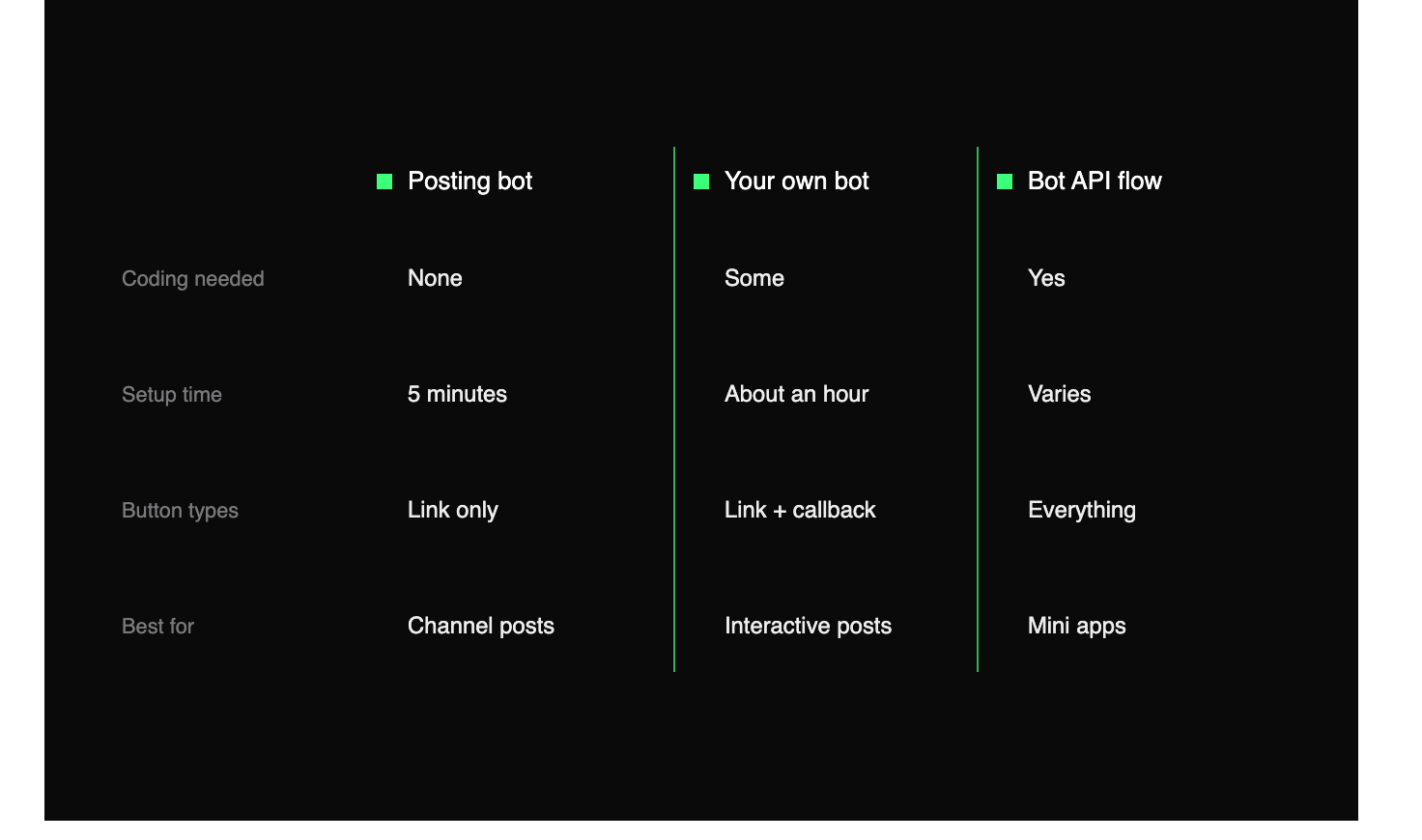
If you just want a call-to-action under your posts, Method 1 and you're done in five minutes. If you want the button to trigger something, Method 2. If you want a small app living inside one message, Method 3.
The short version
Telegram has no in-app button setting, and the August 2026 update didn't add one. Buttons come from bots — but a ready-made posting bot gets you a working button in about five minutes with no code.
Set it up once, publish through the bot from then on, and every post can carry a proper call to action instead of a bare link.