
Best Telegram Auto Forward Bot in 2026: 6 Options Honestly Compared
Search "best telegram auto forward bot" and page one is mostly vendors reviewing themselves. Every result declares its own tool the winner, and none of them tell you the one thing that actually decides your choice: whether the tool runs as a bot or logs into your account.
This comparison fixes that. Six tools, one feature matrix, real prices where they're published, and an honest "pick this if…" verdict for each — including where our own tool is the wrong answer.
Disclosure: we build ForwardBuddy. We've marked its section clearly and listed what it doesn't do. If another tool on this list fits your job better, we've said so.
What actually separates a Telegram forwarding tool from a toy?
Five things, in this order:
- Bot mode vs userbot mode — determines what sources you can read at all
- Whether you hand over your phone number — a real risk decision, not a detail
- Filters — keyword, regex, media type, sender
- Edit and delete sync — does a corrected signal stay corrected downstream?
- Price at your rule count — cheap tiers usually cap rules or delay delivery
Everything else is packaging.
Bot mode vs userbot mode: the choice that decides everything
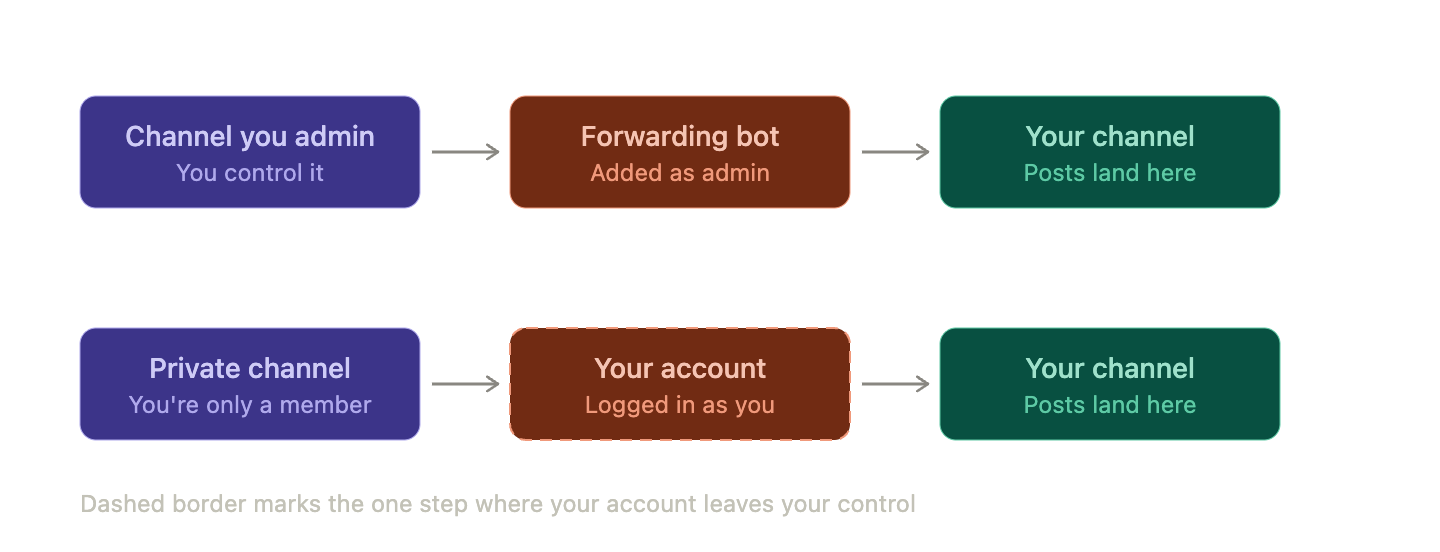
Bot mode uses Telegram's official Bot API. A bot has to be added to a chat — usually as an admin — to read or post. That means it works only where you (or a cooperative admin) control the source. It's clean, it's within Telegram's intended design, and your account is never involved.
Userbot mode connects to your Telegram account over MTProto, the protocol third-party clients use. The service then sees everything you see. That's the only way to mirror a private channel you're merely a member of, a VIP group, or a chat with "Restrict Saving Content" switched on.
The trade-off is blunt: userbot mode reads far more, and it means a third party holds a live session for your account. Nobody who tells you that risk is zero is being straight with you. TeleFeed, for example, states plainly that its service needs no admin role anywhere — view access in the source is enough, because it reads through your connected account rather than a bot added to the chat. telegrambotting
If your sources are channels you already administer, you don't need a userbot at all, and you shouldn't use one.
 The feature matrix: 6 Telegram forwarding tools side by side
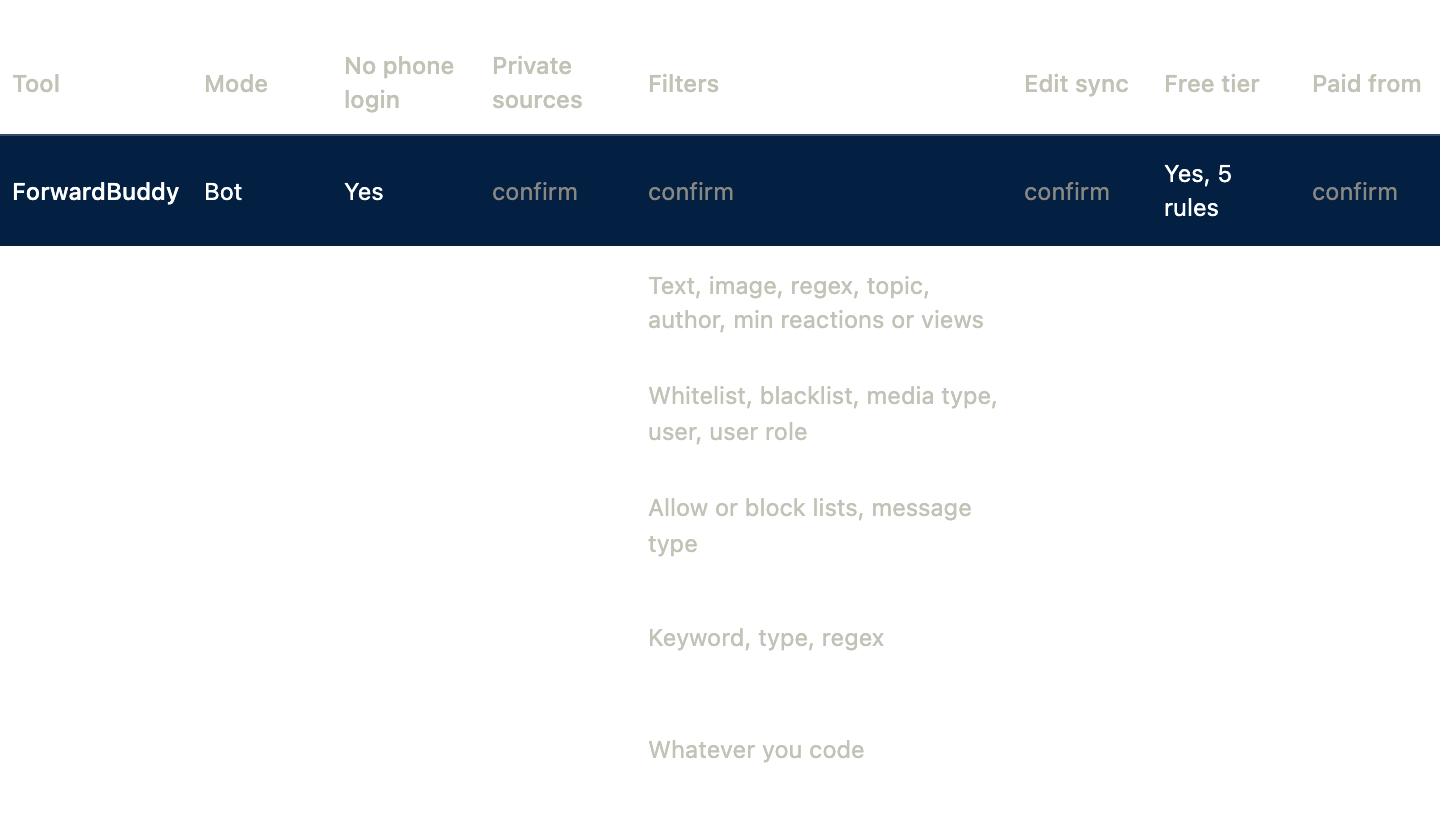
Prices verified August 2026. Three of these six don't publish paid pricing publicly — you have to open the bot to see it, which is worth knowing before you start.
1. ForwardBuddy — best for admins who don't want to hand over an account
ForwardBuddy is our tool, built around one opinion: most people forwarding Telegram messages are moving content between channels they already run, and they should not have to surrender a phone number to do it.
You add ForwardBuddy to your source and destination, define a rule, and it runs. No login code, no session stored somewhere else, no account to lose. The free tier covers five rules, which is enough for a small channel network to run indefinitely.
[[CONFIRM: 2–3 sentences on filters, edit sync behaviour, and destination limits — write only what genuinely ships today]]
Where it's the wrong pick: if your source is a private VIP channel you're just a member of, ForwardBuddy can't read it, because no bot can. That job needs a userbot — see Junction Bot or TeleFeed below.
Pick ForwardBuddy if: you admin your sources, you want a free tier that isn't a countdown timer, and account safety matters more than reaching locked channels.
→ Start ForwardBuddy free — 5 rules
2. Junction Bot — best for transparent, published pricing
Junction Bot is the only tool here with a full public price list, and it's tiered honestly by capability rather than by arbitrary limits.
Economy runs €3/month for 25 forwarding rules from public channels only, with delivery up to an hour behind; Express is €6/month for the same 25 rules at roughly ten-second delivery, and neither tier requires connecting your account. Connecting an account starts at the Direct tier (€12/month, 100 rules, instant delivery, private and copy-restricted sources, posting under your own account), while Expert (€18/month) lifts rules to unlimited and adds smart link replacement, stories and comments, and filtering by reactions and views. junctionbot
Two details worth flagging that competitors gloss over: edit and delete sync only appear from the Direct tier upward — the two cheapest bundles don't have them — and copying a chat's old message history requires a purchased bundle with a connected account. Filtering is genuinely deep: text, images, regex, topics, author, and minimum reactions, views, forwards or replies. Every bundle offers a 7-day free trial. junctionbot + 2
Pick Junction Bot if: you want to know exactly what you'll pay before you start, and you want the option to stay in no-login mode at €3–6/month.
3. TeleFeed — best for high-volume signal and news mirroring
TeleFeed has run since 2019 and is built for cloning, mirroring, filtering, and backing up any chat your account can access, including sources with forwarding restrictions enabled. telegrambotting
It's the most feature-complete userbot on this list. Nine composable commands chain together on a single rule: live mirror, history backfill, transformation, filtering, cleaner, translation across 90+ languages, automatic inline-button clicking for captcha-gated channels, cron scheduling, and per-destination delay. The delay feature is what powers the common live-VIP-plus-delayed-free-tier funnel.The company publishes throughput and uptime figures — 99.98% uptime over 90 days and sustained rates measured up to 1,000 messages per minute per connected account — and notes that per-account limits flex with the account's standing with Telegram. telegrambotting + 2
Forwarding is free to start with no card required, and advanced features sit behind a premium plan. telegrambotting
The catch: the premium price isn't published anywhere on the site. You'll find out inside the bot.
Pick TeleFeed if: you're mirroring dozens of busy channels, you need translation or captcha-clicking, and you accept userbot risk deliberately.
4. Auto Forward Telegram — best for managing routes from a phone
This one is unusual in offering four separate entry points — Telegram bot, web app, Android, and iOS — though it warns that available setup and controls differ by interface and account. Routes run on its hosted service so your device can be offline, which the site is careful to say is not an uptime SLA.Documented controls cover allow/block filters, message-type filters, content cleaning, translation, headers and footers, scheduling, delays, and duplicate control — with a standard 7-day, 50-item duplicate preset described as reducing repeats rather than eliminating them. autoforwardtelegram + 2
A free entitlement exists alongside Gold, Diamond and Platinum tiers, but limits and prices are only confirmable inside the product. autoforwardtelegram
Credit where due: the site is unusually careful about not overpromising. That same caution means you can't fully evaluate it without signing up.
Pick it if: you manage forwarding routes from your phone rather than a desktop.
5. SkTechHub Auto Forwarder — best for forwarding outside Telegram
The differentiator here is that destinations aren't limited to Telegram: it forwards to Slack, Discord, or a custom webhook. It mirrors edits, deletes, and replies from the source, filters by keyword, media type or regex, and adds headers, footers, text replacement and link stripping — plus an affiliate manager that swaps links for your own URLs.There's a lifetime free plan plus a 3-day trial of premium features, and the operator publishes stats of 500+ paid clients and 15M+ messages processed as of Q3 2025. sktechhub + 2
Paid pricing isn't listed on the page.
Pick it if: Telegram is your source but Slack or Discord is where your team actually reads things.
6. Self-hosted open source — best when you refuse to share a session
Several Telethon-based forwarders exist on GitHub, and they're the only option where nobody else ever holds your session. You supply your own API ID and hash from a Telegram developer account and run the script yourself. github
The honest cost: no interface, no support, no filters you haven't written, and a maintenance job every time Telegram changes its API. This is a weekend project that becomes a permanent chore.
Pick it if: you're technical, you're forwarding something sensitive, and control beats convenience.
Which auto forward telegram alternatives fit which job?
- You admin your own channels → ForwardBuddy. Don't connect an account for a job that doesn't need one.
- You need a private or copy-restricted source → Junction Bot Direct, or TeleFeed.
- You want to know the price before signing up → Junction Bot, the only one that publishes it.
- You're running a signals funnel with a delayed free tier → TeleFeed's per-destination delay.
- Your destination is Discord or Slack → SkTechHub.
- You want zero third-party session access → self-host.
- You're mirroring one busy public channel on a budget → Junction Bot Express at €6/month.
Is connecting your Telegram account safe?
Not risk-free, and treat any vendor claiming otherwise with suspicion. TeleFeed's own answer is that it has operated since 2019 without a pattern of bans, runs through the MTProto API via the Telethon client library, respects the FloodWait limits Telegram exposes, and keeps sessions encrypted server-side. That's a reasonable answer — it's a track record, not a guarantee. telegrambotting
Sensible precautions if you go userbot: use a secondary account, enable two-factor authentication, and check which active sessions are logged in periodically. And remember that mirroring a paid channel you subscribed to may breach that channel's terms even where it's technically possible.
What should you expect to pay?
Real money for real forwarding sits between €3 and €18 a month for a single user. Junction Bot's public ladder is the useful benchmark: cheap tiers restrict you to public sources with delayed delivery, and the jump to private-source access with edit sync lands around €12.
Free tiers are real but shaped differently — some cap rules, some cap sources, some hide the advanced features. Work out your rule count first, then compare.
Bottom line
There is no single best telegram auto forward bot, only the right mode for your sources. If you admin your channels, use a bot and keep your account out of it. If you need locked sources, accept the userbot trade-off knowingly and pick a tool with a track record.
If the first describes you, ForwardBuddy's free tier gives you five rules with no phone login and no trial clock.