Business Automation With Telegram Bots: 7 Workflows Worth Building
Most teams already live in Telegram. The messages are there, the clients are there, the alerts get pasted there manually every morning by someone who'd rather be doing anything else.
Business automation with Telegram closes that gap. Instead of another dashboard nobody opens, the work comes to the chat window your team already has pinned. This guide covers seven workflows that reliably pay for themselves, what each one actually costs to build, and — the part most articles skip — how to decide which one to build first.
Not all seven are worth it for every company. Two of them are usually a mistake to start with. We'll be specific about which.
Why Telegram for internal ops?
Telegram isn't the obvious choice for internal tooling. Slack has more integrations. Email has better audit trails. So why does it keep winning for operational automation?
The Bot API is free and genuinely open. There's no per-conversation charge and no approval queue for message templates. On WhatsApp Business, every conversation you initiate carries a fee and a template review. On Telegram, you send what you want, when you want.
The primitives are unusually good. Inline keyboards give you real buttons, so an approval is one tap instead of a typed reply someone has to parse. Forum Topics turn a single group into dozens of threaded lanes. Mini Apps let you drop a full web interface inside the chat when a button isn't enough.
Bots can now act on behalf of business accounts. Telegram Business lets a connected bot read and reply inside your real customer chats, not just a separate bot chat. For agencies and consultancies where clients message a human account, that's the difference between an automation people use and one they route around.
Adoption is free. Nobody needs a seat license or a new login. If your clients are in crypto, Web3, or Eastern European and Asian markets, they're already on Telegram — the onboarding friction is zero.
Where it falls flat: Telegram is a poor system of record. If a workflow needs immutable audit logs, regulated data handling, or legal-grade retention, the bot should trigger the process and write the record somewhere else. Chat history is not compliance.
 Workflow 1 — Client onboarding and intake
What it replaces: the eight-email back-and-forth to collect a brief, credentials, brand assets, and a signed scope.
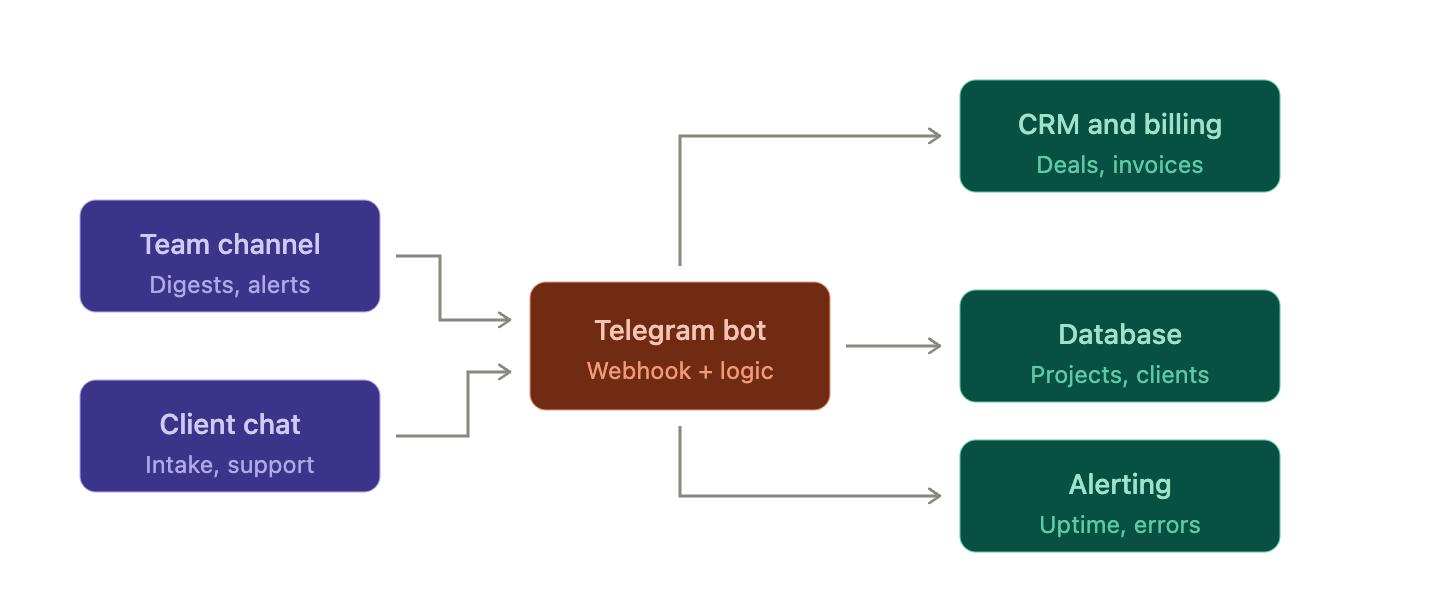
The bot walks a new client through a structured intake in chat. Each question is a button or a short reply. Files upload straight into the thread. When it's done, the bot writes a row to your CRM or sheet, creates the project folder, and posts a summary to your internal channel.
Build effort: low-to-medium. A finite-state conversation, file handling, and one or two API writes. A week for a solid version.
Worth it when: you onboard more than three or four clients a month and each one costs you an hour of coordination. Below that, the automation costs more than it saves.
The quiet win is data quality. A bot that refuses to advance until it has a valid URL collects cleaner input than any email thread ever has.
Workflow 2 — Smart alerts that aren't noise
What it replaces: a firehose channel everyone has muted.
The bar for a good alert bot isn't "sends notifications." It's "sends few enough that people still read them." Three rules that matter:
- Thresholds, not events. Alert on five failed payments in ten minutes, not on every failed payment.
- Deduplicate and roll up. One message that edits itself as a situation develops beats forty new ones.
- Make the alert actionable. Attach buttons: Acknowledge, Snooze 1h, Assign to me. An alert you can only read is a to-do you'll forget.
Build effort: low. A webhook receiver and some state. Two to three days.
Worth it when: almost always. This is the highest-ROI starting point for most teams and the one we'd recommend building first.
Workflow 3 — Automated reporting and digests
What it replaces: someone opening four dashboards every Monday and pasting numbers into a message.
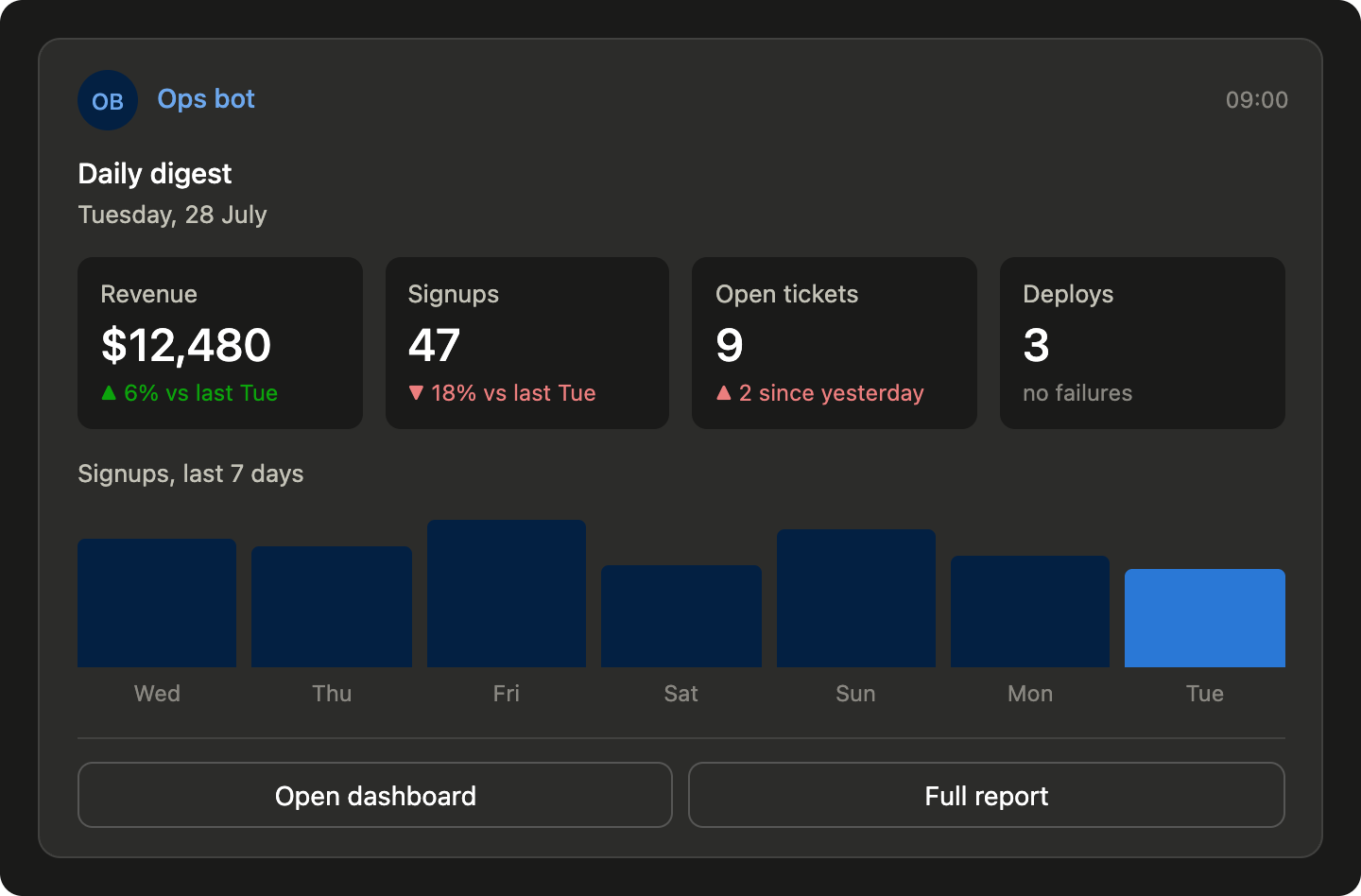
A digest bot pulls from your analytics, billing, and project tools on a schedule and posts a single formatted summary — yesterday's revenue, open tickets, deployments, whatever your team actually acts on. Add a chart image and it becomes something people screenshot into client updates.
The upgrade most teams miss: make the digest comparative. "Signups: 47" is trivia. "Signups: 47 (▼18% vs last Tuesday)" is a decision.
Build effort: medium. The bot is easy; the data plumbing is the work.
Worth it when: you have more than one data source and more than one person who needs the same numbers.
 Workflow 4 — AI triage assistants
What it replaces: answering the same twelve questions forever.
A Telegram AI assistant sits on your support or sales chat, answers from your own documentation, and — critically — hands off to a human the moment it isn't confident. Connect an LLM, give it a retrieval layer over your FAQs and price list, and set a strict fallback.
The failure mode is a bot that bluffs. A confidently wrong answer to a pricing question costs more than the twenty questions it handled correctly. Design for the handoff first, the answers second. Log every conversation where it punted — that log is your product roadmap.
Build effort: medium. Cheap to prototype, expensive to make trustworthy.
Worth it when: you have real repeat-question volume and documentation good enough to ground answers on. Without the second part, don't start.
Workflow 5 — Two-way data syncs
What it replaces: copy-pasting between a spreadsheet and a chat.
This is where Telegram stops being a notification channel and becomes an interface. The bot reads from a sheet or database and posts items for action; the reply writes back. Mark a lead as contacted, update a deal stage, log hours — without leaving the conversation.
Build effort: medium-to-high. Two-way sync means conflict handling, idempotency, and a real answer to "what happens when the same row gets updated twice."
Worth it when: your team's real workflow already lives in a sheet and you're fighting to keep it current. If your data lives in a proper system with a decent mobile app, skip this one.
Workflow 6 — Approval and sign-off flows
What it replaces: "can someone approve this?" shouted into a group chat.
Invoices, content, deploys, discounts, refunds — anything with a gate. The bot DMs the approver the actual item (the image, the invoice PDF, the diff) with Approve / Reject / Request changes buttons, then executes on the answer and logs who decided what.
We build these constantly, and one design choice matters more than the rest: show the real artifact, not a link to it. An approver who has to open a browser tab will batch it until Friday. An approver who sees the rendered banner in their DM taps approve in four seconds.
Build effort: low. Callback queries and a state table. Genuinely a few days.
Worth it when: any recurring decision currently blocks on one person's attention. Excellent second project after alerts.
Workflow 7 — Internal helpdesk and ticket routing
What it replaces: support requests scattered across DMs with no owner and no history.
Using Forum Topics, one Telegram group becomes a ticket system: each request opens its own topic, gets tagged, gets an assignee, and stays threaded until it's closed. Clients message a single bot; your team works in lanes.
Build effort: medium. Topic management, routing rules, and a status model.
Worth it when: support volume has outgrown DMs but hasn't earned a Zendesk seat for everyone. That window is wider than most teams expect.
How to start: prioritizing your business automation on Telegram
Don't build the most exciting one. Build the one with the best ratio. Score each candidate 1–5 on four axes:
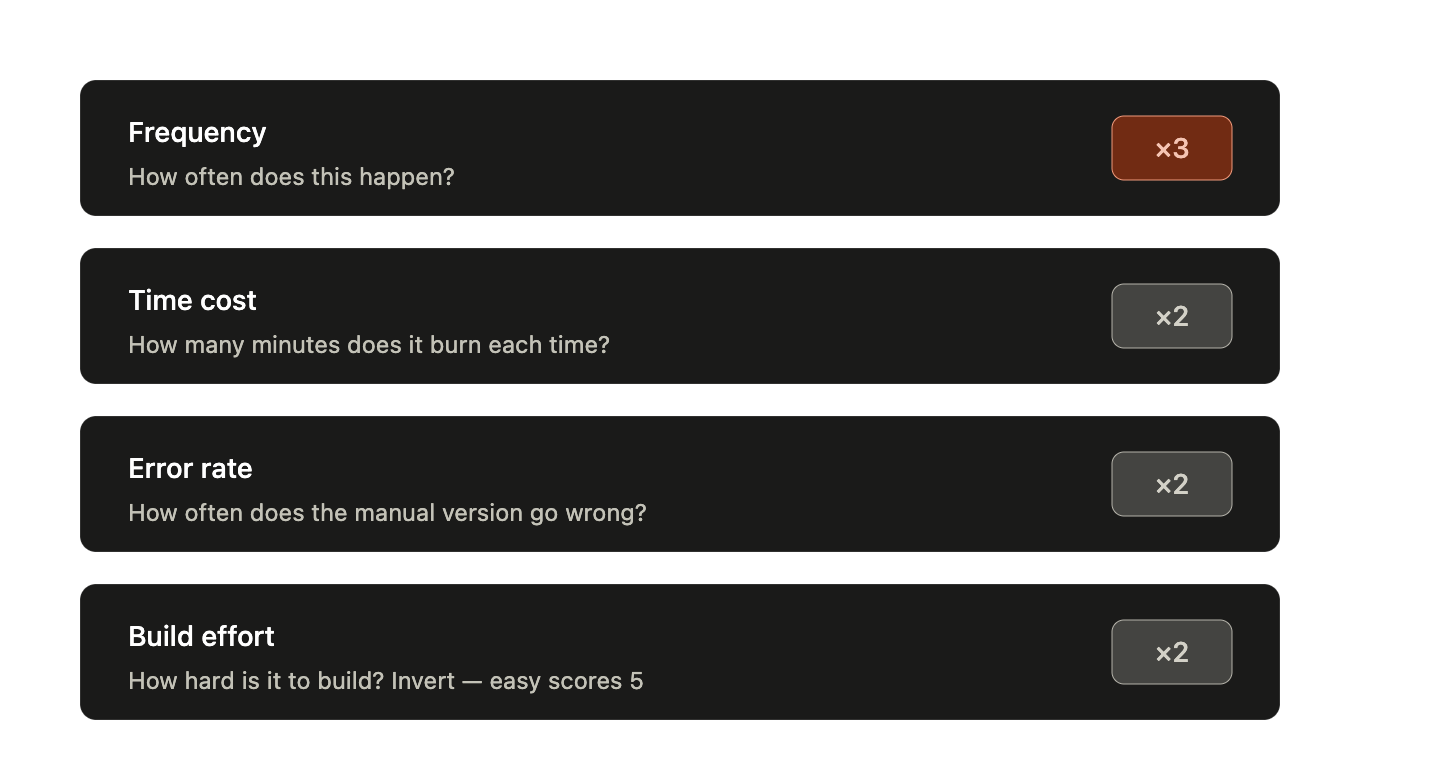
Multiply, add, and build the top score. In practice this almost always ranks smart alerts or approval flows first — high frequency, low effort — and two-way data syncs last.
Three rules that save projects:
- Ship one workflow end-to-end before starting a second. A half-finished bot gets abandoned; a working one gets requests.
- Put a human in the loop for the first month. Every automation that acts on production should start in review mode — the bot proposes, a person confirms. Remove the gate once you trust it, not before.
- Instrument it. Log every invocation. If nobody used the workflow in three weeks, delete it.
Start with one bot, one workflow, one week. The second one takes half as long.
FAQ
Is Telegram secure enough for internal business automation?
For operational workflows, yes — bot traffic runs over HTTPS and you control the server. But bot messages aren't end-to-end encrypted, and anyone in the group can read the channel. Don't pipe credentials, payment data, or regulated personal data through a bot. Send a reference; keep the payload in your own system.
Do I need Telegram Premium for a business bot?
No. The Bot API is free and always has been. Telegram Business features — opening hours, greeting messages, connecting a bot to your personal account's chats — are bundled with Premium. Standard bots need nothing.
Should I use a no-code platform or build custom?
No-code is right for linear customer-facing flows: FAQ trees, lead capture, broadcasts. Build custom the moment you need to touch your own database, enforce real business logic, or handle approvals with state. Most internal-ops workflows in this article cross that line quickly.
How much does a Telegram bot for business cost to run?
Hosting is the main line item and it's small — a basic bot runs comfortably on a cheap VPS. AI assistants add LLM API costs that scale with volume. The real cost is engineering time, which is why the prioritization scorecard matters more than the infrastructure question.
Can one bot handle multiple workflows?
Yes, and it should. Separate bots mean separate tokens, deployments, and mental overhead. Use command namespaces or a menu, and split only when a workflow needs genuinely different permissions.
Where to go from here
Seven workflows, one honest recommendation: pick the one your team complains about most, build the smallest version that works, and put a human approval gate in front of it for the first month.
Telegram automation compounds. The first bot is infrastructure — auth, deployment, logging. The fifth one is an afternoon.