Telegram Welcome Message Bot vs Native Welcome Messages: What Native Can't Do
On 25 August 2026, Telegram added welcome messages to groups and channels. No bot, no setup, just Edit → Welcome Message. Plenty of admins switched it on, watched it work, and then hit a wall about a week later.
This is the honest version of that comparison. What native welcome messages actually do, where they stop, and when you still need a Telegram welcome message bot. No pretending the native feature doesn't exist — and no pretending it replaced everything either.
What does Telegram's native welcome message actually do?
Straight from Telegram's own announcement: chat owners can create welcome messages in a group or channel, only new members see them, you can attach media or send several messages at once, and rich formatting works.
Three details matter more than they sound.
It appears inside the chat, not in DMs. When someone joins, only they can see the message. It sits quietly in the conversation. Existing members see nothing, so the chat stays clean.
It's a welcome pack, not one message. You can stack several messages and media together, and the rich text editor works here too — including tables and inline files.
It costs nothing and breaks nothing. No extra bot in your admin list, no third party holding a token.
That last point is genuinely good, and it's why almost every channel should turn this on today.
How do you set a native welcome message?
Open your group or channel profile, choose Edit → Welcome Message, and send the messages you want new members to see. That's the entire setup.
One catch worth knowing: Telegram also shipped a placeholder that shows up when someone's app is too old to render a new feature, with a button to update. So members on outdated app versions don't get your carefully built welcome pack — they get a nudge to update first.
So do you still need a Telegram welcome message bot?
There's one question that settles it.
Is your onboarding content, or is it a process?
If onboarding means "here are the rules, here's the pinned FAQ, here's our site" — that's content. Native handles it perfectly. Turn it on and stop reading.
If onboarding means something has to happen — someone gets approved, someone confirms something, someone gets followed up with later — that's a process. Native welcome messages don't run processes. They display things.
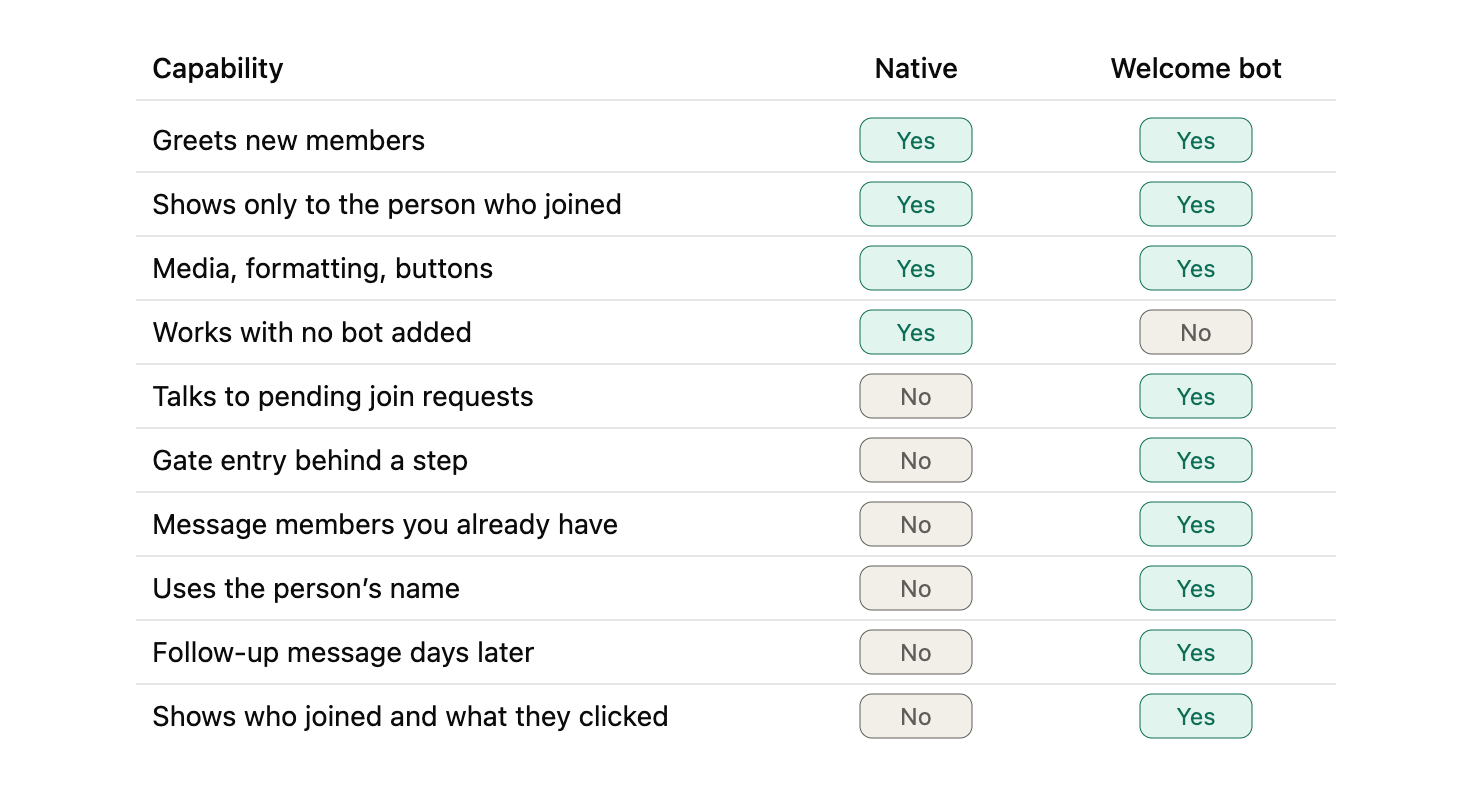
What native welcome messages can't do
Everything below is based on what Telegram announced and documented. If they extend the feature later, this list gets shorter — worth re-checking before you commit to anything.
1. They don't help anyone stuck in the join-request queue
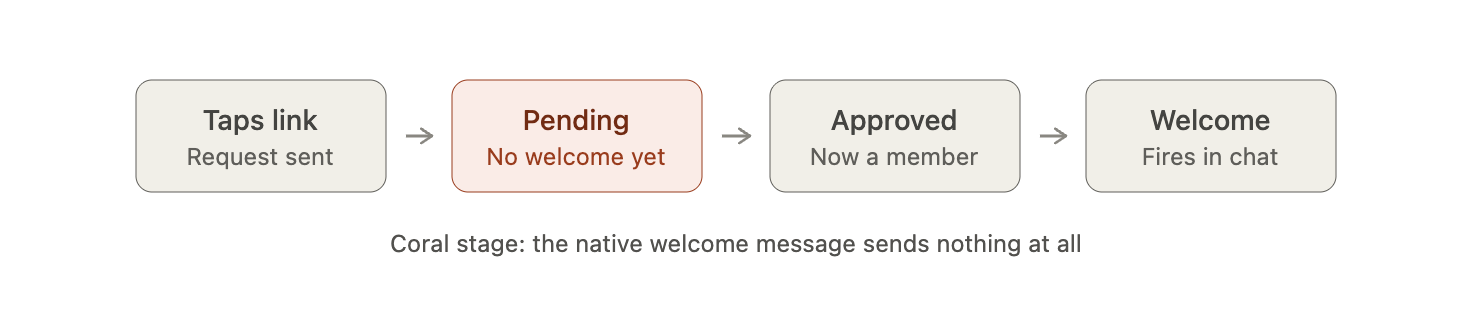
If your channel uses a "request to join" link, the person who taps it isn't a member yet. They're waiting. Native welcome messages fire when someone actually joins, so during that wait the applicant hears nothing at all. On a manually approved channel, that silence can last hours — and that's exactly when people give up and leave.
Telegram handles this stage on the bot side instead. Its Bot API added join request queries, a guard bot field, and methods for answering a pending request and sending a Web App to the applicant. That's a completely separate pipeline from the welcome message you set under Edit.
2. They can't gate anything
A welcome message shows up after the door has already opened. If you want someone to confirm they've read the rules, pick a language, prove they're a real person, or answer one question before getting in, native has nowhere to put that step.
3. They only ever talk to new people
That's by design — only new members see it. Which is exactly right for onboarding and useless for anything else. Announcing a price change to 12,000 existing subscribers is a broadcast, and native welcome messages are not a broadcast tool.
4. There's no personalisation
Your welcome pack is identical for everyone. No name, no join source, no "you came in from the YouTube link, so here's the YouTube offer." Welcome bots have used name placeholders and per-link logic for years.
5. There's no day three
Onboarding that actually works is usually a sequence, not a single hit. Day one welcome, day three the genuinely useful resource, day seven the ask. Native gives you one moment and then goes quiet.
6. You can't tell whether any of it worked
No view count, no click count, no list of who joined this week. You're writing into a room with the lights off.
Native vs a welcome bot, side by side
When native welcome messages are genuinely enough
Real answer, no hedging. Use native and skip the bot completely if:
- your channel or group is open, with no join requests
- your welcome is information, not a task
- your audience is small enough that you'd spot problems by hand
- you'd rather not hand a bot admin rights on principle
That last one is a legitimate position, not paranoia. Fewer moving parts is a feature.
There's a useful admin detail here too. The August update added a "can send welcome messages" right for chat administrators, so on a team you can control exactly who's allowed to edit the welcome without handing over everything else
When a Telegram welcome message bot earns its place
A bot is worth adding when onboarding has a job to do, not just words to say:
- You run join requests. Someone has to approve them, and someone should talk to the applicant while they wait.
- Entry is conditional. Paid channel, invite-only community, region-restricted content.
- You want to reach members later, not only at the door.
- You run more than one channel and are doing the same thing by hand in each.
Channel Guru is Weego's bot for this half of the job — join-request approval, a welcome that goes out once someone's actually approved, and broadcasts from one place. If it's the approval part you need first, we covered that step by step in our guide to auto-approving Telegram join requests.
And the honest bit: if all you needed was a tidy greeting, Channel Guru is more than you need. Use native.
The setup that actually works: run both
Most of the advice online treats this as either/or. It isn't.
Think of native as the notice board on the wall, and the bot as the person at the front desk. The notice board is always right and never needs attention. The front desk handles whatever the notice board can't answer.
A split that works well in practice:
- Native welcome message — rules, links, what this channel is for, where the pinned resources live. Static, always true, zero maintenance.
- Welcome bot — approvals, the message to people still waiting, the gate, the day-three follow-up, the broadcast to everyone already inside.
Set the native one first, because it takes two minutes. Then look at what's still not happening and let the bot cover that gap. Most admins who do it in the other order end up paying for a bot to do a job Telegram now does for free.
Common questions
Does the native welcome message arrive as a DM?
No. It appears inside the group or channel, visible only to the person who just joined.
Do welcome bots still work after the August 2026 update?
Yes. Nothing in that release removed or restricted what bots can do.
Will all my existing members see it?
No. Only people who join after you set it up, and only if their app is up to date.
Does it work with join requests?
The welcome fires once someone is actually a member. It says nothing to people still waiting for approval.
Can I use native and a bot together?
Yes, and for most channels that's the right answer.
What to set up today
Turn on the native welcome message. Two minutes, no downside, and it makes your channel look looked-after from the first second.
Then ask the process question. If your onboarding needs approvals, gates, follow-ups or broadcasts, that's the part a bot is for — and the greeting can stay with Telegram.
Running join requests? Add Channel Guru as an admin and set up approval in about two minutes.