Here's the awkward truth about searching for the best Telegram support bot: almost every "best of" list on page one is published by one of the bots. You are reading a sales page with a table in the middle of it.
Click here to try our Support Bot
This one is different. We sell a Telegram helpdesk bot (SupportBuddy), and we are going to tell you three times in this article when not to buy it — including the exact situation where Mava is the better choice.
We compared seven ways to run customer support inside Telegram in 2026: dedicated helpdesk bots, multi-platform support platforms, open-source tools you host yourself, and two free options built into Telegram that most comparison posts quietly skip because nobody earns money when you pick them.
By the end you'll know which one fits your team, what it actually costs, and how to have a working Telegram helpdesk running in about ten minutes.
The short answer (if you only read one section)
- Telegram-only team, under ~15 people, want real tickets? A Forum Topics helpdesk bot like SupportBuddy is the closest fit — every customer gets their own thread inside one group.
- Support spread across Discord, Slack, email and Telegram? Pick Mava. Genuinely. A Telegram-only bot will make your life worse.
- Fewer than ~20 tickets a month? Use Telegram's own Forum Topics and a shared group. Cost: zero.
- One founder answering DMs, already paying for Premium? Telegram Business quick replies and away messages may be all you need.
- You want to own your data and you have a server? Self-host Chatwoot or an open-source support bot.
- You need moderation and anti-spam, not tickets? Combot — but understand it is not a helpdesk.
Now the detail, tool by tool.
What actually makes a Telegram support bot good?
Most comparison tables measure the wrong things. After watching small teams run support in Telegram, five things decide whether a tool sticks:
1. Does one customer equal one thread? If replies from twelve customers land in a single chat, your team will lose messages by week two. This is the single biggest failure point.
2. Can two people answer without stepping on each other? You need to see that a teammate already picked up a ticket. Otherwise the customer gets two different answers.
3. Does it break when you leave Telegram? Some tools pull conversations into an external web dashboard. That's powerful, but your team now lives in two places instead of one.
4. What happens to the history? If someone messages again in three months, can you see what happened last time?
5. What does it cost at your volume? Support tools are priced per conversation, per seat, or per group. At 40 tickets a month those three models produce wildly different bills.
Keep those five in mind — they're the columns in the comparison further down.
The free option nobody selling you a bot wants to mention: Forum Topics
In late 2022 Telegram added Topics — a way to split one group into separate threads, like channels inside a Discord server. It quietly turned every Telegram group into a usable helpdesk skeleton, for free.
Here's the setup: create a group, switch on Topics, and make one topic per customer, per issue, or per product area. Your team works inside a single group; each conversation stays in its own lane.
How to switch it on: open the group → tap the group name → Edit → Topics → toggle on. If you don't see the toggle, your group is still a basic group; Telegram converts it to a supergroup automatically once it grows or you make it public.
The honest limits. Doing this manually means someone has to create each topic by hand, copy the customer's message across, and remember to close it afterwards. There's no ticket number, no "assigned to", no auto-reply, and the customer never sees the topic — they're still in a DM with you.
That's exactly the gap that Forum-Topic helpdesk bots fill. But if you're getting five support messages a week, honestly: use this, spend nothing, and come back when it hurts.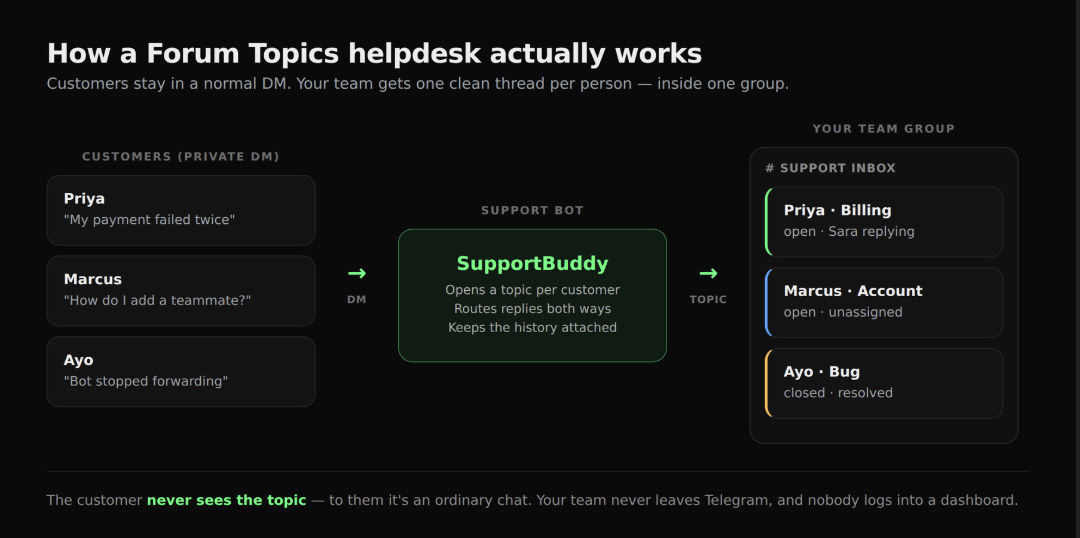
Telegram Business: the features you may already be paying for
The second free-ish option that comparison posts skip. Telegram Business is built into the app and included with a Telegram Premium subscription — no separate tool, no bot to install.
What you get that's relevant to support:
- Quick replies — saved answers you fire off with a shortcut, with formatting, links, files and stickers.
- Greeting messages — an automatic first reply to anyone who messages you for the first time.
- Away messages — sent automatically outside your opening hours or while you're on holiday.
- Opening hours and location — shown on your profile so people stop asking.
- Chat tags — coloured labels to sort conversations.
- Chatbot connection — you can plug a bot in to answer on your behalf.
This is real telegram customer support automation, and it costs the price of one Premium subscription (a few dollars a month, varies by country).
Where it stops. It's built for one person's inbox. There's no shared queue, no way for a teammate to pick up a ticket, and no reporting. It's a brilliant solo-founder tool and a bad three-person-team tool.
SupportBuddy — best for Telegram-only teams who want real tickets
Full disclosure: SupportBuddy is ours, part of the Weego Tech bot suite. Here's what it does and who it's wrong for.
The idea: a customer messages your bot in a normal DM. SupportBuddy opens a Forum Topic for them inside your team's group. Your team replies in that topic; the customer sees the reply in their DM. Nobody leaves Telegram, and nobody logs into a dashboard.
What that gets you over doing Topics by hand:
- Topics are created automatically, one per customer
- Replies route both ways without copy-paste
- Conversation history stays attached to the customer
- Tickets can be closed and reopened
- Your whole team works from one group
Who should not use it. If your customers also reach you on Discord, Slack, email or a website widget, SupportBuddy solves a quarter of your problem. Skip to the Mava section — we mean it.
Pricing: [CONFIRM — paste your tier names, limits and prices here before publishing.]
👉 Start SupportBuddy free — we'll set it up with you · or read the full SupportBuddy vs Mava breakdown
Mava — best if your support lives in more than one place
Mava is the tool currently ranking for most searches in this category, and it deserves to be in the conversation. It's a support platform that pulls Discord, Telegram, Slack, email and a web chat widget into one shared inbox, with an AI that answers from your documentation.
Pick Mava if any of these are true:
- Your community is on Discord and Telegram (very common in crypto and dev-tool companies)
- You want an AI that auto-answers repeat questions from your docs
- You need analytics, seats, and a proper agent workflow
- You'd rather your team work in a web dashboard than inside Telegram
Pricing (from Mava's own pricing page): a free plan with 30 support requests a month and one seat; Founder at $39/month for 100 requests and three seats; Growth at $99/month for 500 requests and unlimited seats; Scale at $199/month for 2,000 requests, multilingual AI and API access; Enterprise at $599/month.
The trade-off: it's priced per support request, and it moves your team out of Telegram into a separate dashboard. For a two-person team handling 60 Telegram-only tickets a month, that's a lot of platform for the problem. For a team drowning in four channels at once, it's the right answer and a mava alternative would be a downgrade.
SUCH — the no-code middle ground
SUCH is a Telegram-focused, no-code bot builder aimed at communities. You build flows visually — menus, FAQ answers, forms — and hand off to a human when the flow runs out of road.
Good fit if: you want to deflect the same twenty questions automatically, and you'd rather click a flow builder than write bot code.
Less good if: you want a true ticket queue with assignment and history. It's a bot builder that can do support, not a helpdesk that happens to be a bot.
Check current pricing on their site — it has a free tier and a low-cost paid plan, but published numbers move around.
Combot — excellent tool, wrong category
Combot shows up in every "best Telegram bot" list, so let's be clear about what it is. Combot is a group moderation and analytics bot: word filters, blocklists, warn-and-mute escalation, spam detection, and a web dashboard with activity trends and member statistics.
It is very good at that. It is not a helpdesk — no tickets, no per-customer threads, no assignment, no conversation history in a support sense.
Use Combot alongside a support bot if you run a big public community group that needs policing. Don't use it as your telegram helpdesk bot, and be suspicious of any comparison post that lists it as one.
Free for small groups; a paid Pro tier priced per group unlocks the full analytics history and advanced triggers.
Chatwoot and the self-hosted route
The option that basically never appears on page one, because it's open source and nobody's affiliate link points at it.
Chatwoot is an open-source customer support platform with a Telegram channel built in, alongside WhatsApp, email, web chat and more. Self-host it and the software is free — you pay for a server. There's also a paid cloud version if you'd rather not run it yourself.
There are also small open-source Telegram support bots on GitHub that do the Forum-Topics trick, some with no database and no webhook required. If you have a developer on the team and an afternoon, this is a legitimately good path.
The honest cost: "free" software still costs you server bills, updates, backups and the hour it breaks on a Saturday. Pick this if owning your data matters or you have real volume; skip it if nobody on the team enjoys server maintenance.
Freshdesk, Zendesk and the helpdesk you already own
If your company already pays for a traditional helpdesk, check whether it has a Telegram integration before buying anything new. Most of the big ones do, via native connectors or middleware.
The upside: one system of record, existing workflows, existing reporting.
The downside: these integrations are usually thin. Telegram becomes just another inbox feed, and Telegram-native things — groups, topics, inline buttons, media — often survive the trip badly. Test it with real messages before you commit your team to it.
Full comparison: all seven, side by side
 Which should you pick? A 30-second decision path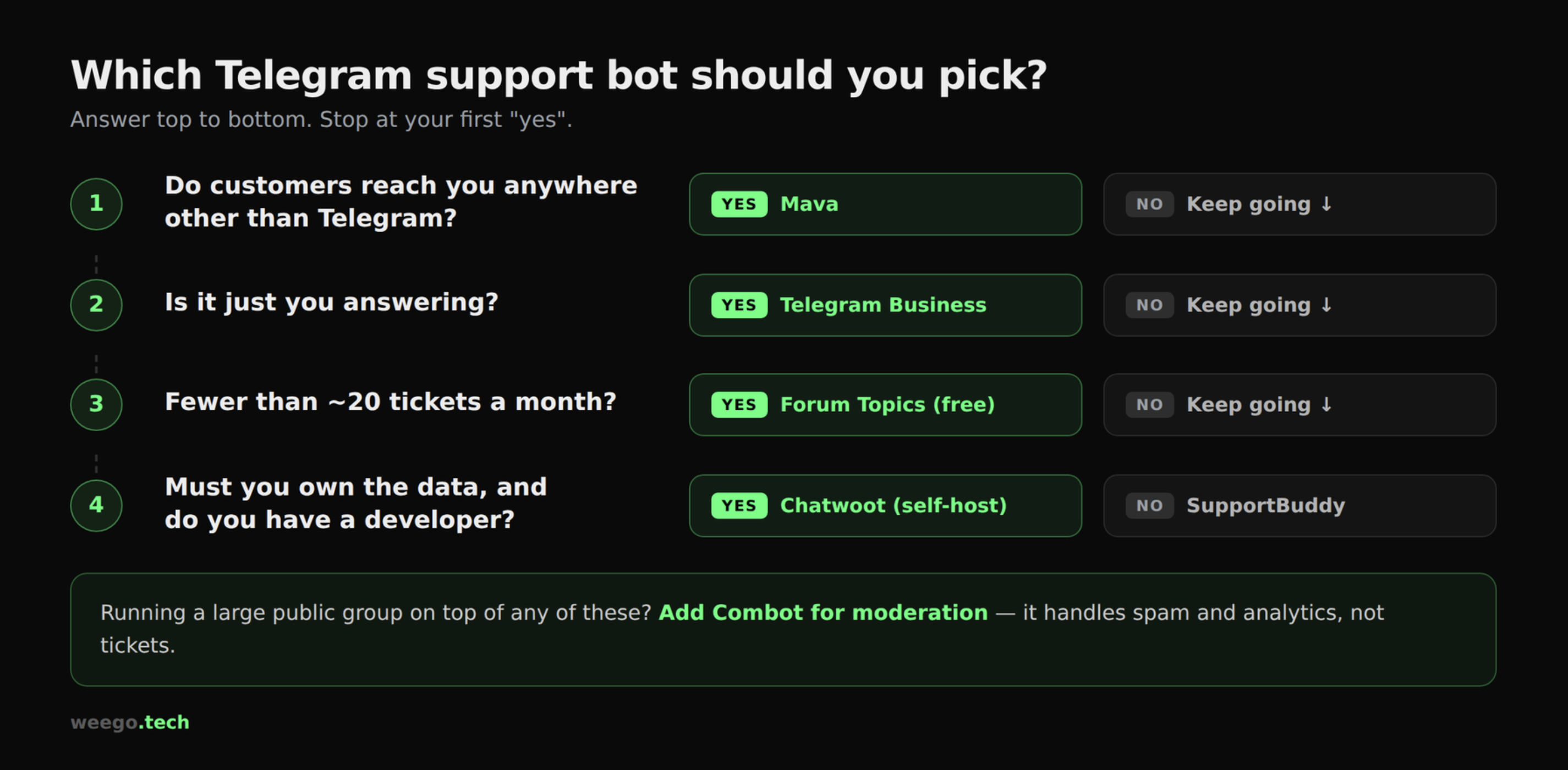
Read it top to bottom:
- Do customers reach you anywhere other than Telegram? → Yes: Mava (or Chatwoot if you self-host). No: continue.
- Is it just you answering? → Yes: Telegram Business. No: continue.
- More than ~20 tickets a month? → No: manual Forum Topics, free. Yes: continue.
- Do you want to own the data / have a developer? → Yes: Chatwoot or an open-source bot. No: SupportBuddy.
- Also running a large public group? → Add Combot for moderation on top of whatever you chose.
How to set up a Telegram helpdesk in about 10 minutes
This works for the free Forum Topics route and for any Forum-Topic-based bot, including ours.
- Create a private group for your team. Name it something obvious like "Support Inbox".
- Turn on Topics: group name → Edit → Topics → toggle on.
- Add your teammates and give the ones who'll answer admin rights.
- Add your support bot as an admin with permission to manage topics. (For the manual route, skip this.)
- Create your standing topics — one for "General", one for "Bugs", one for "Billing".
- Publish one entry point. A single link to your bot or your DM, on your website, in your channel description, in your pinned message. One door, not five.
- Write three quick replies now: your greeting, your away message, and the answer to your most repeated question.
That last step is the one teams skip, and it's the one that saves the most time.
Four mistakes small teams make with Telegram support
Giving out personal accounts. It feels friendly until someone leaves the company and takes the conversation history with them. Route everything through a bot or a shared group.
No away message. Telegram feels instant, so silence reads as rudeness. An away message resets expectations for free.
Paying per-conversation prices for a Telegram-only problem. Run the maths at your real monthly volume before you subscribe to anything.
Buying a helpdesk before you have tickets. If you're at ten messages a week, free Forum Topics is not the cheap option — it's the correct one.
Frequently asked questions
Is there a genuinely free Telegram support bot? Yes, in two forms. Telegram's own Forum Topics cost nothing and need no bot. Open-source bots on GitHub are free to run on your own server. Several commercial tools also have free tiers — Mava's includes 30 support requests a month.
Can a Telegram bot answer support questions automatically? Yes. Platforms like Mava train an AI on your documentation to answer repeat questions, and Telegram Business lets you connect a bot to reply on your behalf. Start by automating your five most repeated questions, not everything.
Do I need Telegram Premium to run support? Only for Telegram Business features. Bots and Forum Topics work on a free account.
What's the best Mava alternative for a Telegram-only team? A Forum-Topics helpdesk bot such as SupportBuddy, or self-hosted Chatwoot if you want to own the stack. If you're on more than one platform, though, the honest answer is that Mava is the alternative — not the thing you're replacing.
Will customers see the internal topic? No. In a Forum-Topics setup the customer stays in a normal one-to-one chat with your bot. Topics are what your team sees.
The verdict
There is no single best Telegram support bot — there's the one that matches how many places your customers can reach you.
One platform, small team, real tickets: SupportBuddy. Several platforms: Mava, without hesitation. Tiny volume: Forum Topics, free. Solo founder: Telegram Business. Data ownership: Chatwoot. Moderation: Combot, on top of one of the above.
If you landed on the first one, we'll set it up with you — a live group, a working bot and your first three quick replies, at no cost.
And if this article talked you into Mava instead, that's a good outcome too. Better to read one honest comparison than to switch tools twice.
Related reading: Running a Telegram helpdesk with Forum Topics · SupportBuddy vs Mava, feature by feature