If you run more than one Telegram channel, you already know the tedium: post something in the main channel, then copy it, then paste it into the backup, the regional channel, the group. Do that ten times a day and you've built yourself a second job.
Click here to start forwarding now
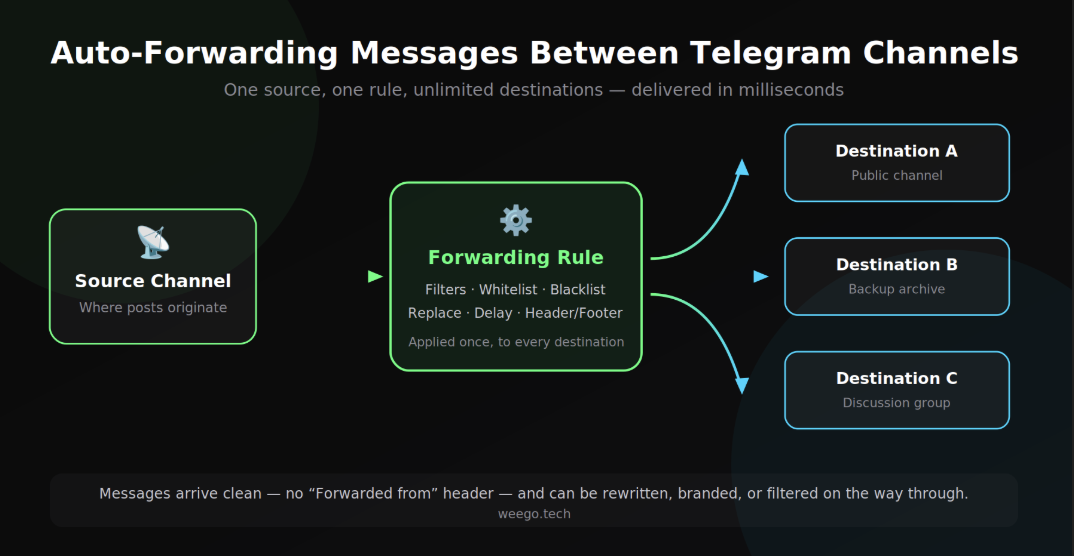
This guide shows you how to auto-forward messages from one Telegram channel to another so it happens by itself — including how to strip the "Forwarded from" tag, filter out the posts you don't want, rewrite links and handles on the way through, and fan a single post out to a dozen destinations at once. Everything here works from inside Telegram. You don't need to write code.
Does Telegram have a built-in auto-forward feature?
No — and this is the part that trips most people up.
Telegram's native forward is a manual action. You tap a message, tap forward, pick a chat. It works, but you have to be there, awake, and holding your phone.
The one exception is a channel's linked discussion group. Posts you make in a channel appear automatically in the group attached to it. That's genuinely automatic, but it only works in that one direction, between those two specific chats. It won't mirror one channel into another channel.
For anything else — channel to channel, group to channel, many channels into one feed — you need something running outside Telegram that watches the source and reposts on your behalf.
What are the three ways to auto-forward Telegram messages?
There are really only three approaches, and they trade off in predictable ways.
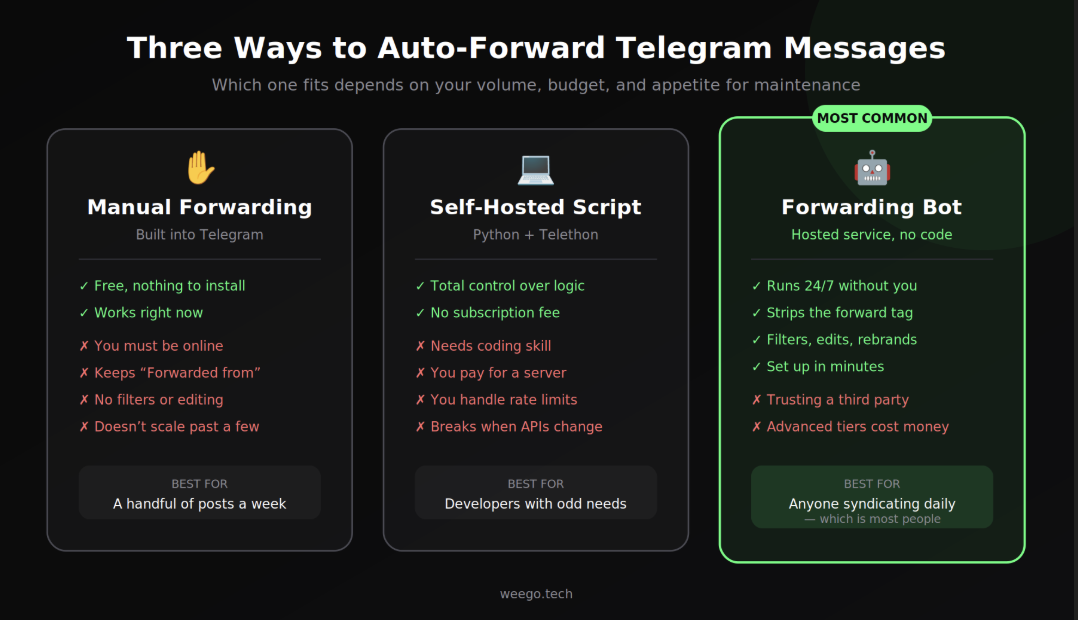
Manual forwardingSelf-hosted scriptForwarding botSetup timeNoneHours to daysMinutesRuns without youNoYesYesRemoves "Forwarded from"NoIf you code itYesFilters and rewritingNoIf you code itBuilt inOngoing costFreeServer + your timeFree tier, paid upgradesBreaks when Telegram changesNoOftenHandled for you
Manual is fine if you're forwarding a handful of posts a week and don't mind the attribution tag.
A self-hosted script — usually Python with the Telethon library — gives you total control. If your forwarding logic is genuinely unusual (routing based on your own database, say, or pushing to non-Telegram systems), this is the honest right answer, and there are good open-source starting points on GitHub. The cost is real, though: you rent a server, you handle Telegram's rate limits, you fix it when an API changes, and you're the one awake at 3 a.m. when it stops.
A forwarding bot is a hosted service that does the watching and reposting for you. If you're weighing specific tools, we compare ForwardBuddy and TeleFeed side by side.You configure it by tapping buttons in Telegram. This is what most people actually want, and it's the method the rest of this guide walks through.
What do you need before you start?
Three things, and getting them wrong causes most first-attempt failures:
- Admin rights in the destination. Whatever does the posting needs "Post Messages" permission in the channel it's posting to. There's no way around this.
- Read access to the source. Either the bot is an admin there too, or you connect an account that's already a member.
- The source and destination clear in your head. It sounds obvious. People mix them up constantly and then wonder why their main channel filled up with someone else's posts.
How do you set up auto-forwarding step by step?
Using ForwardBuddy as the example, the whole flow is seven taps' worth of work:
- Open the bot. Search
@ForwardBuddyBotin Telegram and press Start. - Tap ➕ Add Rule. A "rule" is one forwarding flow — sources, destinations, and settings bundled together.
- Pick a mode. With Bot means you add the bot as admin to your source. Without Bot means you paste a channel link and a helper account joins to watch it. Use My Account means your own connected Telegram account does the work.
- Set the source. Share the channel from your chat list, or paste its link.
- Add the destination. Paste the target channel's link. Add as many as you want — one rule can deliver to all of them.
- Configure filters. Optional, but this is where the value is. More on it below.
- Tap Save. The rule goes live immediately. Every matching post from this second onward mirrors across.
One thing worth knowing before you build ten of these: rules can be duplicated. If you spend twenty minutes tuning filters and replacements for one source, you don't rebuild that for the next one — you copy the rule and swap the source.
Should you keep the "Forwarded from" tag?
This is the single most consequential setting, and it's worth understanding rather than just toggling.
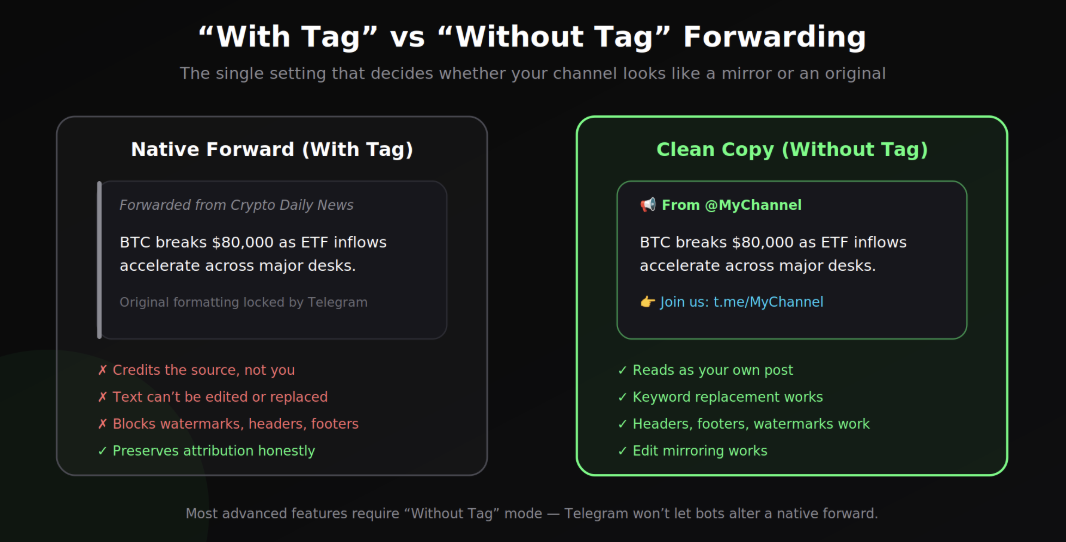
With Tag uses Telegram's native forward. The post arrives credited to the original channel, with a clickable link back. It's honest and it's the right choice when you're curating other people's work and want to say so.
Without Tag sends a fresh copy. It reads as your own post. We cover the mechanics of this in more detail in our guide to forwarding Telegram messages without the forwarded-from tag.. It reads as your own post.
The practical catch: Telegram doesn't let bots modify a native forward. The message belongs to the original. So the moment you want to replace a competitor's handle with yours, add a footer, watermark an image, or have edits sync through — you need Without Tag mode. Almost every advanced feature depends on it.
A word on ethics here. Removing attribution from someone else's original work and passing it off as yours is plagiarism, whatever the tooling makes possible. Clean copies are the right call when you're syndicating your own content across channels you own, mirroring with the source's permission, or running a white-label deployment. Think about which side of that line you're on before you flip the switch.
How do you forward to several channels at once?
Add multiple destinations to a single rule. The message is processed once and delivered to all of them simultaneously — a main channel, a backup archive, a regional mirror, a discussion group.
This matters more than it sounds. Building three separate rules for three destinations means maintaining the same blacklist in three places, and eventually they drift out of sync. One rule, three destinations, one set of settings.
If a destination ever becomes permanently unreachable — the bot gets kicked, the chat is deleted — a well-built forwarder removes it and tells you, rather than silently failing forever while the other destinations keep working.
Can you merge multiple channels into one feed?
Yes, and it's the most underused feature in this whole category.
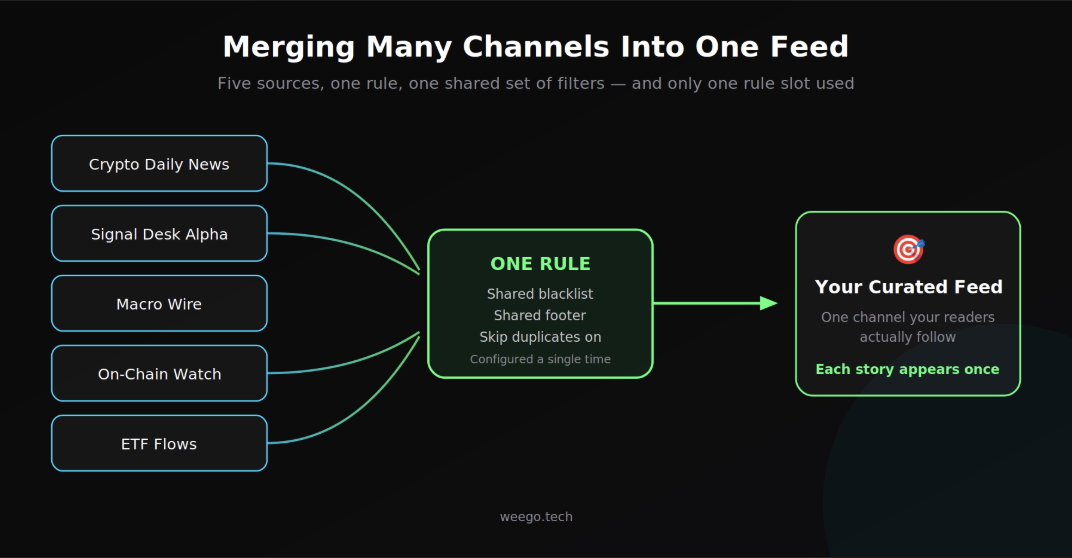
Attach several sources to one rule and they merge into a single destination. Five news channels become one feed your subscribers actually read. A dozen signal providers become one stream you monitor with a shared blacklist filtering the noise.
Two things make this work well in practice:
- It costs one rule slot, not five. A rule with twenty sources still counts as a single rule.
- Turn on source labelling. When several channels feed one destination, readers can't tell where a post came from. A source-name prefix fixes that, and it sits above your header rather than replacing it.
Aggregated feeds also make duplicate detection genuinely necessary — five crypto channels will all post the same headline within minutes of each other.
How do you control which messages get forwarded?
Three layers, each doing a different job:
Content-type filters work on structure. Forward only photos and videos to a gallery channel. Forward only text to a clean signals feed. Forward only messages containing links to a news aggregator. Worth knowing: a photo with a caption counts as a photo, not text — that catches people out.
Whitelists allow only matching posts. If your whitelist contains bitcoin and ethereum, nothing else gets through. Matching is case-insensitive and substring-based, which is a double edge — a whitelist entry of coin will happily match "coincidence."
Blacklists block matching posts. This is your spam filter: promo codes, referral links, competitor mentions.
Whitelist runs first, then blacklist. A message has to pass both.
For precision, regular expressions work in both lists — wrap the pattern in forward slashes:
/\b(BTC|ETH|SOL)\b/     matches whole-word tickers only, not "BTCUSDT"
/^BREAKING/             matches only posts that start with "BREAKING"
/t\.me\/\w+/            matches any Telegram invite link
One gotcha: commas separate keywords, so a comma inside a regex pattern will split it into two broken entries.
How do you rebrand messages as they pass through?
Keyword replacement swaps text before delivery. Format is old → new, one pair per line:
@OriginalChannel → @MyChannel
Buy Now → Learn More
Leave the right side empty to strip a phrase entirely — useful for deleting [Advertisement] tags from a source. Note that replacement is case-sensitive, unlike the filters, so Bitcoin and bitcoin need separate lines.
Headers and footers add fixed text above or below every message. The classic use is a channel credit on top and a join link on the bottom.
Watermarks stamp your logo or handle onto forwarded photos. This is the one branding method that survives a screenshot — text footers vanish the moment someone crops the image. You can control position (including a tiled pattern that can't be cropped out), opacity, and size.
Length limits truncate long posts. Combine a 300-character cap with a footer reading "Read the full post in our main channel" and you've built an automated teaser funnel.
Can you control when messages get forwarded?
Two separate tools that people frequently confuse:
Delay holds a message for a set number of seconds, then sends it. Good for giving paid subscribers a head start before content hits the free channel, or as a recall window — a five-minute delay means you can fix a typo in the source before it propagates.
Forwarding hours restricts a rule to a daily window. Messages outside it are skipped, not queued. That distinction matters: if you want everything eventually delivered, use a delay. If you want your corporate channel silent overnight, use forwarding hours. Overnight windows that wrap past midnight work fine.
How do you keep mirrored channels genuinely in sync?
Three settings separate a rough mirror from a clean one:
Edit mirroring updates the forwarded copy when you edit the original. Without it, a corrected price or an amended announcement never reaches your destination readers, and they're acting on stale information. Telegram won't let you swap the actual media file on a sent message, so photos can't be replaced — but captions and text update in place.
Reply preservation keeps threaded conversations threaded. Without it, a question and its answer arrive as two unrelated posts and the discussion becomes unreadable.
Skip duplicates drops repeat content within a 24-hour window, matched on both text and the underlying file identity, so a re-uploaded image is still recognised.
What order does everything run in?
This is the thing almost nobody documents, and it explains most "why isn't my filter working?" confusion.
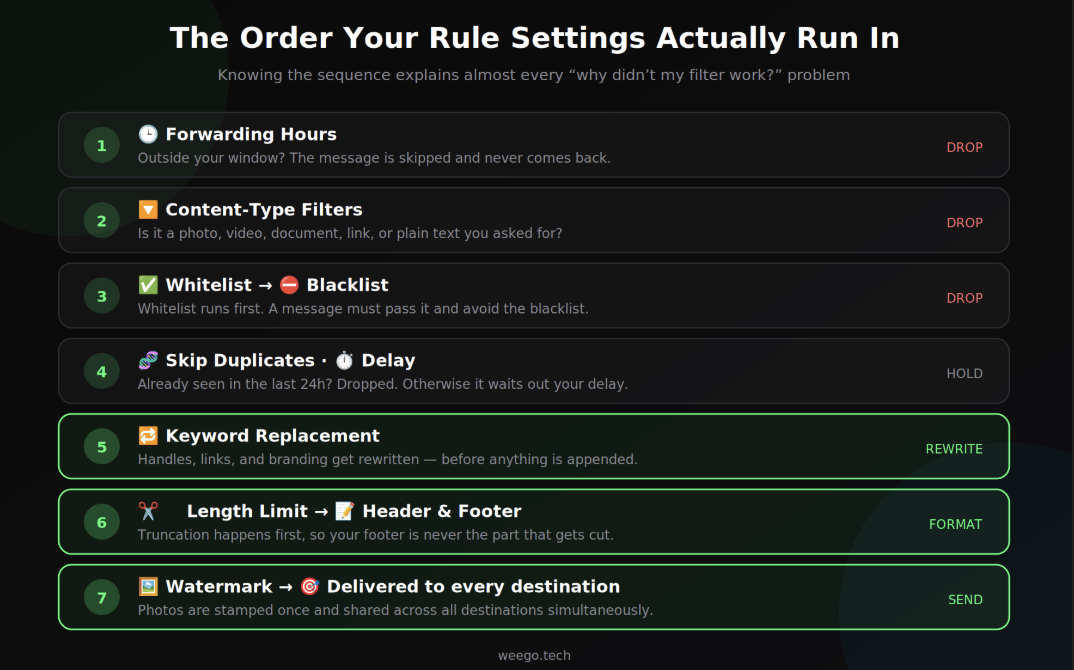
Settings don't all fire at once. They run as a pipeline, and each stage can drop the message:
- Forwarding hours — outside your window, it's gone
- Content-type filters — wrong type, dropped
- Whitelist, then blacklist — must pass both
- Skip duplicates, then delay
- Keyword replacement
- Length limit, then header and footer
- Watermark, then delivery to every destination
Two consequences worth internalising. Replacement runs before headers and footers, so your own footer links can't be mangled by your own replacement rules. And truncation happens before the footer is appended, so your call-to-action is never the part that gets cut off.
What about messages posted before you set this up?
Standard rules only handle new messages. They start from the moment you hit save.
To bring across existing history you need to clone the Telegram channel — a one-time backfill that copies past messages into the new channel. Most tools let you scope it: the whole channel, everything after a specific message link, or a date range.
The migration recipe that works: clone the history first, then accept the "keep syncing?" prompt at the end. Your new channel ends up with the complete past and every future post. That's a full channel migration in two steps.
Expect it to take a while — copying is deliberately paced at roughly one message per second to stay inside Telegram's rate limits. A large channel is an overnight job, not a coffee-break one.
How do you forward from a channel you don't own?
Common situation: you want to mirror a public news channel, but you obviously can't make yourself admin there.
Two workable approaches:
A helper account joins for you. You paste the channel link, the service's own account joins as a regular member and watches for posts. Nothing is required from the source channel's admins.
Connect your own account. You log your personal Telegram account into the tool, and it forwards using your existing memberships. Anything you can read, it can read — including private channels you're already in. You pick source and destination from your own chat list instead of pasting links.
Connecting your account is genuinely more powerful, and it deserves a moment's thought. You're handing a login session to a third party. Use it with services you're willing to trust, check that disconnecting actually terminates the session, and keep two-step verification on.
What are the most common problems, and how do you fix them?
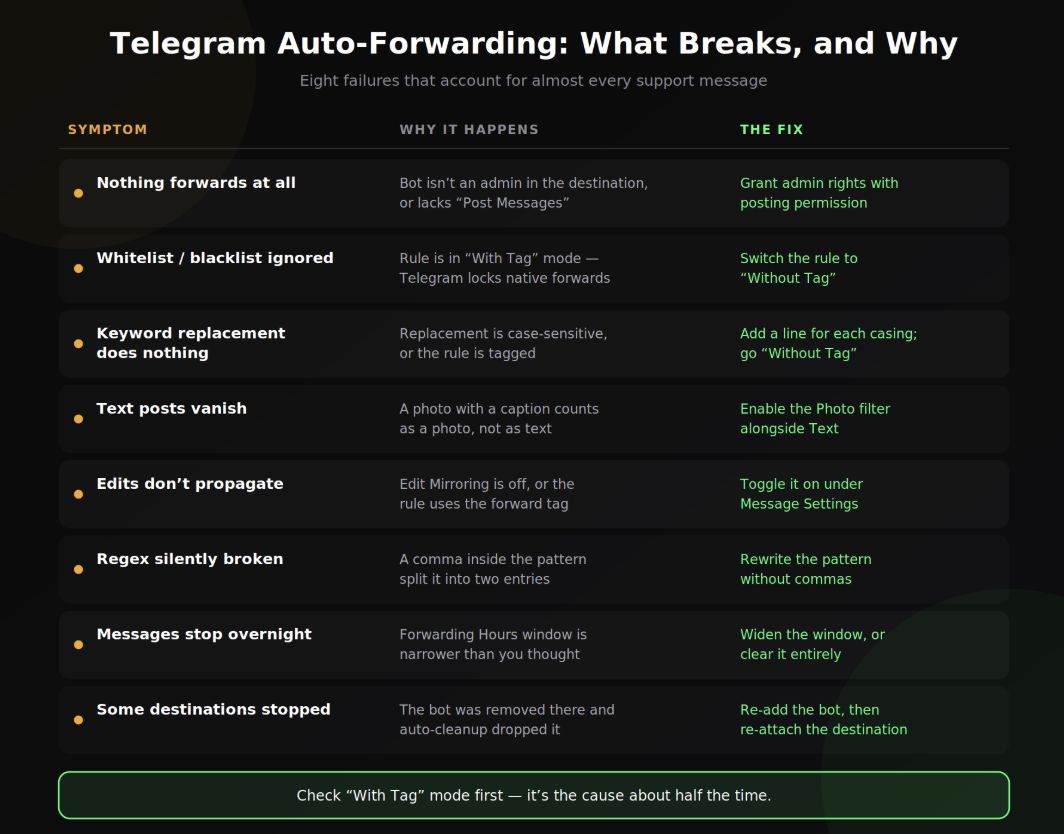
| Symptom | Usual cause | The fix |
|---|---|---|
| Nothing forwards at all | Bot isn't admin in the destination, or lacks "Post Messages" | Grant admin rights with posting permission |
| Whitelist/blacklist ignored | Rule is in With Tag mode | Switch to Without Tag |
| Keyword replacement does nothing | Case mismatch, or you're in With Tag mode | Add a line for each casing |
| Text posts vanish | Photos with captions count as photos, not text | Enable the Photo filter alongside Text |
| Edits don't propagate | Edit mirroring off, or the rule is tagged | Toggle it on under Message Settings |
| Regex silently broken | A comma inside the pattern split it in two | Rewrite the pattern without commas |
| Messages stop overnight | Forwarding hours window is narrower than you thought | Widen the window or clear it |
| Some destinations stopped | Bot was removed there | Re-add the bot, then re-attach the destination |
If you take one troubleshooting rule from this guide: when something advanced isn't working, check whether the rule is in "With Tag" mode first. It's the cause about half the time.
What does auto-forwarding cost?
A self-hosted script costs whatever your server costs, plus your maintenance time — which is the expensive part and the one people forget to price.
Hosted bots generally run a free tier plus paid upgrades. ForwardBuddy's current structure, as an example: Free covers 5 rules, 3 sources per rule, and 200 messages a day. Basic at $5/month removes the message cap and unlocks whitelists, blacklists, keyword replacement, delays, forwarding hours, and duplicate skipping. Pro at $10/month adds edit mirroring, headers and footers, watermarks, reply preservation, account connection, and channel cloning.
The honest guidance: start on a free tier. Most people running one or two mirrors never need to pay. Upgrade when you hit an actual wall, not in anticipation of one.
Is auto-forwarding allowed on Telegram?
Forwarding itself is a normal Telegram feature and automating it is routine. Where you should be careful is content, not mechanics:
- Copyright and attribution. Republishing someone else's work without permission is a problem regardless of how automated it is.
- Content protection. If a channel has saving and forwarding disabled, its owner has explicitly asked that it not be copied. Respect that.
- Paid content. Mirroring a paid channel into a free one is a good way to attract a complaint and lose an account.
- Spam. Fanning identical content into channels you don't own attracts platform enforcement quickly.
Syndicating your own content across your own channels — the overwhelmingly common use case — raises none of these issues.
Frequently asked questions
Can I forward from a private channel?
Yes, if you have access. Either invite a helper account via an invite link, or connect your own account, which already has the membership.
Will people know I'm mirroring their channel?
In With Tag mode, obviously yes — the attribution is right there. In Without Tag mode there's no visible marker, though a channel admin comparing feeds can usually spot a mirror by timing. A delay makes that less obvious. Whether you should be hiding it is a separate question, and worth asking.
Does the bot need admin rights in the source?
In "With Bot" mode, yes. In "Without Bot" or connected-account mode, no — membership is enough.
Can I forward Telegram messages to Discord or Slack?
Not with a Telegram-native forwarding bot. That's cross-platform automation, which needs a different class of tool or a custom integration.
How fast is it?
Effectively instant — well under a second in normal conditions. Watermarking adds a small delay because the image has to be downloaded, re-rendered, and re-uploaded.
What happens if the service goes down?
Messages posted during an outage generally aren't recovered retroactively. It's worth asking any provider about this before you depend on them for something critical.
Where to start
If you're mirroring one channel into another, you can have it working in about five minutes: open a forwarding bot, add a rule, set source and destination, save. Don't touch the advanced settings on the first pass.
Once it's running, add exactly one thing at a time — a blacklist, then a footer, then a delay — and watch what each one does. Building a rule with eight settings enabled at once and then debugging why nothing arrives is a genuinely miserable afternoon.
And if you're migrating rather than mirroring, clone the history first, then let live sync take over. Your new channel gets the full past and every future post, with nothing left behind.