How to Forward Telegram Messages to Discord (2026 Guide)
You run a Telegram channel. You also run a Discord server. And every day you copy the same post twice, by hand.
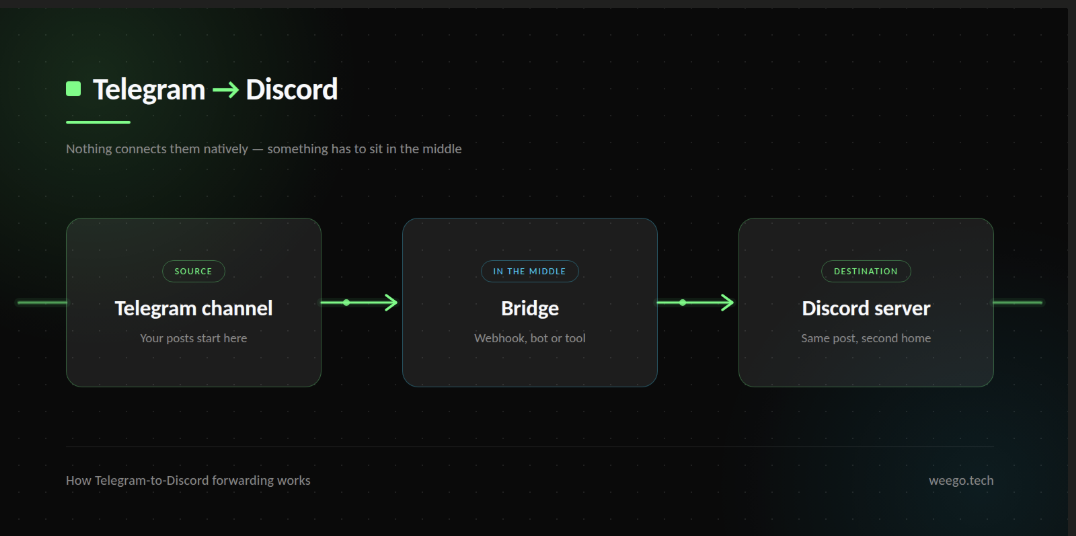
There is no button for this. Telegram and Discord are separate companies with separate systems, and neither one wants to talk to the other. So if you want to forward Telegram messages to Discord, something has to sit in the middle and carry them across.
This guide covers the three ways people actually do it, what each one costs, what quietly breaks after a week, and how to set it up so you are not fixing it every Monday.
The short answer
- Free, but technical → a Discord webhook plus a small bot or script
- No code, pay as you go → Make or Zapier
- Many channels, messy sources → clean up on the Telegram side first, then bridge once
Most people pick the wrong one because they only look at the price. The real cost shows up later, and it is usually your time.
Why do people forward Telegram to Discord?
Four situations come up again and again.
Trading and crypto signal groups. The signals arrive in Telegram. Half the members live in Discord. Nobody wants to miss an entry because they were in the wrong app.
Gaming and NFT communities. Announcements go out in Telegram, but the community talks in Discord. Posting twice means one of them always gets the news late.
Teams. Suppliers, clients or a news feed send updates on Telegram. The staff work in Discord all day.
Personal feeds. You follow twelve Telegram channels and want the good bits collected in one Discord channel you actually read.
If you are in the first group, our guide to the best Telegram bots for crypto signals covers the Telegram side of that setup in more detail.
What you need before you start
Three things, whichever method you choose:
- Admin rights on the Telegram channel you are pulling from. You cannot bridge a channel you do not control unless you are a member and use a different approach.
- Manage Webhooks permission on the Discord server you are posting into.
- A decision: do you want every single message to cross over, or only some of them?
That third one sounds small. It is the thing that decides whether this works or turns your Discord into a wall of spam. Hold that thought — we come back to it.
Method 1: Discord webhook plus a bot (free)
This is the method almost every GitHub project uses.
How it works: a Telegram bot sits in your channel and reads new posts. When one arrives, it sends that text to a Discord webhook URL, and Discord posts it.
Setting it up
- Make the Discord webhook. Server Settings → Integrations → Webhooks → New Webhook. Pick the channel it should post in, then copy the webhook URL. Treat that URL like a password — anyone who has it can post in your server.
- Make the Telegram bot. Message @BotFather, send
/newbot, follow the prompts, and save the token it gives you. - Add the bot to your channel as an admin. Telegram only sends channel posts to bots that are admins there.
- Run the script. There are free open-source projects that do exactly this job. You will need somewhere to run it — a small VPS, a Raspberry Pi, or a free hosting tier.
- Test with one message before you trust it with anything important.
What this method cannot do
This is the part the GitHub pages skip, so read it before you commit a weekend.
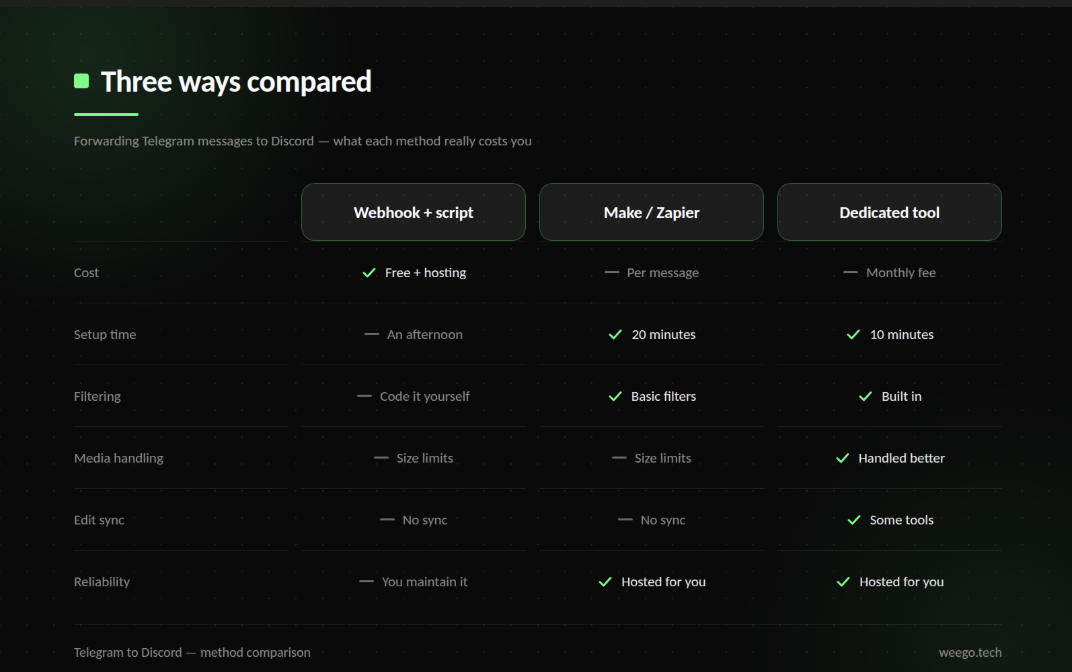
- No filtering. Every post crosses. Ads, "gm", stickers, the lot.
- Formatting gets flattened. Telegram and Discord use different markup. Bold survives sometimes, links often turn into raw URLs, and custom emoji do not make it.
- Media is limited by both sides. Telegram's standard Bot API only lets a bot download files up to around 20 MB. Discord caps free uploads at 20 MB too, with 50 MB on Nitro Basic and 500 MB on full Nitro. A 300 MB video is not going across — at best you get a link.
- Edits and deletes do not sync. Fix a typo in Telegram and Discord keeps the wrong version forever.
- It stops silently. If your server reboots or the token expires, nothing warns you. You find out days later when someone asks why the feed died.
Method 2: Make or Zapier (no code)
If the words "run the script" made you close the tab, this is your route.
Make (formerly Integromat) and Zapier both have Telegram and Discord connectors. You pick a trigger — new message in a Telegram channel — and an action — post to Discord. No hosting, no token files, roughly twenty minutes of clicking.
The catch is the pricing model. These tools charge per operation, not per month of use. Every single message that crosses burns one operation, sometimes two.
Do the maths on your own channel. A quiet channel posting 20 times a day uses about 600 operations a month, which fits a free tier comfortably. A busy signals channel posting 500 times a day uses 15,000 a month, and you are into paid territory fast.
You also inherit the same limits as Method 1: no real filtering, formatting still suffers, and edits still do not sync.
Method 3: a dedicated bridge tool
There are paid tools built specifically to move messages between platforms. They handle the boring parts properly — retrying failed sends, queueing when Discord rate-limits you, converting media formats, and in some cases syncing edits.
If the feed matters to your business and you do not want to babysit a script, this is the honest answer. Expect to pay a monthly fee.
Be aware that many tools marketed as "Telegram forwarding bots" only move messages between Telegram channels. They will not post to Discord at all. Check that specific claim before you pay, because the two jobs sound similar and are not.
The mistake almost everyone makes
Here is the pattern I see constantly, and it is worth more than the three methods above.
Most people bridging Telegram to Discord are not mirroring one channel. They are pulling from eight, or twelve, or twenty source channels — signal providers, news feeds, partner channels.
So they build eight separate bridges. Eight scripts, eight webhooks, eight things that can break independently. And because none of those bridges filter anything, Discord fills up with ads, duplicate posts from channels that copy each other, and "join my VIP group" spam.
The better shape is to clean up on the Telegram side first.
Pull every source channel into one Telegram hub channel. Filter it there — block keyword spam, strip out ads, remove the "forwarded from" tag, drop duplicates. Then run one bridge from that clean hub channel to Discord.
One bridge instead of eight. And what reaches Discord is already worth reading.
That Telegram half is exactly what ForwardBuddy does — collecting from many channels into one, with filters and clean reposting. To be straight with you: ForwardBuddy does not post to Discord. It is a Telegram-to-Telegram tool. It handles the messy half of this job, and you still need one of the three methods above for the final hop.
If that first half is the part giving you trouble, our comparison of the best Telegram auto forward bots and the guide to forwarding without the "forwarded from" tag cover it properly.
What actually breaks in real life
Whichever route you pick, these five will bite you eventually.
Formatting does not survive cleanly. Bold and italics translate badly, and Telegram's custom emoji simply vanish.
Large media fails. Both platforms cap file sizes, and the smaller cap wins. Long videos will not cross.
Edits are one-way. Correcting a Telegram post leaves the wrong version sitting in Discord.
Deletes are one-way too. Removing a post in Telegram does not remove it from Discord. For anything sensitive, that matters.
Discord rate-limits you. A Discord webhook accepts roughly 5 requests every 2 seconds. A burst of announcements can exceed that, and messages get rejected. Good tools queue and retry; a basic script just drops them.
Frequently asked questions
Can I forward from Discord to Telegram instead?
Yes, and it is easier. Discord bots can read channels directly, so you point a bot at a Discord channel and have it post to Telegram.
Is this allowed by Telegram and Discord?
Forwarding your own content is fine. Both platforms have rules against spam and against republishing other people's content without permission, so use your judgement on where the content came from.
Can I forward from a private Telegram channel?
Only if you can add your bot as an admin. If it is someone else's private channel, you cannot, and tools claiming otherwise are usually breaking Telegram's terms.
Will Discord members see the original Telegram author?
Not automatically. Webhook posts appear under whatever name and avatar you set on the webhook. If you want the author shown, the bridge has to add it into the message text.
Can I forward only messages containing certain words?
Not with a plain webhook script — you would have to code the filter yourself. This is the main reason to filter on the Telegram side first.
Where to start
If you are technical and the feed is small, build the webhook bridge — it is free and an afternoon's work.
If you are not technical and the volume is low, use Make and stop thinking about it.
If you are pulling from several channels, fix the Telegram side before you build any bridge at all. One clean source channel beats ten noisy ones, and it will save you far more time than picking the perfect bridging tool.