Telegram's August 2026 Update: Every New Feature Explained
Telegram turned 13 and celebrated by shipping a release that quietly changes how groups, channels and bots work. The Telegram August 2026 update landed on 25 August 2026 with five changes — and one of them finally kills a job that admins have paid bots to do for eleven years.
This post explains every new feature in plain language: what it does, how to turn it on, and what it actually means if you run a channel or build bots. We've also gone through the developer changelog, which most of the coverage skipped entirely.
What's new in the Telegram August 2026 update?
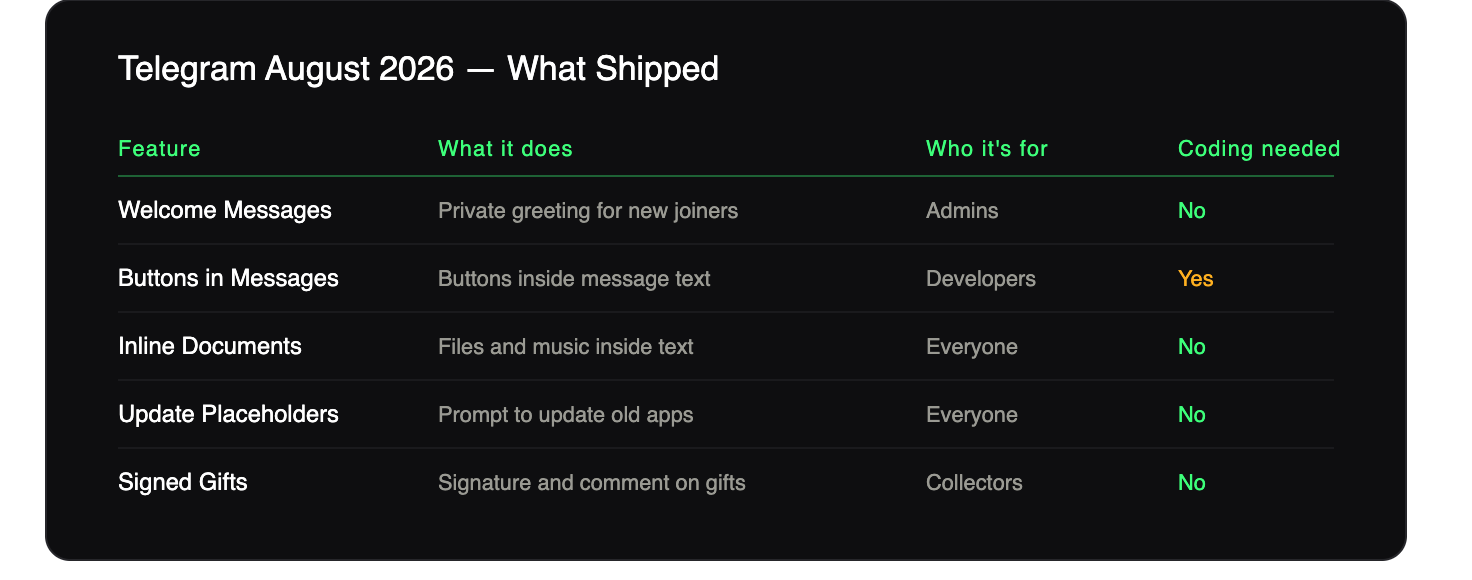
Five features shipped in the anniversary release:
- Welcome Messages — a greeting only new members see, with no bot required
- Buttons in Messages — developers can put buttons inside the text of a message
- Inline Documents — drop files, music and documents anywhere inside your text
- Placeholders for App Updates — old app versions now show a "tap to update" card instead of a broken message
- Signed Gifts — add your name and a note to gifts bought from the marketplace
Telegram also used the post to look back at its year: 12 major updates containing more than 55 features.
Welcome Messages: greet new members without spamming everyone
This is the headline feature. Groups and channels now support welcome messages that give new members extra information without cluttering the chat for everyone else. When someone joins, only they can see the message.
That last part matters. Old bot-based welcomes posted publicly, so a busy group filled up with "Welcome @user!" lines nobody wanted. This one is private to the person who just walked in.
It is not limited to a single line of text either. You can add multiple messages and media to the welcome pack, and rich formatting works too — including tables and inline media.
How do I set a Telegram welcome message?
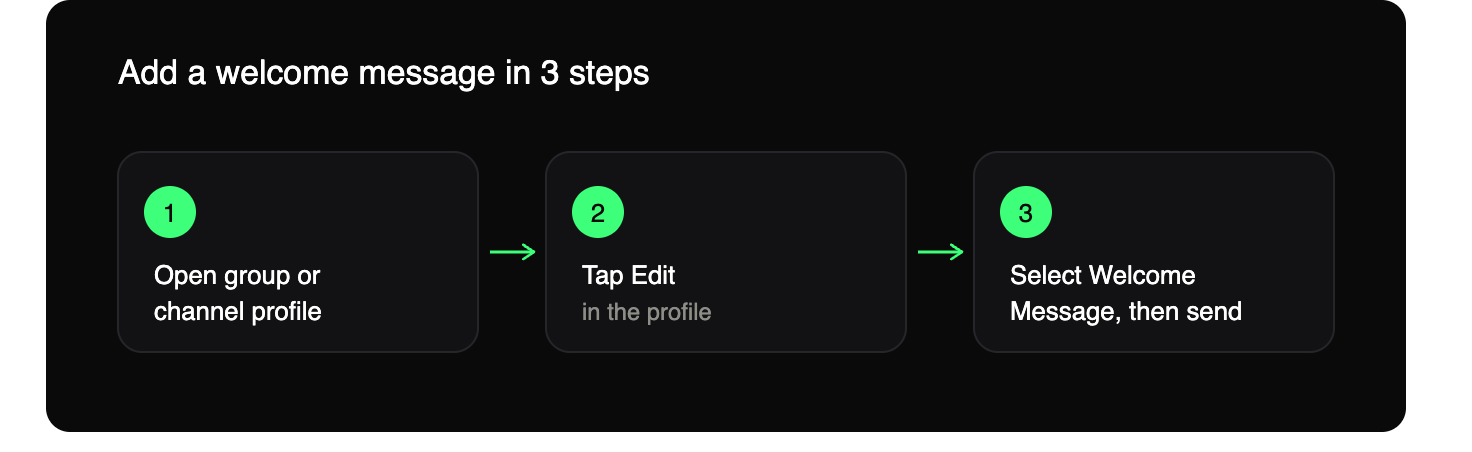
No bot needed. Open your group or channel profile, select Edit > Welcome Message, and send the messages you want new members to see.
That's the whole setup. If you want the full walkthrough with examples you can copy, read our Telegram Welcome Messages guide.
Buttons in Messages: an app that fits inside one message
Telegram bots have been able to build apps inside a chat for years. Now developers can put multiple buttons right inside a message — so the app fits in a single bubble.
Paired with ephemeral messages, this lets you create flows for anything from surveys, games and horoscopes to viewing and ordering products. "Ephemeral" here means a message only one specific person can see, even in a busy group — so twenty people can tap the same post and each get their own private result.
These messages can be posted anywhere, including groups or channels, where any number of users can interact with them — for example, to play chess in separate simultaneous games.
One honest caveat: this one isn't for admins. Telegram is clear that building these flows requires coding. If you want interactive buttons in your channel, you need a bot developer — or an existing bot that already supports it.
Inline Documents: files and music inside your text
Telegram's rich text editor now handles more kinds of inline media. You can place documents, files and music anywhere in your text, and attaching an inline file takes two taps.
Instead of a wall of text followed by six separate file attachments, the PDF now sits in the paragraph that talks about it. For resource channels, course groups and support docs, that's a real readability win.
To open the text editor, tap the ⛶ icon that appears once you've typed more than three lines in the input field.
Placeholders for App Updates: no more broken-looking messages
A small fix with a big effect. When someone on an outdated app can't render a new feature, Telegram now shows a placeholder with a button to instantly download the latest update.
If you post a message using a brand-new feature, people on old app versions used to see something broken or blank. Now they see a prompt to update instead.
Worth turning on automatic updates while you're here. On Android, open the Play Store and tap Settings > Network Preferences > Auto-update Apps. On iOS, go to Settings > Apps > App Store and enable 'App Updates'.
Signed Gifts: add your name to marketplace gifts
You can use Telegram Stars to buy rare gifts from other users in the gift marketplace, and you can now add your signature and a comment to the gifts you buy there.To send one, open any user's profile, tap ⋮ / ⋯ > 'Send a Gift', then use the 'Collectible' filter to browse rare upgraded gifts.
Niche for most channel owners, but it matters if your community trades collectibles.
What changed for bot developers in Bot API 10.3?
The app-facing blog post is only half the story. Bot API 10.3 shipped on 24 August 2026, and a few changes are worth knowing about:
- A new admin right,
can_send_welcome_messages, was added toChatAdministratorRights,ChatMemberAdministratorandpromoteChatMember— so welcome messages are now a permission you can grant or withhold like any other. - New button classes for rich messages:
RichMessageButton,RichTextButton,RichBlockButtonsandInputRichBlockButtons— the plumbing behind in-message buttons. DisabledButtonand adisabledfield onInlineKeyboardButton, so a button can be shown greyed out instead of removed.- A
force_replyfield onInlineKeyboardMarkupandReplyKeyboardMarkup. - Ephemeral message settings were consolidated into a single
ephemeral_message_parametersobject, replacing the olderreceiver_user_idandcallback_query_idparameters across every send method — if you built on the July release, this is a breaking change you need to patch. - Expandable block quotations and inline document blocks were added to rich messages, along with an
is_compactoption for tables.
One detail nobody seems to have noticed: there's a permission for welcome messages, but no Bot API method to set one. A bot can be granted the right, yet the message itself is still configured by a human in the app. So welcome messages are a manual feature for now, not an automatable one.
What does this mean if you run a channel or group?
If your only reason for running a welcome bot was posting a greeting, you can drop it today. Native does that job better, because only the new member sees it.
But native Welcome Messages stop at "show a greeting." They don't approve join requests, they don't gate access behind a rule or a subscription check, they don't message people later, and — as above — you can't set or change them programmatically.
So the honest split looks like this:
- Use native for a static greeting, rules, and links that rarely change.
- Use a bot when you need join-request approval, delayed follow-ups, broadcasts, or a welcome that changes based on where the member came from.
If join requests are your bottleneck, start with our guide on auto-approving Telegram join requests. If you're weighing a custom flow, our breakdown of Telegram bot development cost covers what building one actually takes.
Frequently asked questions
When was the Telegram August 2026 update released?
25 August 2026, alongside Telegram's 13th anniversary. The matching Bot API 10.3 release went out on 24 August 2026.
Do I need a bot to set a welcome message now?
No. It's built into the app — group or channel profile, then Edit > Welcome Message.
Can everyone in the group see the welcome message?
No. Only the person who just joined sees it.
Can I add buttons inside a message without coding?
No. Telegram states plainly that building these flows requires coding.
Why can't I see the new features yet?
You're likely on an older app version. Telegram now shows a placeholder with a download button when an outdated app can't render a new feature.
The short version
The August 2026 release is small in count and large in consequence. Welcome Messages remove a reason to install a bot, Buttons in Messages give developers a reason to build better ones, and Bot API 10.3 has a breaking change hiding in the ephemeral message parameters.
If you run a channel, set your native welcome message today — it takes two minutes. Then work out which parts of your onboarding native still can't cover.