How to Auto Forward Telegram Messages With AI (Rewrite, Translate & Filter)
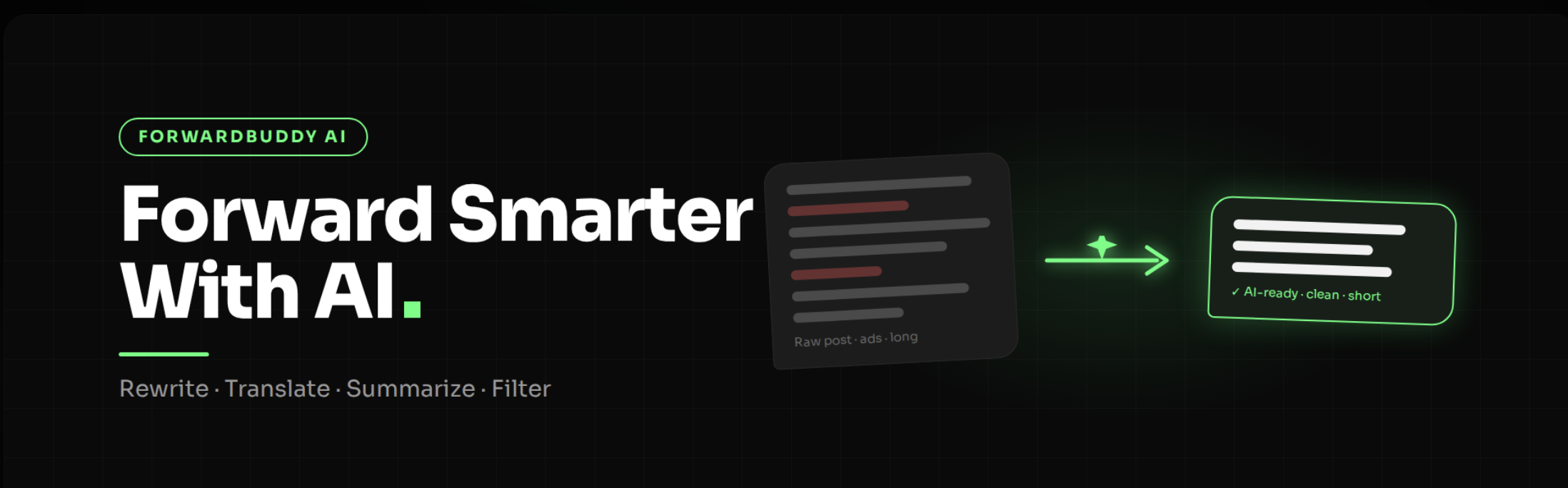
Plain auto forwarding copies a message from one channel to another. That's useful, but the copy looks exactly like the original. It's in the same language, has the same wording, and carries the same ads.
What if the message could be rewritten, translated, shortened, or checked before it is posted?
That's what happens when you auto forward Telegram messages with AI. This guide covers how it works, what it costs, how to turn it on in ForwardBuddy step by step, and five real ways channel owners use it.
Turn On AI Forwarding Free CLICK HERE
What does "AI forwarding" actually mean?
Normal forwarding has two steps: a message arrives, and the bot posts it.
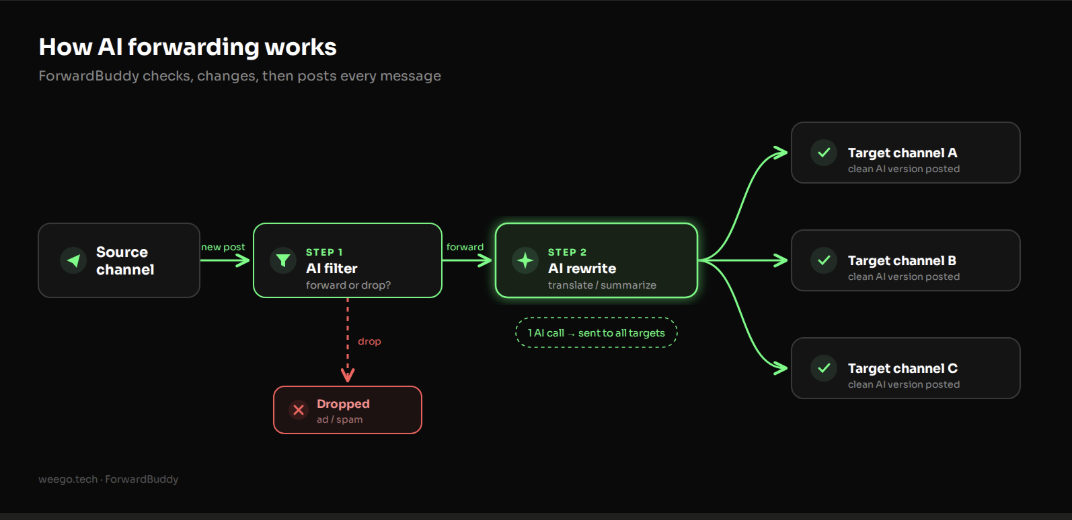
AI forwarding adds a step in the middle. Before posting, the bot sends the message text to an AI model with your instructions. It then posts the AI's version instead of the original.
In ForwardBuddy, the AI can do two separate jobs:
- Change the message. Rewrite it, translate it, summarize it, change its tone, or follow your own custom prompt.
- Judge the message. Read what the post means and decide whether it should be forwarded at all.
Why add AI to your Telegram forwarding?
Most people who forward content hit the same four problems.
Duplicate content looks lazy. If your channel posts the same words as ten other channels, readers have no reason to follow you. A rewrite makes each post read as your own.
Your audience speaks another language. A great English source is useless to a Hindi, Spanish, or Arabic audience. Translating by hand for every post doesn't scale.
Source posts are too long. News articles and research threads are long. Your readers want the three key points.
Keyword filters miss things. A keyword filter blocks "promo", but it lets through "limited offer for my subscribers 🔥". An AI filter understands that both are ads.
How does ForwardBuddy's AI work? (Bring your own key)
ForwardBuddy uses a Bring Your Own Key (BYOK) model. It doesn't sell you AI credits. You connect your own API key from an AI provider, and ForwardBuddy uses that key when it processes your messages.
This has three benefits:
- No markup. You pay the AI provider's normal price. ForwardBuddy adds nothing on top.
- You choose the model. Pick a fast, cheap model for simple translation, or a smarter one for careful rewrites.
- You control the limits. Spending caps and usage limits are set in your own provider account.
Which AI providers can you connect?
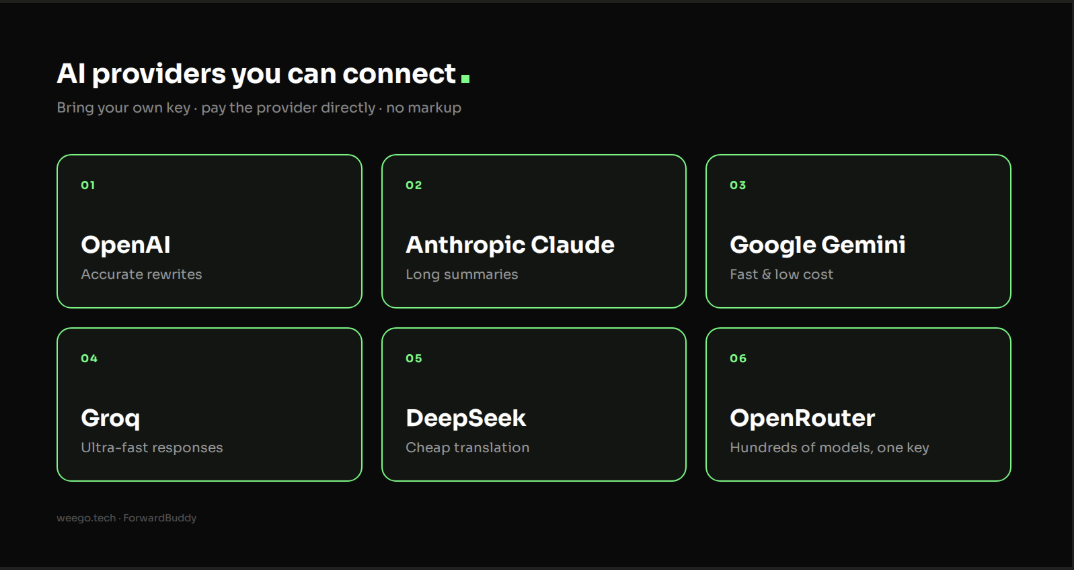
ForwardBuddy supports six providers:
- OpenAI. Strong, accurate rewrites and reasoning.
- Anthropic Claude. Good at long summaries and careful writing.
- Google Gemini. Very fast and low cost at high volume.
- Groq. Extremely fast responses from open models like Llama.
- DeepSeek. Low-cost translation and logic tasks.
- OpenRouter. One key that gives access to hundreds of models.
Your API key is stored encrypted (Fernet encryption), so it isn't saved as plain text.
What can the AI do to your messages?
Here are the five ways the AI can change a post before it goes out.
1. Rewrite and paraphrase
The AI changes the sentences and word choice, but keeps the facts the same. The meaning stays; the wording is new.
2. Real-time translation
Posts are translated into your target language as they are forwarded. One source channel can feed channels in several languages.
3. Shorten and summarize
Long announcements, news stories, or research posts become short bullet points that are easy to scan.
4. Tone and style
Change how a post sounds: Professional, Casual, Urgent, or Viral.
5. Custom instructions
Write your own prompt for anything else. For example: "Remove all links and @mentions, add our channel sign-off, and keep it under 60 words."
Example (for illustration only):
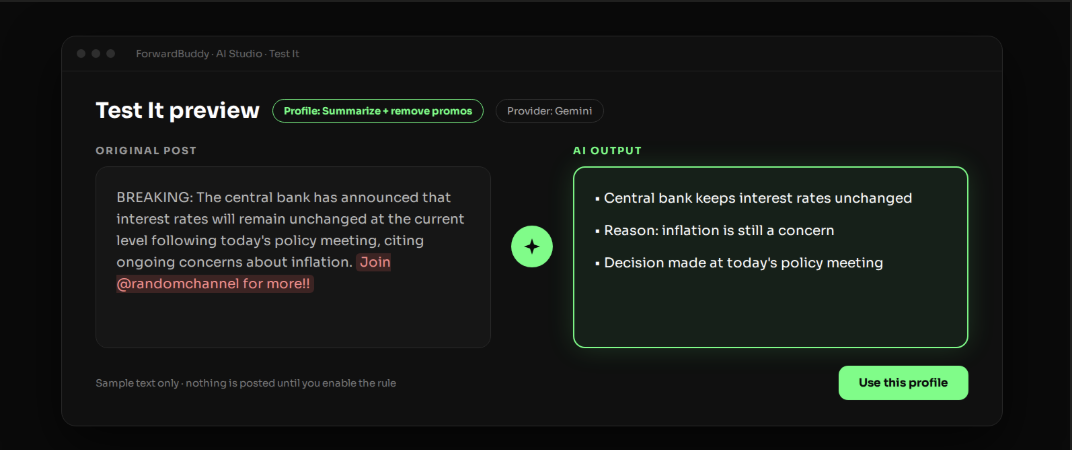
Original: "BREAKING: The central bank has announced that interest rates will remain unchanged at the current level following today's policy meeting, citing ongoing concerns about inflation. Join @randomchannel for more!!"
After "Summarize + remove promos":
• Central bank keeps interest rates unchanged
• Reason: inflation is still a concern
• Decision made at today's policy meeting
What is AI semantic filtering?
This is the feature most forwarding bots don't have.
A normal filter looks for words. A semantic filter looks at meaning. You describe in plain English what should get through, and the AI decides for each post.
Example filter rules you could write:
- "Forward only real news. Drop ads, giveaways, and self-promotion."
- "Forward only crypto trade signals that include an entry price. Drop chat and memes."
- "Drop anything that is not about football."
This keeps your channel clean without a keyword list that has to be updated every week.
How much does AI forwarding cost?
There are two parts:
- ForwardBuddy Pro plan: $10/month. AI features are Pro-only. Free and Basic plans don't include them.
- Your AI provider's usage fees. These are billed by your provider, based on how much text is processed. Check your provider's pricing page for current rates.
ForwardBuddy also works to keep that second bill small:
- 6-hour smart caching. Prompt instructions and post fingerprints are cached for 6 hours, so the same post isn't sent to the AI twice.
- One AI call, many channels. If one rule forwards a post to several target channels, ForwardBuddy runs the AI once and sends the result to all of them. According to ForwardBuddy's docs, this can save up to 90% of token costs.
Tip: For simple translation or summaries, start with a small, fast model. Switch to a bigger one only if the quality isn't good enough.
How to turn on AI forwarding in ForwardBuddy (step by step)
This assumes you already have a working forwarding rule. If you don't, first follow our guide to auto forward Telegram messages from one channel to another.
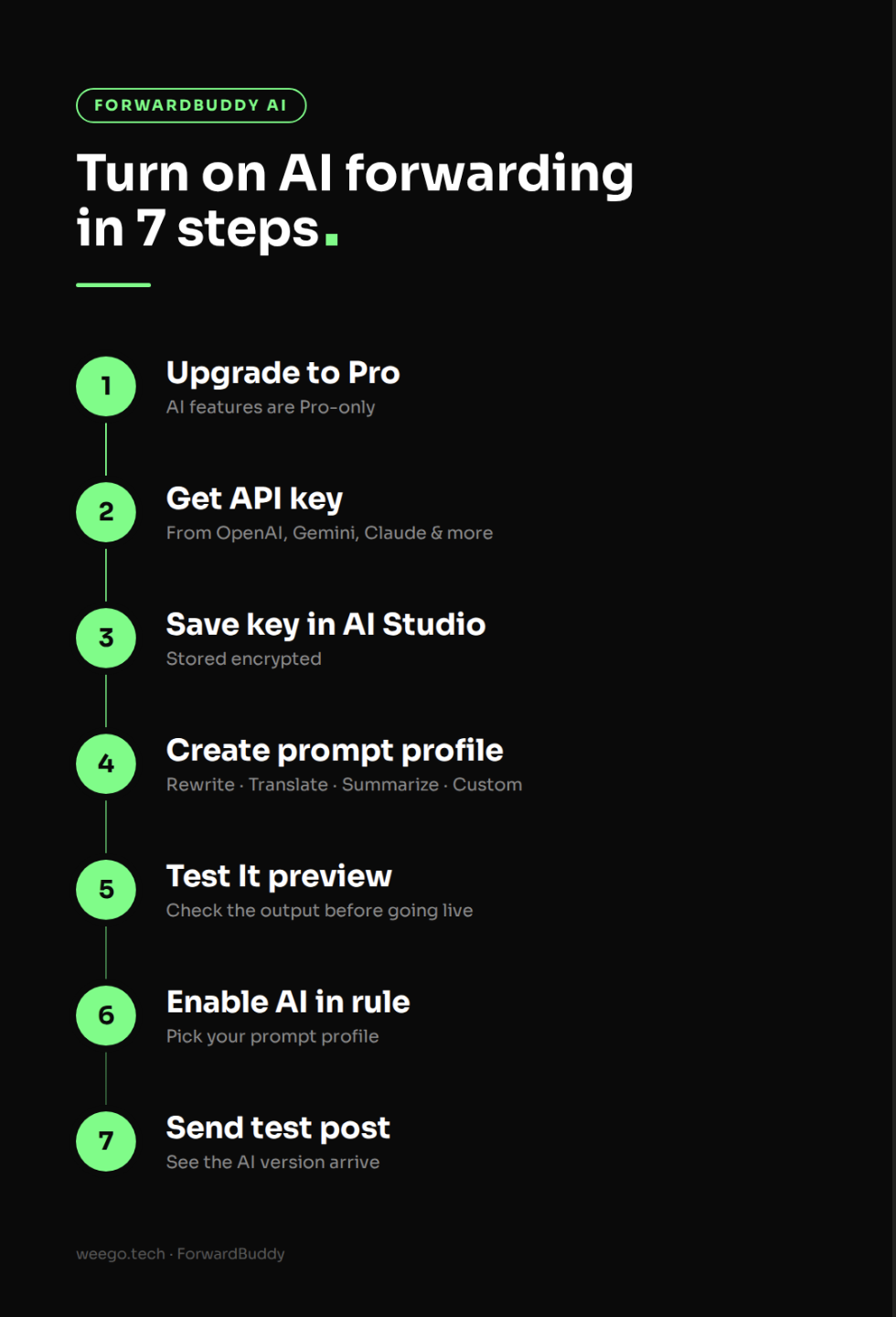
Step 1: Upgrade to the Pro plan
AI Transformations are only available on Pro. Upgrade from the plans section of ForwardBuddy.
Step 2: Get an API key from your AI provider
Create an account with the provider you picked and generate an API key. For example, you can get keys from OpenAI's API keys page or from Google AI Studio for Gemini.
Copy the key and keep it private. Anyone who has it can spend your credits.
Good habit: set a monthly spending limit in your provider account before you start.
Step 3: Open AI Studio and save your key
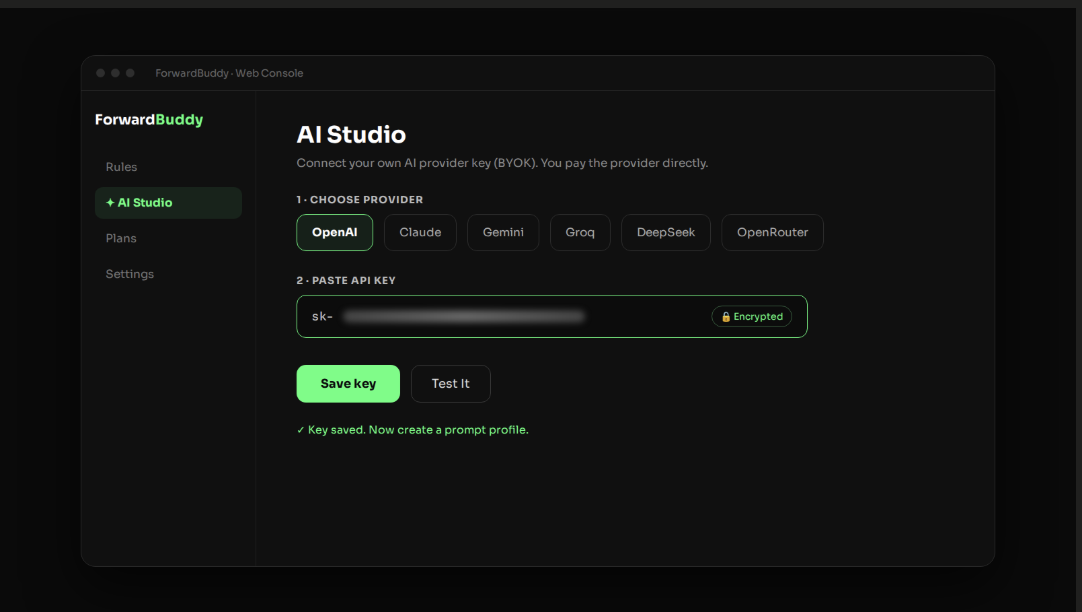
Open the ForwardBuddy Web Console and go to AI Studio. Choose your provider, paste your API key, and save. It's stored encrypted.
Step 4: Create a prompt profile
A prompt profile tells the AI what to do. Pick a ready-made type:
- Rewrite
- Translate
- Summarize
- Custom (write your own instructions)
Give it a clear name like "EN→Hindi news" or "Crypto summary", so it's easy to pick later.
Step 5: Test it with the live preview
Before going live, use the "Test It" preview simulator. Paste a real sample post and see exactly what the AI returns.
If the output isn't right, change the prompt and test again. This step saves you from posting bad output to real subscribers.
Step 6: Turn on AI Transformation in your rule
Open the forwarding rule you want to upgrade. Turn on AI Transformation and select the prompt profile you just made. Save the rule.
Step 7: Send a test post
Post something in your source channel and check the target channel. You should see the AI version, not the original.
That's it. Every new post on that rule now goes through the AI first.
5 real ways to use AI when forwarding messages
1. Build a translated news channel
Setup: An English news source → a Translate profile → your Hindi (or Spanish, Arabic…) channel.
Result: A full local-language news channel that updates itself around the clock.
2. Run one source into many language channels
Setup: One source, with a separate rule for each language, and each rule using its own Translate profile.
Result: One content stream, reaching several audiences. (If you're new to this, see how to forward to multiple channels.)
3. Clean up crypto signal channels
Setup: A semantic filter ("forward only posts with a coin, entry and target") + a Custom profile ("remove links and @mentions, keep the format").
Result: Only real signals reach your members. No chatter, no competitor promos. See our list of the best Telegram bots for crypto signals.
4. Turn long updates into quick summaries
Setup: A research, blog, or announcement channel → a Summarize profile.
Result: Subscribers get three short bullets instead of a wall of text, and more of them actually read it.
5. Make reposted content your own
Setup: A Rewrite profile + tone set to "Casual" or "Viral".
Result: Posts don't read like copies. Pair this with forwarding without the "Forwarded from" tag for a clean, original-looking channel.
A fair reminder: Only repost content you have the right to use. AI rewording doesn't change who owns the original.
Tips to get better AI results
- Be specific in prompts. "Summarize in 3 bullets, under 40 words, no emojis" works better than "make it short."
- Tell it what to keep. For example: "Keep all numbers, prices and dates exactly as written." This matters for signals and news.
- Test with messy posts. Try it on your source's worst posts, not only the clean ones.
- Start cheap, then upgrade. Small models handle most translation and summaries well.
- Watch your provider dashboard for the first few days to understand your real cost.
Frequently asked questions
Do I need to pay for AI separately?
Yes. You need the ForwardBuddy Pro plan ($10/month) plus your own AI provider account. The provider bills you directly for usage, with no markup from ForwardBuddy.
Is my API key safe?
Your key is stored encrypted using Fernet encryption. For extra safety, set a spending limit in your provider account.
Can I use a different AI prompt for each channel?
Yes. The prompt profile is chosen inside each forwarding rule, so different rules can use different profiles.
Is AI forwarding available on the free plan?
No. The free plan covers standard forwarding. AI Transformations need Pro.
Which AI provider should I pick?
For cheap, fast translation, try Gemini, Groq, or DeepSeek. For the most careful rewrites, try OpenAI or Claude. If you want to test many models with one key, use OpenRouter.
Start forwarding smarter
Plain forwarding just moves messages. AI forwarding makes them better: in your audience's language, in your voice, and free of spam.
With ForwardBuddy you bring your own key, pay no AI markup, and can set it up in a few minutes.
👉 Try ForwardBuddy and turn on AI in your first rule today. For every setting, see the ForwardBuddy docs on AI Transformations.