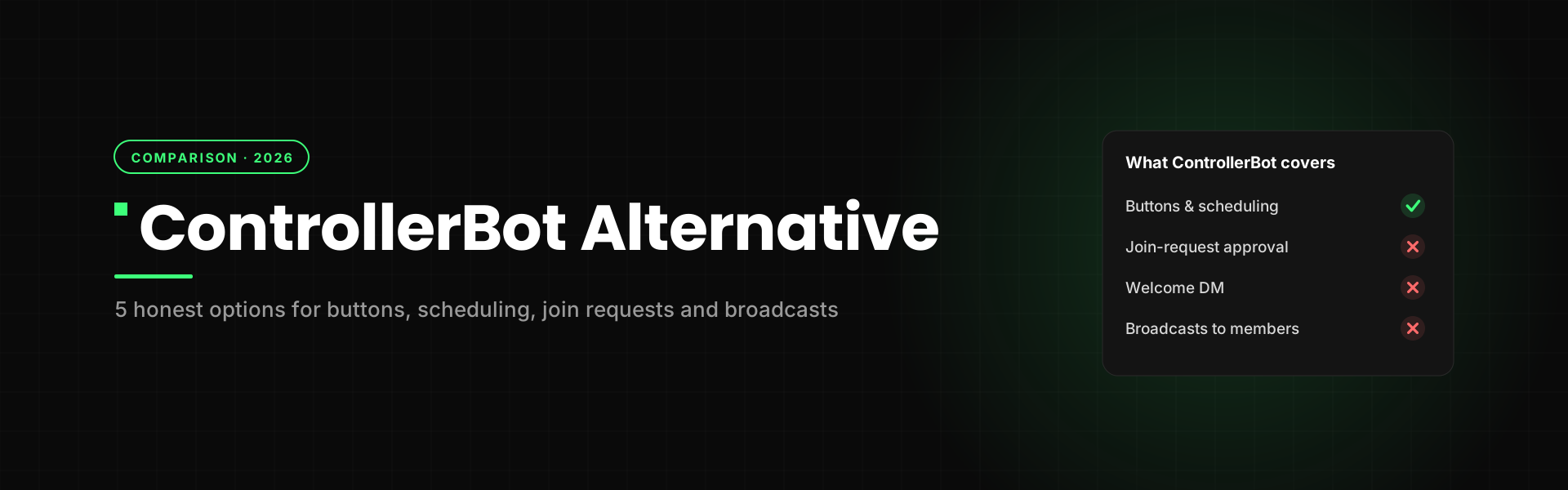
ControllerBot is the first bot most channel owners ever set up. It's free, it puts buttons under your posts, it schedules them, and it tells you how each post did. For a long time, that was all a channel needed.
Then the channel grows. You switch on join requests, and now 300 people are sitting in a queue waiting for you to tap Approve. You want to greet each of them in a private message. You want to reach them again next week. ControllerBot can't do any of that, because it was built to publish posts, not to look after the people reading them.
So if you're hunting for a ControllerBot alternative, here's the honest version: what ControllerBot still does best, how to fix it when it stops working, the 5 alternatives worth your time, and when you shouldn't switch at all. Full disclosure: we build Channel Guru, one of the tools below. We'll show you where it loses, too.
What does ControllerBot do well?
Credit where it's due. ControllerBot became the default channel bot for good reasons:
- It's free. The core features cost nothing, whatever your channel size.
- Inline buttons. You can put clickable link buttons under any post, which is still the main reason people install it.
- A simple post scheduler. Write a post now, set a time, and it goes out later. You can also edit posts that are still waiting.
- Reactions and post stats. Emoji reactions under posts, plus views and basic channel statistics, all inside Telegram.
- Posts come from your own bot. You connect a bot you made in BotFather, so your posts carry your bot's name, not ControllerBot's.
Years ago, admins paired it with CommentsBot to add comments under posts. Today Telegram does that natively when you link a discussion group to your channel, so most people only need ControllerBot for posting.
If buttons, scheduling, reactions and post stats are your whole job, ControllerBot is still a good tool. Keep reading only if something is broken or missing.
How to use ControllerBot on Telegram (quick setup)
If you're setting it up for the first time, or rebuilding a setup that broke, this is the flow:
- Find the real one. Search for @ControllerBot and open the verified account. Copycat bots with similar names exist.
- Add your channel. Press Start, then send
/addchannel. - Make your own bot. Open @BotFather, create a new bot and copy the BotFather token it gives you. Paste the token back into ControllerBot. Use a brand-new bot, not one already connected to another service such as Livegram or Manybot.
- Make that bot an admin. Add your new bot to your channel as an administrator with permission to post messages.
- Link and set your time zone. Forward any post from your channel to ControllerBot, then set your time zone so scheduled posts go out at the right hour.
- Post through your bot. From now on, write posts in your bot, add buttons or reactions, then publish or schedule.
ControllerBot not working? Check these 5 things first
"Controller bot not working" is one of the top suggestions Google shows for this bot. Before you switch tools, rule out the usual causes. Most of them take two minutes to fix.
1. You sent the token and nothing happens. The bot is often already used by another service, or the token was reset in BotFather. Create a fresh bot, copy the new token, and connect that instead.
2. "Not enough rights" error. Your bot lost its admin role, or the "Post messages" permission got switched off. Admins hit this after a Telegram update in 2023 that broke bot posting in channels. Open your channel's admin list and turn the permission back on.
3. Scheduled posts go out at the wrong time. Your time zone setting is wrong. Fix it in ControllerBot's settings, then check one scheduled post.
4. You're talking to a fake. Copycat bots exist. Make sure the bot you're using is the verified @ControllerBot.
5. You can't edit a post from the channel. That's by design. A post sent through your bot is edited through your bot, not by long-pressing it in the channel.
If none of these fix it, the problem may be on ControllerBot's side. Give it a few hours before rebuilding anything.
And if it works fine but simply doesn't do what you need? That's not a bug. That's the next section.
Where does ControllerBot stop? Join requests, welcome DMs and broadcasts
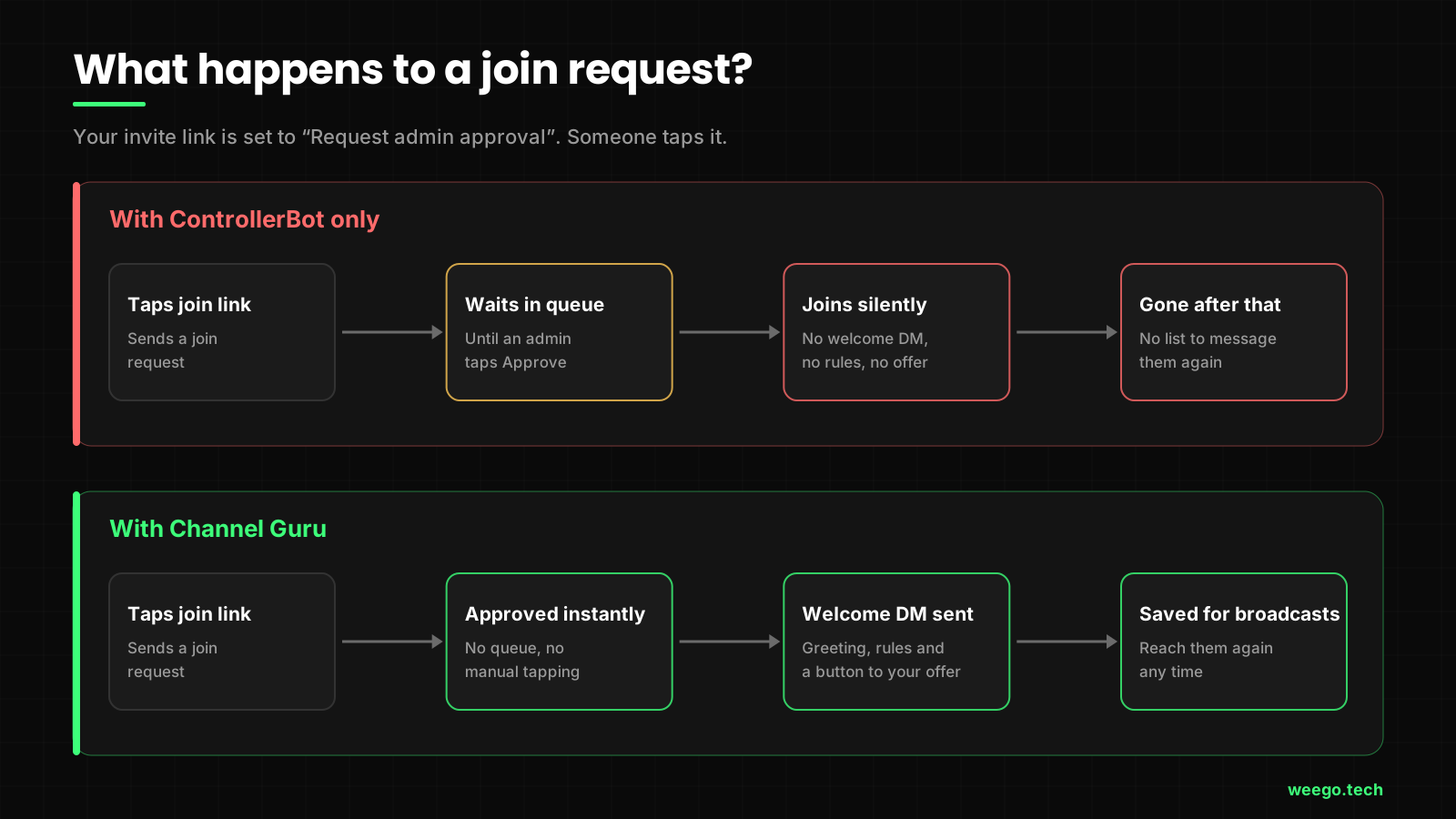
When your invite link is set to Request admin approval, every new person creates a join request. A bot that is an admin with the right permission can approve those requests for you. Telegram also lets that bot send the person a private message at that same moment, which is the best chance you'll ever get to say hello.
ControllerBot doesn't listen for join requests. So:
- No auto-approval. You still tap Approve, one person at a time.
- No welcome DM. New members get no private hello, no rules and no link to your offer.
- No broadcasts. There's no list of members you can message again later. You can only post in the channel and hope they see it.
Telegram's native Welcome Messages, added in August 2026, help a little, but they still can't talk to people waiting in the join-request queue. We covered the gaps in Telegram welcome message bot vs native.
Same join request, two very different outcomes.
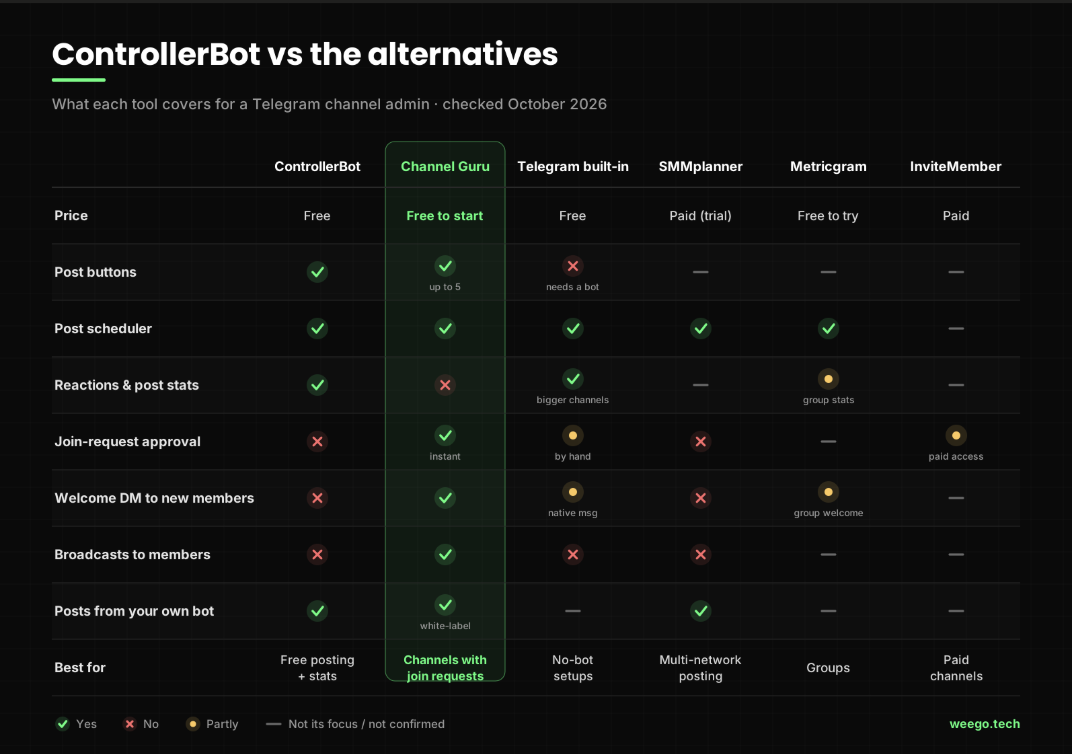
The 5 best ControllerBot alternatives in 2026
Here's how the options compare across the jobs channel admins actually do every week.
1. Channel Guru: best all-in-one for channels with join requests
Channel Guru covers the posting side and the people side in one bot:
- Posts with buttons. Up to 5 link buttons on any post.
- Scheduling. Build a rich-media post and queue it for later.
- Join requests. Approves requests the moment they arrive, so nobody waits in a queue.
- Welcome DM. Sends each new member a private greeting: text, image, video or a post with its own buttons.
- Broadcasts. Message every approved member across all your channels, or just one channel's audience. Sends are paced to stay inside Telegram's limits.
- White-label bot. Plug in your own BotFather token, and members see your bot's name instead of a shared one.
Where it loses: Channel Guru doesn't add reaction buttons and doesn't have ControllerBot's post stats. If you live in those numbers, keep ControllerBot for them (more on running both below).
Pick it if: your channel uses join requests, or you want to reach new members directly, not just post at them.
2. Telegram's built-in tools: best if you want zero bots
You may need less than you think. Telegram now does a lot on its own:
- Scheduling: long-press the send button and choose Schedule Message.
- Reactions: pick which reactions are allowed in your channel settings.
- Post stats: channel statistics show up once your channel is big enough.
- Welcome message: native since August 2026 (here's how to set one up).
Where it loses: no buttons (those always need a bot), join requests are approved by hand, and there's no way to message members privately later.
Pick it if: you post text and media, don't need buttons, and don't use join requests.
3. SMMplanner: best if Telegram is one of many networks
SMMplanner is a web-based post scheduler. You connect your channel with a BotFather token, then plan posts from your computer and cross-post the same content to other social networks.
Where it loses: it's a posting tool, like ControllerBot, just on the web. It doesn't handle join requests or welcome DMs, and it's paid after a free trial.
Pick it if: a social media manager plans Telegram posts next to other platforms from a desktop.
4. Metricgram: best if you actually run a group
Metricgram is built for Telegram groups: group analytics, challenges and badges, AI chatbots, Stripe payments and welcome messages.
Where it loses: it's aimed at communities that chat, not one-way channels. Even Metricgram's own comparison page says ControllerBot is more specialised for channel buttons and reactions. That's a fair point.
Pick it if: your main space is a group with real conversation, and the channel is secondary.
5. InviteMember: best for paid channels
InviteMember turns a channel or group into a subscription. It takes payments, gives paying members access and removes people when they stop paying.
Where it loses: it isn't a post editor or a scheduler. You'll still need something else for posts with buttons.
Pick it if: you sell access to a private channel, such as signals, courses or premium content.
ControllerBot vs Channel Guru: can you run both?
Yes, and for many channels that's the best setup. They do different jobs: ControllerBot publishes and measures posts, while Channel Guru handles people at the door.
- Leave your ControllerBot setup alone. Your bot, buttons and stats keep working.
- Add Channel Guru as an admin with two permissions on: Post Messages and Invite Users via Link. Without the second one, it can't see join requests.
- Turn on "Request admin approval" on your invite link. Our auto-approve join requests guide walks through it.
- Set your welcome DM in Channel Guru: a greeting, your rules, and a button to your offer.
- Pick one scheduler. Schedule posts in one tool only, so nothing goes out twice.
Which ControllerBot alternative should you pick?
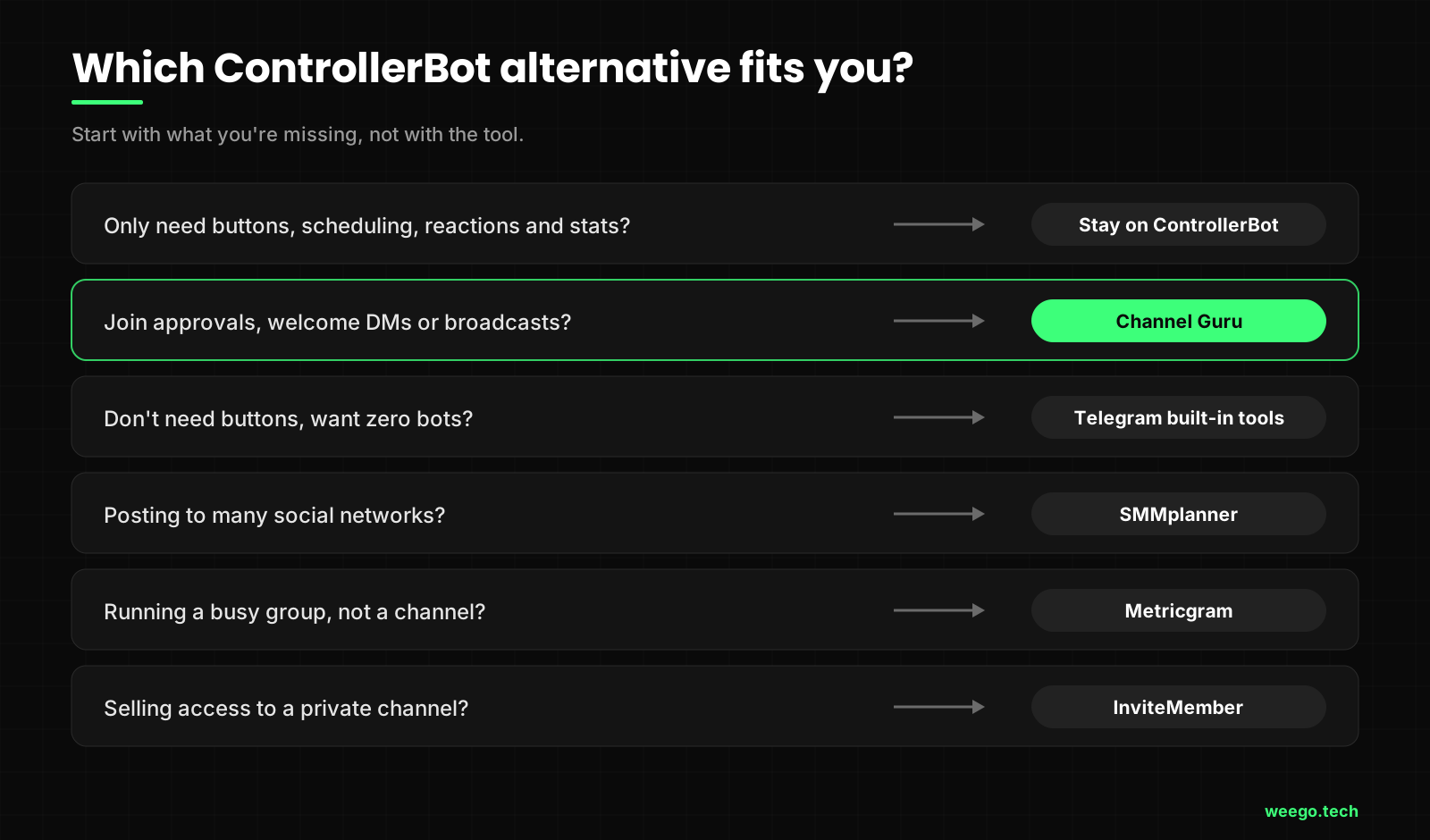
- Missing join-request approval, welcome DMs or broadcasts? Channel Guru.
- Don't need buttons at all? Telegram's built-in tools.
- Posting to five networks, not just Telegram? SMMplanner.
- Running a busy group? Metricgram.
- Selling access to a private channel? InviteMember.
- Want something none of these do? That's when a custom bot makes sense. Here's when custom Telegram bot development is worth it.
When should you stay on ControllerBot?
Honestly? More often than "alternative" articles admit.
Stay put if your channel is public, people join instantly without approval, and your weekly routine is: write a post, add a button, schedule it, check the views. ControllerBot does exactly that, for free, and has done it reliably for years. Switching would cost you time and gain you nothing.
The time to look elsewhere is when your work moves from posts to people: approving them, greeting them and talking to them again. That's where a posting bot runs out of road.
ControllerBot FAQ: quick answers
Is ControllerBot free? Yes. Its core features, including buttons, scheduling, reactions and stats, are free.
Why is my ControllerBot not working? Usually it's a bot token already used by another service, missing admin permissions or a wrong time zone. Work through the 5 checks above before switching.
Can ControllerBot approve join requests? No. It doesn't handle join requests. You need a bot that does, such as Channel Guru, or you approve people by hand.
Can ControllerBot send a welcome message to new members? No. It can't send private messages to new members. Telegram's native welcome message or a welcome bot can.
What is the best free ControllerBot alternative? For zero bots, Telegram's built-in tools. For buttons plus join requests and welcome DMs, Channel Guru is free to start.
Can I use ControllerBot and Channel Guru together? Yes. Give each one its own admin permissions and use only one of them for scheduled posts.
The bottom line
ControllerBot is still one of the best free tools for one job: publishing posts with buttons, reactions and stats. If that's your job, keep it.
But most "ControllerBot alternative" searches really mean something else: my channel needs more than posts now. If you're approving join requests by hand, sending zero welcome messages and have no way to reach members again, that's the gap Channel Guru was built to close. And you don't have to delete ControllerBot to try it.
Stop approving join requests by hand
Channel Guru approves new members instantly, sends them a welcome DM and lets you broadcast to them later. Posts with buttons and scheduling are included. Setup takes about 2 minutes, and it runs fine next to ControllerBot.
Add Channel Guru free →Feature details checked October 2026. Telegram and third-party bots change often, so check each tool's own page before you decide.