
Telegram doesn't have a WhatsApp-style broadcast list. There's no button to pick 200 contacts and send them one private message. You can still reach everyone at once in 2026. You just need the right tool for the audience you have.
Quick answer: To send a broadcast message on Telegram, post it in a channel (it reaches every subscriber's feed), or send it through a bot (it lands in each person's private chat). A bot can only message people who have started it or asked to join your channel. So to reach your channel subscribers in DM, use a join-request bot that saves each new member to a list you can broadcast to later.
This guide covers all three methods, Telegram's real sending limits, and how to broadcast without getting your bot blocked.
Does Telegram have a broadcast list?
No. WhatsApp lets you send one message to a saved list of contacts, and each person gets it as a private chat. Telegram never built that feature.
Telegram gives you two building blocks instead:
- Channels. One-way feeds with unlimited subscribers. Everyone sees the post in the channel, not in a private chat.
- Bots. Bots can send a private message to each user, one by one. That's how "broadcast bots" work.
What you can't do safely is mass-message people from your own personal account. Telegram limits accounts that message lots of non-contacts. If people report you, your account can be restricted from messaging strangers. Don't use your personal account or "mass DM" userbots for broadcasts.
3 ways to send a broadcast message on Telegram
| Method | Where it lands | Who you can reach | Best for |
|---|---|---|---|
| 1. Channel post | The channel feed | Every subscriber | Daily updates, news, content |
| 2. Bot broadcast | Each person's private chat | People who started your bot | Offers, alerts, reminders |
| 3. Join-request bot + broadcast | Each person's private chat | Channel members who joined through a join request | Re-engaging channel subscribers |
Method 1: Broadcast with a Telegram channel
A channel is Telegram's built-in broadcast tool. Only admins can post, and there's no subscriber limit.
- Open Telegram and tap the pencil icon (or the menu on Desktop).
- Choose New Channel, then add a name, photo and description.
- Pick Public (anyone can find it) or Private (invite link only).
- Share the link and write your first post.
Two built-in options help a lot:
- Schedule a post: long-press the send button and choose Schedule Message.
- Send without sound: long-press send and choose Send Without Sound for posts that don't need to buzz anyone's phone.
The catch: many people mute channels. Your post sits in the feed until they open it. If you need people to actually see a message, like a launch, a price drop or an event reminder, a private message works better. That's where bots come in.
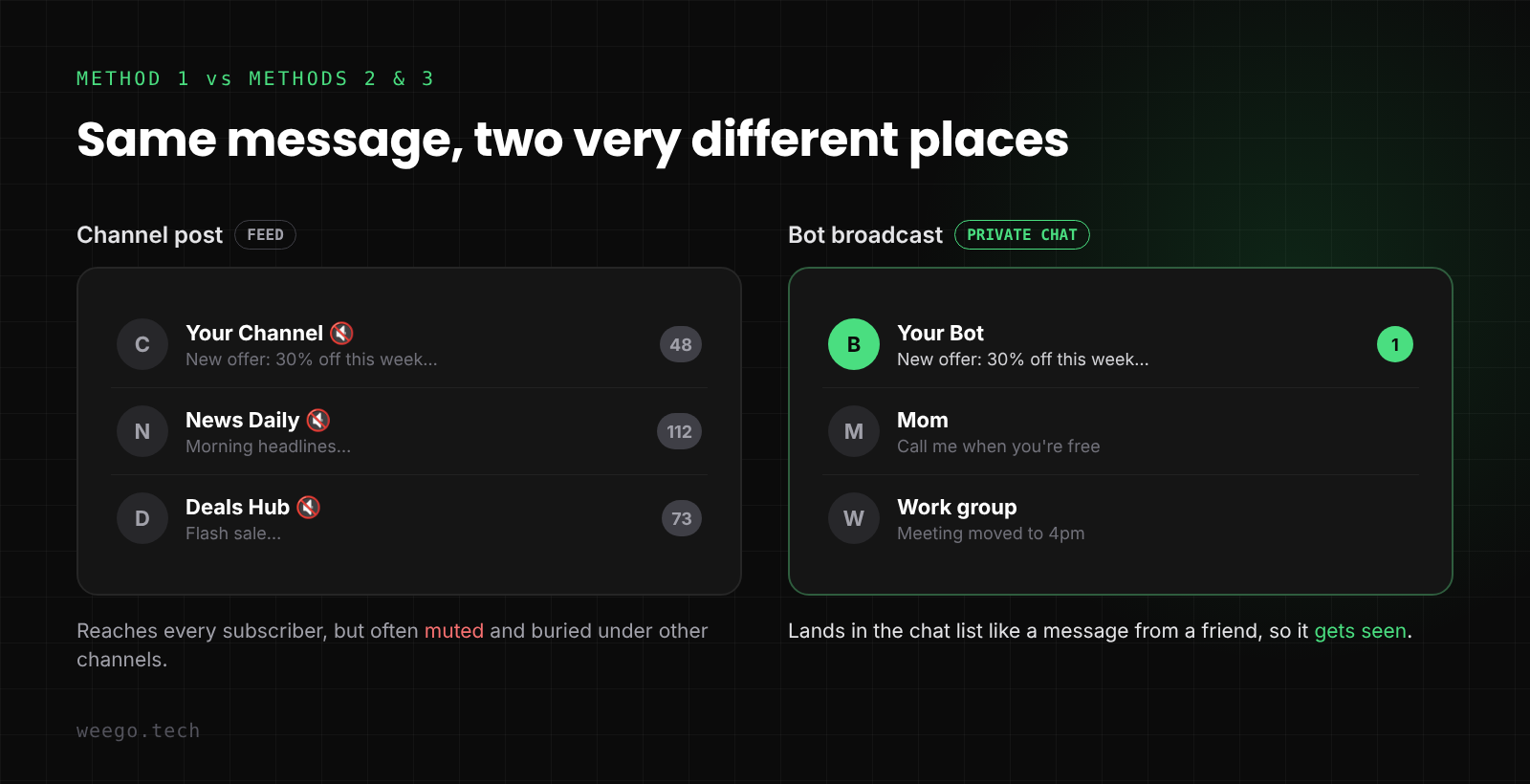
A channel post sits in a muted feed. A bot broadcast lands in the chat list next to messages from friends.
Want your channel posts to drive clicks? Add buttons to your Telegram messages so each post has a clear next step.
Method 2: Broadcast with a Telegram bot
A bot can send the same message to every user on its list, each as a private chat. It feels personal, and it shows up in the chat list like any other message.
There's one rule you can't get around: a bot can't start a conversation. It can only message people who have pressed Start on it (or interacted with it in another way Telegram allows). So your broadcast list is only as big as the number of people who started your bot.
Telegram's broadcast limits
Telegram's official Bots FAQ sets the limits every broadcast bot has to follow:
- About 30 messages per second across different users. Go faster and Telegram returns "Too Many Requests" (429) errors.
- About 1 message per second in a single chat.
- 20 messages per minute in a single group.
- Paid broadcasts: bots can raise the limit to 1,000 messages per second. Each message above the free limit costs 0.1 Telegram Stars. Telegram only allows this for big bots, with at least 100,000 Stars on balance and at least 100,000 monthly active users.
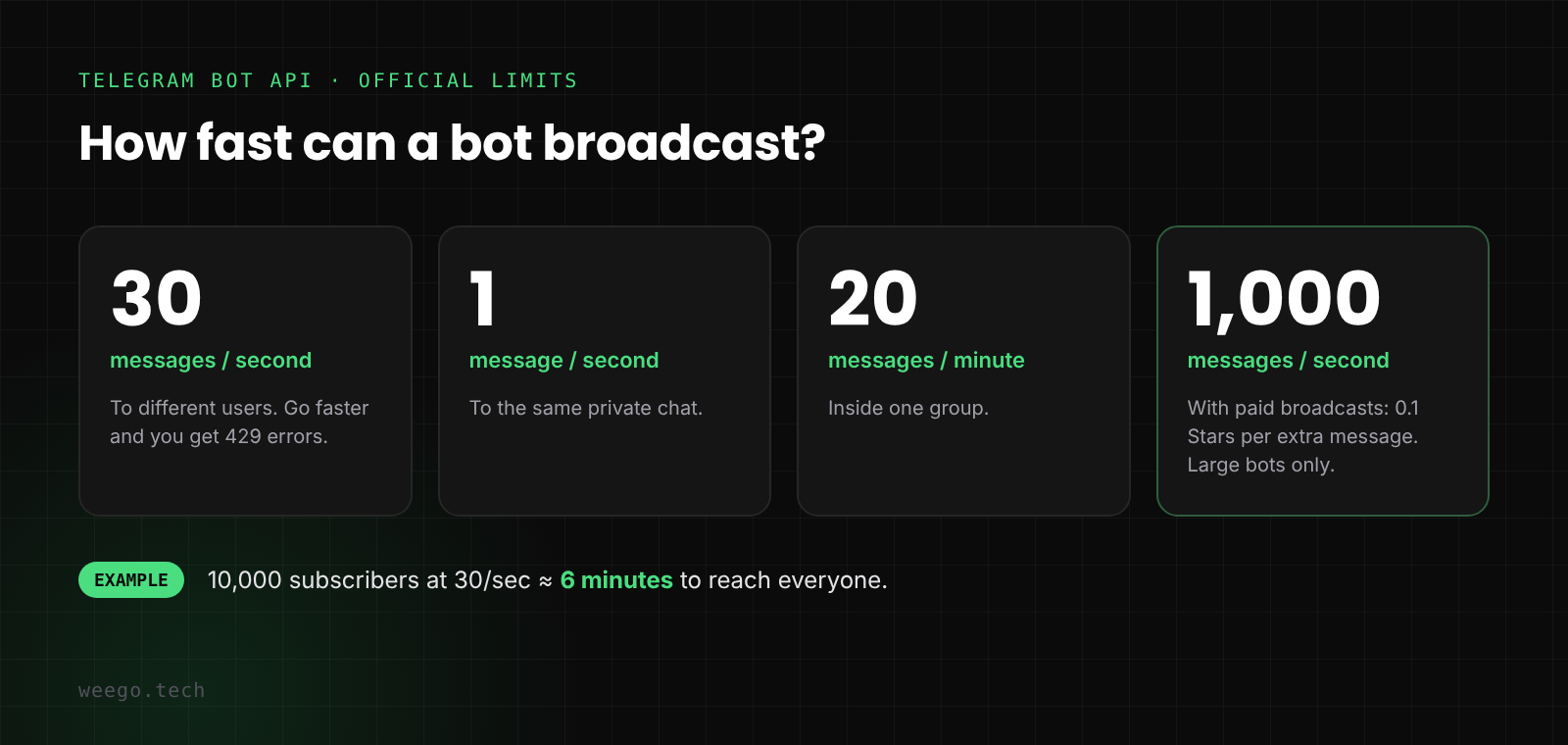
Telegram's official broadcast limits for bots.
At 30 messages per second, a list of 10,000 people takes about 6 minutes. For most channels and businesses, that's plenty. A good broadcast bot sends in the background and spaces out messages for you, so you never hit the limit.
Build your own or use a ready-made bot?
If you're a developer, a simple broadcast script is a loop that calls sendMessage with a short delay. The hard parts are saving users, handling people who block your bot, and keeping the bot responsive while it sends. If you'd rather not build all that, a ready-made bot handles it. (If you need custom logic, here's what Telegram bot development costs in 2026.)
Method 3: Send a private message to your channel subscribers
This is the question most channel owners actually have: "How do I send a message to all my Telegram channel subscribers in their DMs?"
By default, you can't. Joining a channel doesn't start a chat with any bot, so no bot can message those people.
Join requests change that. When your private channel uses an invite link with Request Admin Approval turned on, each person who wants in sends a join request. Telegram's Bot API lets an admin bot message that person for 5 minutes, until the request is approved or declined.
A join-request bot uses that window to:
- Approve the request instantly, so nobody waits.
- Send a welcome message in a private chat.
- Save the new member to your subscriber list.
Every new member now lands in a list you can broadcast to later. Your channel posts reach the feed, and your broadcasts reach their DMs.
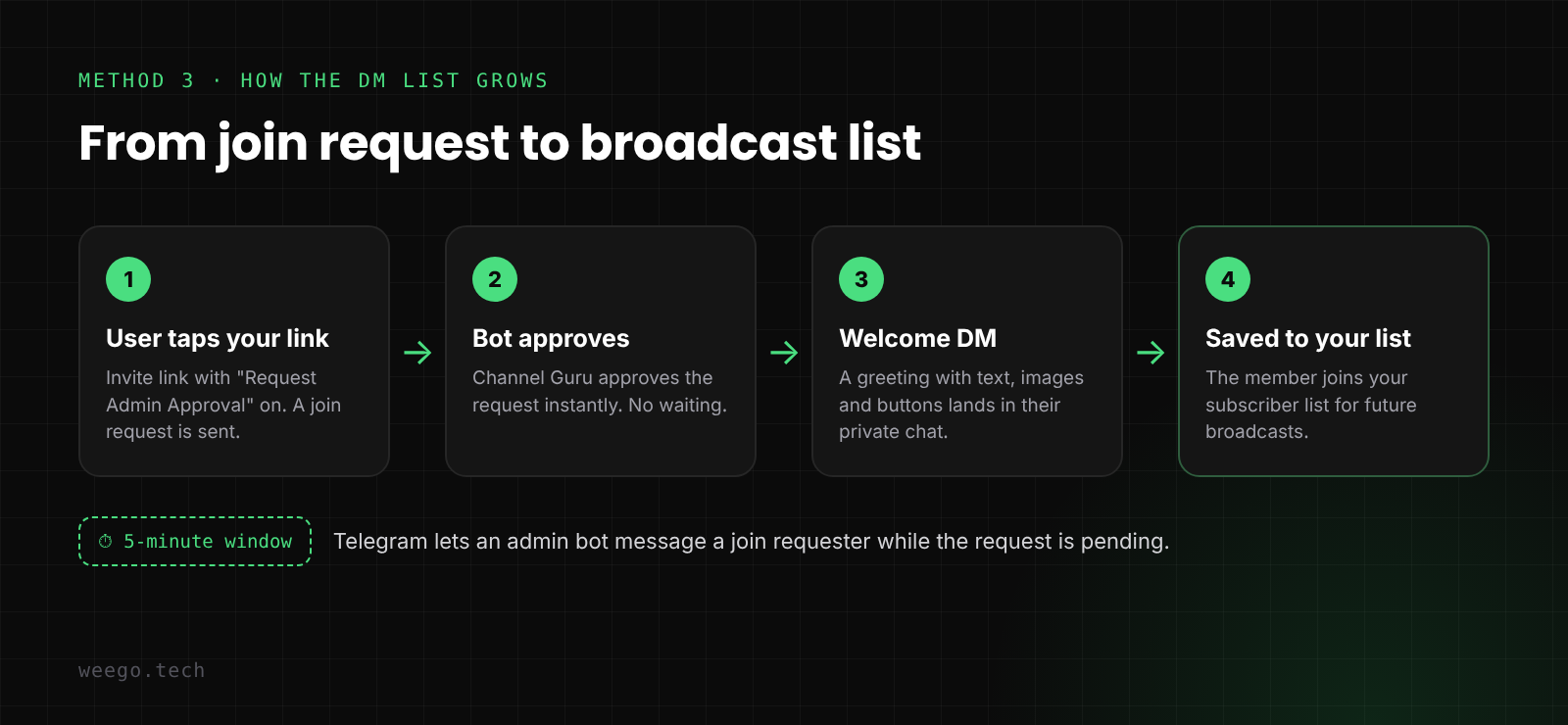
How each join request becomes a subscriber you can message later.
How to set it up with Channel Guru
Channel Guru is our bot that does all three steps and includes a broadcast engine. Setup takes about 3 minutes:
- Start the bot. Open @ChannelGuruBot on Telegram and press Start.
- Make it an admin. Add the bot as an admin in your channel with Post Messages and Invite Users via Link turned on. Without the invite permission, it can't see join requests.
- Link your channel. Tap Add Channel and follow the prompt to connect it.
- Turn on join requests. Create an invite link with Request Admin Approval on, and share that link instead of your old one.
- Set your welcome message. Use the default, or write your own with images and buttons.
From now on, every person who joins through that link is approved, welcomed and saved. (More on this in our guide to auto-approving Telegram join requests.)
Sending the broadcast
- Tap Broadcast Message in Channel Guru. The bot shows your total audience size.
- Choose All Users (every subscriber across your linked channels) or Channel-Wise (only one channel's members).
- Enter how many users to send to. This lets you test on a small group first.
- Send your message. Text, formatting, pictures and inline buttons all work.
- Check the preview and tap Yes.
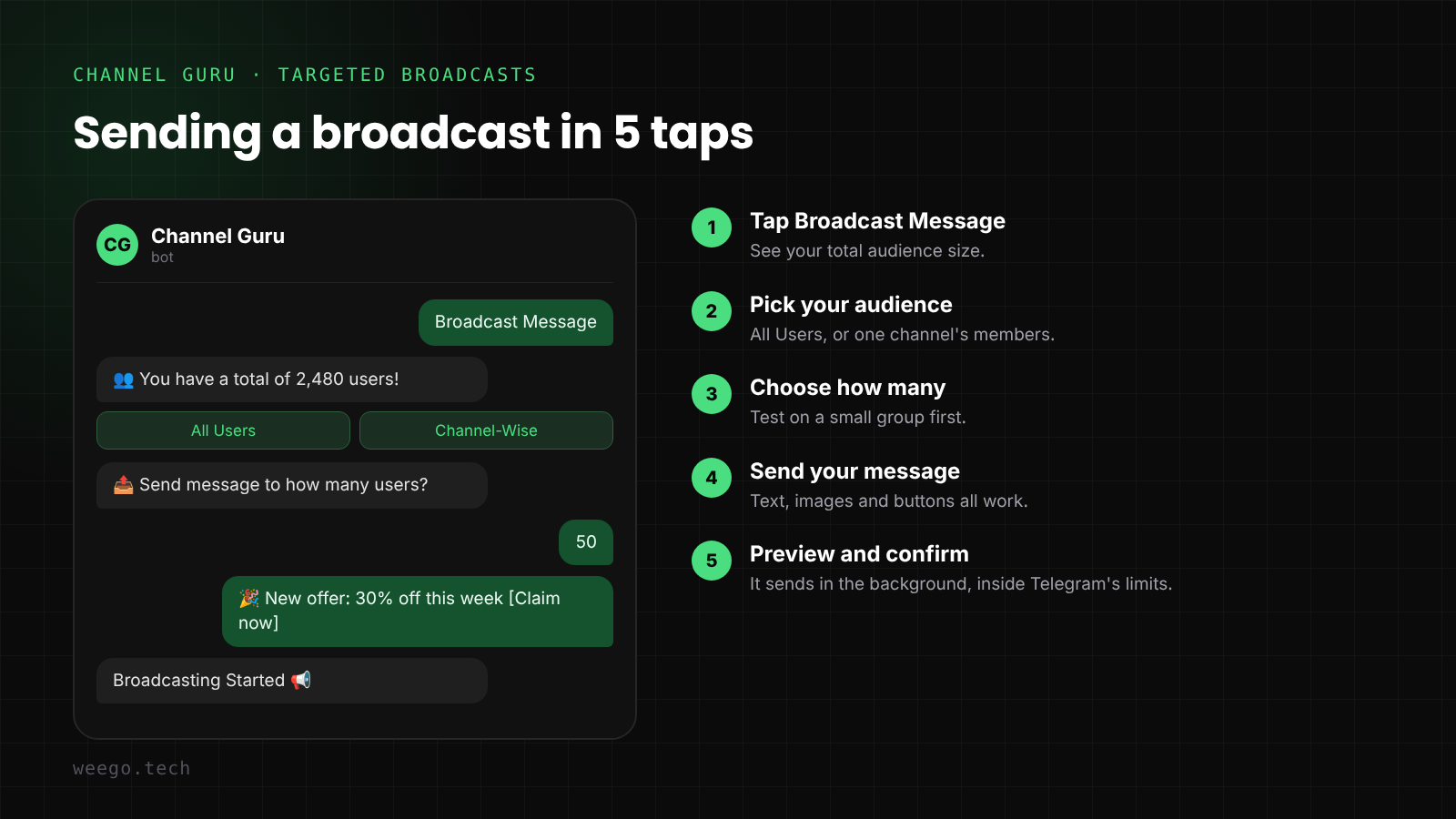
Illustration of the Channel Guru broadcast flow.
The broadcast runs in the background and spaces out messages to stay inside Telegram's limits. Your join approvals keep working while it sends. See the broadcast docs for details.
Note: this only reaches people who joined through a join request after you set up the bot. Members who joined before can't be messaged unless they start the bot themselves. The sooner you switch your invite link, the bigger your list grows.
How to broadcast without getting blocked
Every time someone blocks your bot, your list shrinks for good. These habits keep people subscribed:
- Send less than you think. One or two broadcasts a week is plenty for most channels. Save DMs for things that matter.
- Make it worth opening. A deal, an early-access link or a time-sensitive alert. Not a repeat of your channel post.
- Segment by channel. If you run several channels, send each audience only what fits it.
- Test small first. Send to 50 people, check that links and buttons work, then send to everyone.
- Use one clear button. One call to action beats three links in a wall of text.
- Pick a good time. Send when your audience is awake. Check when your channel posts get the most views.
Growing the list matters as much as sending to it. Our 0 to 10K channel growth playbook covers how to get more people through the door.
Telegram broadcast FAQ
Can I send a private message to all my Telegram channel subscribers?
Not directly. Telegram doesn't let channel admins or bots message subscribers who never interacted with a bot. The workaround is to use a join-request link with a bot like Channel Guru. It saves each new member, so you can broadcast to them in DM later.
Does Telegram have a broadcast list like WhatsApp?
No. Telegram uses channels for one-to-many messages and bots for private broadcasts. Mass-messaging from your personal account can get it restricted.
How many messages can a Telegram bot send per second?
About 30 per second to different users, 1 per second to the same chat, and 20 per minute in a group. Large bots can enable paid broadcasts for up to 1,000 per second at 0.1 Stars per extra message.
Can a bot send a broadcast to Telegram groups?
Yes. A bot can post in any group where it's a member and allowed to send messages. Each group counts as one chat, with a limit of 20 messages per minute.
Is broadcasting on Telegram free?
Yes. Channel posts and normal bot broadcasts are free. Only Telegram's paid broadcast mode, for very large bots that need more than 30 messages per second, costs Stars.
Can I schedule a Telegram broadcast?
Yes. In a channel, long-press the send button and choose Schedule Message. Channel Guru also lets you design posts and schedule them for your channels.
Start building your broadcast list today
Channel posts reach the feed. Broadcasts reach the inbox. The best Telegram setups use both: a channel for everyday content, and a bot list for the messages that can't be missed.
The list only grows from the day you start, so set it up now. Add Channel Guru to your channel, switch to a join-request link, and every new member becomes someone you can reach directly.