How to Grow a Telegram Channel in 2026: The 0 to 10K Playbook
Quick answer: To grow a Telegram channel in 2026, fix your name, username and description so people can find you, post on a fixed schedule, swap shout-outs with channels your size, send every new member a welcome DM, link your group and channel with Telegram Communities, and never buy fake subscribers.
Search “how to grow a Telegram channel” and many of the results want to sell you subscribers. Most of the rest are recycled tip lists written before Telegram added similar-channel suggestions, Communities and native welcome messages.
This guide is different. It’s a stage-by-stage playbook: what to do at 0 subscribers, at 100, at 1,000 and at 3,000, and what to stop doing at each step. Every tactic here is free or close to free. None of them involve fake accounts.
Find the stage you’re in, do that, and skip the rest until you get there.
Why do most Telegram channels stop growing?
Telegram has no feed that pushes your posts to strangers, and no “For You” page. People find a channel through four doors only:
- Search: Telegram’s own search, or Google.
- A shared link: someone forwards your post or sends your link.
- A recommendation inside Telegram: the similar channels list.
- An ad: Telegram Ads or a paid post in another channel.
Growing a channel means opening all four doors, in the right order. Most channels stall because they post into the void and hope one door opens by itself.
There’s a second trap. Telegram shows a view count on every post. A channel with 5,000 subscribers and 90 views per post looks dead to anyone who checks, including the partners and advertisers you’ll need later. Keep that in mind; it comes back in the section on fake subscribers.
The 0 to 10K roadmap at a glance
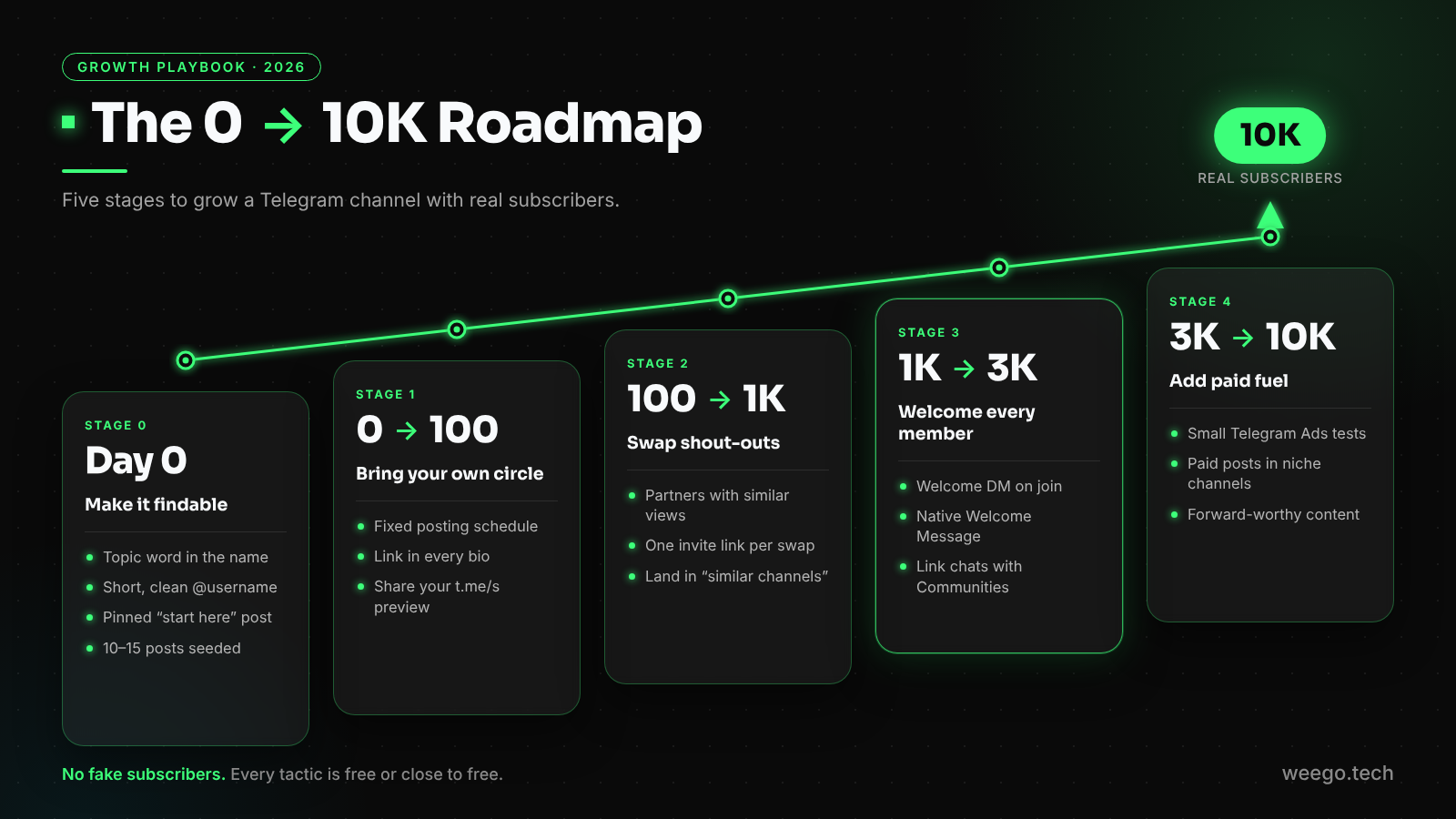
- Stage 0 (before launch): make the channel easy to find and worth joining.
- Stage 1 (0 to 100): bring in people you already know, and build a posting habit.
- Stage 2 (100 to 1,000): shout-out swaps with channels your size.
- Stage 3 (1,000 to 3,000): turn join requests into welcome DMs, and link your chats with Communities.
- Stage 4 (3,000 to 10,000): add paid fuel (Telegram Ads, paid posts) to an engine that already works.
Stage 0: Set up your channel so people can find it
Do this before you invite a single person. You only get one first impression, and a half-finished channel wastes it.
Pick a channel name people would actually search
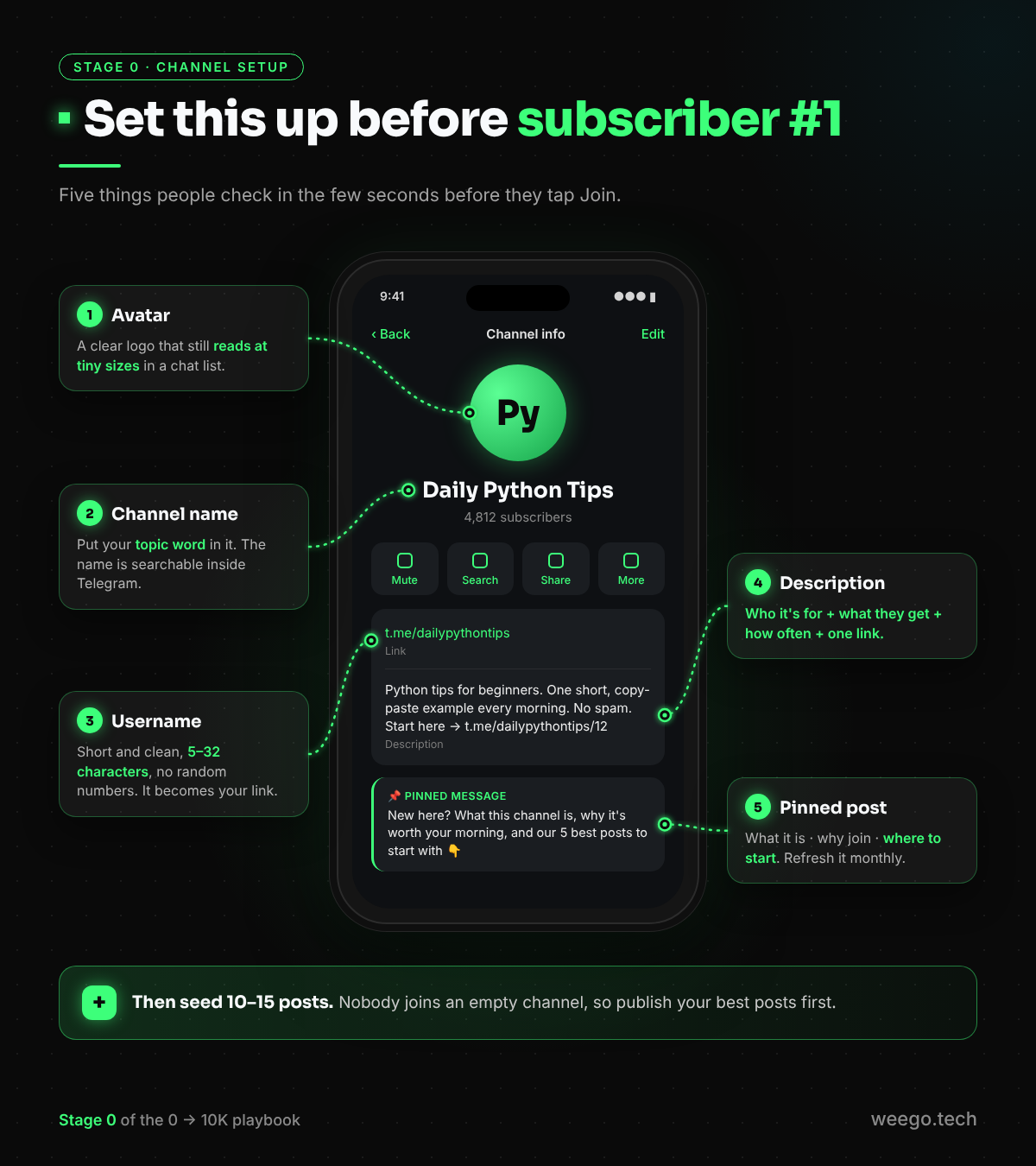
Your channel title shows up in Telegram’s global search, so put your topic word in it. “Daily Python Tips” gets found. “Rahul’s Corner” doesn’t.
Keep it short enough to read in a chat list. You can add a brand word after the topic: “Daily Python Tips · CodeDesk”.
Choose a clean channel username
Your channel username becomes your public link: t.me/yourname. It can be 5 to 32 characters long, using letters, numbers and underscores.
Pick something short that includes your topic, with no random numbers. Choose carefully, because changing it later breaks every old link you’ve shared.
Write a description that sells in one glance
The description has room for only a couple of sentences, so use a simple formula:
Who it’s for + what they get + how often + one link.
Python tips for beginners. One short, copy-paste example every morning. No spam. Start here → t.me/yourname/12
Public or private?
If growth is the goal, go public. Only public channels can:
- show up in Telegram search,
- appear in the “similar channels” list Telegram shows people, and
- have a t.me/s web preview, a page anyone can read in a browser without the app, and one that Google can find.
A private channel can only grow through links. You can still get the main benefit of private channels (a join request for every new member) on a public channel. Stage 3 shows how.
Pin a post that does the selling
Most people who open your channel decide in a few seconds. Your pinned post should answer three questions:
- What is this channel?
- What do I get if I join?
- Where should I start?
Link to your three best posts inside it, and update it every month.
Seed 10 to 15 posts before inviting anyone
Nobody joins an empty room. Publish 10 to 15 of your best posts first, so a visitor can scroll and immediately see what they’ll be getting.
Stage 1: How to grow a Telegram channel from 0 to 100
Your first 100 subscribers come from you, not from Telegram. That’s normal, so don’t skip this stage.
Post on a fixed schedule. Pick a rhythm you can keep for six months, such as one post every day at 9 a.m., and stick to it. Telegram’s built-in scheduler helps: long-press the send button and choose Schedule message. If you need recurring or bulk scheduling, see our ControllerBot alternative guide.
Invite your warm circle personally. Send a short, real message to friends, colleagues and customers who’d actually care. Twenty personal invites beat a 500-person mass blast that gets you muted.
Put the link everywhere you already exist:
- your Instagram, X, LinkedIn and YouTube bios
- your email signature
- a “Join us on Telegram” button on your website
- your WhatsApp status, once a week
Share your t.me/s web preview. People who don’t have Telegram can still read your channel at t.me/s/yourname. It’s a “try before you join” page, and works especially well on X and LinkedIn.
Don’t drop links in other people’s groups uninvited. It gets you reported, and a pile of spam reports can get your account limited. One rude link costs more than it brings in.
Stage 1 goal: 100 real people, plus a posting habit you no longer have to think about.
Stage 2: 100 to 1,000 with shout-out swaps and cross-promotion
This is the growth engine for small channels. In a shout-out swap, you post a short recommendation for a partner’s channel and they post one for yours. Both audiences meet a channel they’re likely to enjoy, and it’s free.
How to find swap partners
- Look at your own “similar channels” list. When someone joins a public channel, Telegram shows them a list of similar public channels, chosen by how much the subscribers overlap. Those channels already share your audience, so they’re your best partners.
- Browse a Telegram channel directory such as TGStat by topic.
- Ask your own subscribers which other channels they read.
There’s a bonus here. Telegram builds the similar channels list from subscriber overlap, so every swap with a channel in your niche makes it more likely that you’ll start appearing in their list. Swaps grow you twice.
Rules for a fair swap
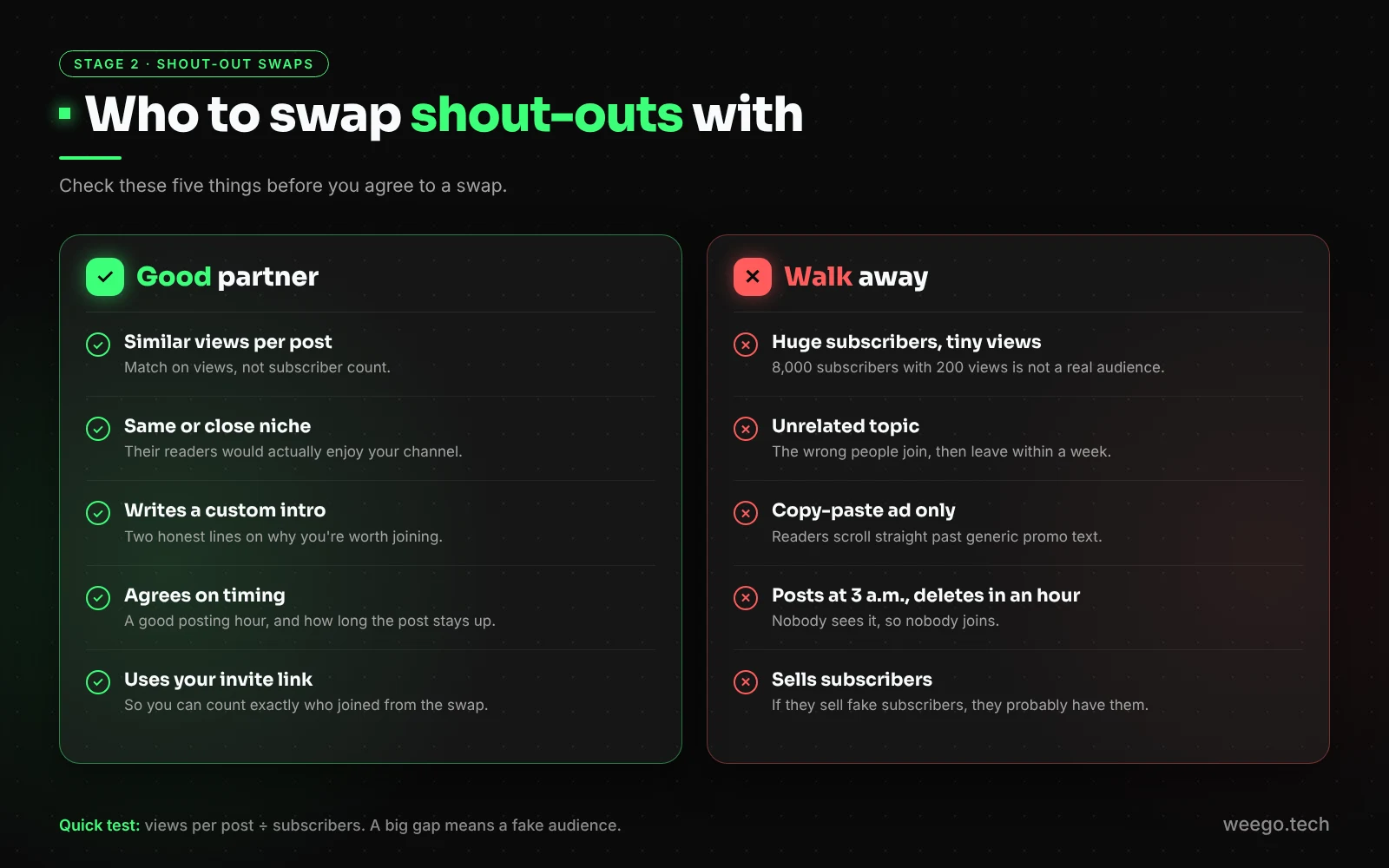
- Match on views, not subscribers. A channel with 2,000 subscribers and 900 views per post is a better partner than one with 8,000 subscribers and 200 views.
- Stay close to your niche. A fitness channel swapping with a crypto channel brings people who leave a week later.
- Write the shout-out yourself. Two lines about why your readers would like their channel. Copy-paste ads get ignored.
- Agree on timing: same day, a good posting hour, and how long the post stays up.
- Walk away from channels with suspicious numbers, meaning huge subscriber counts and tiny views. Their audience isn’t real.
A swap message you can copy
Hi! I run @yourname (about 600 people, around 300 views per post) on [topic]. I think our readers overlap. Would you like to swap shout-outs this week? I’ll write a short, honest intro for your channel. Happy to go first.
Track every swap with its own invite link
Don’t send all your traffic through one link. Create a separate named invite link for each partner (Channel info → Invite links → Create a new link). Telegram shows how many people joined through each one.
After a month you’ll know which partners send people who stay, and you can swap with those again.
Stage 3: 1,000 to 3,000: turn every join request into a welcome DM
Here’s something most growth guides miss: a Telegram channel can’t send a private message to its subscribers. If someone joins through your username, you never get to say hello.
There’s one exception, and it’s the most useful growth trick in this guide.
Why join requests change everything
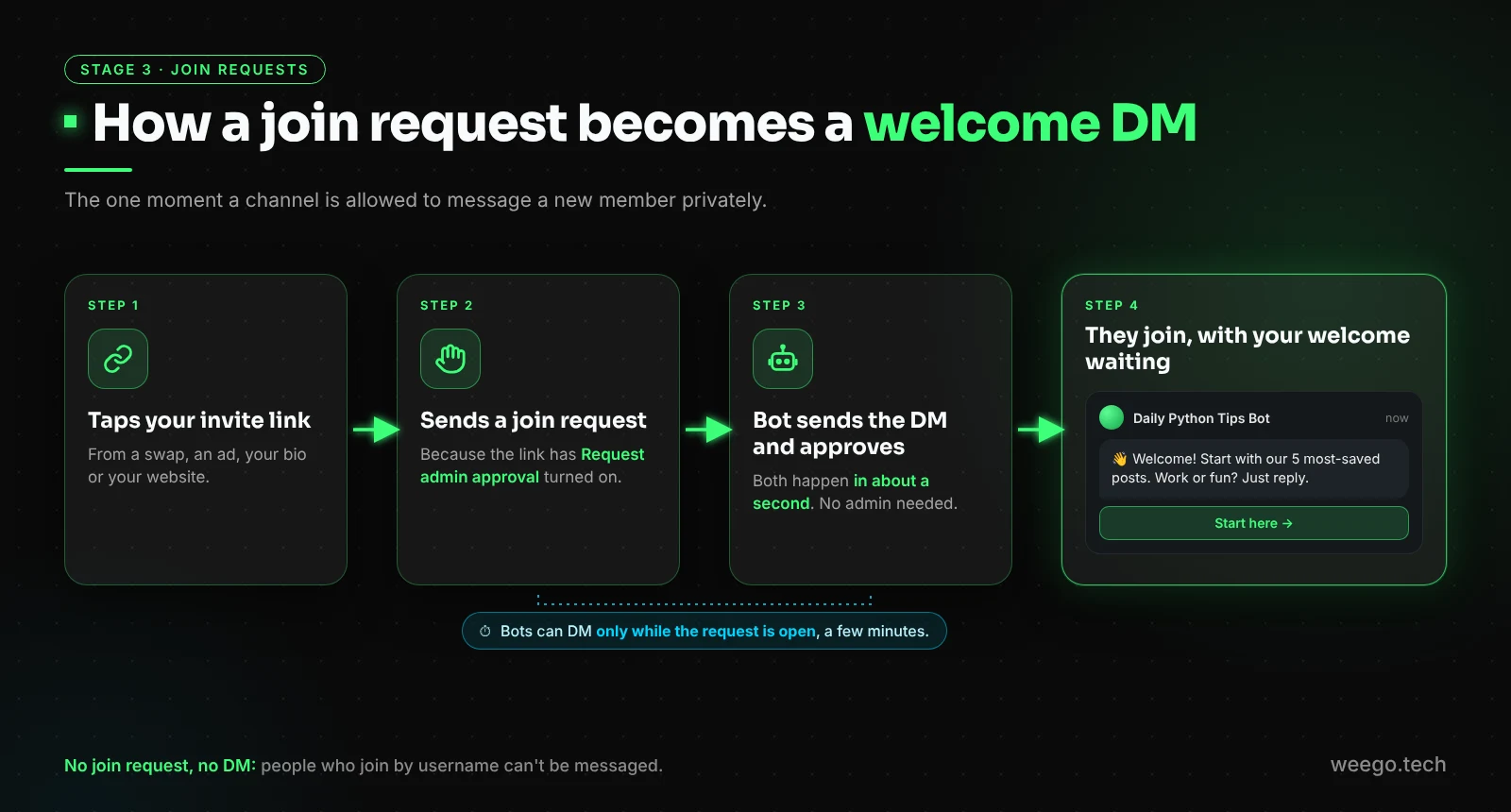
If someone joins through an invite link that needs admin approval, they send a join request instead of joining instantly. While that request is waiting, a bot that is an admin of your channel (with permission to invite users) is allowed to send that person a private message. The window is short, a few minutes before the request is approved or declined, so it has to be automatic.
That means you can approve every request instantly and land a personal welcome DM in their private chats, at the exact moment they’re most interested in you.
How to set it up
- Create an invite link with Request admin approval turned on. You can do this on a public channel too; your username stays open for everyone else.
- Add a join-request bot as an admin, with Invite users via link switched on.
- Write your welcome DM (see below).
- Use the approval link in all your promotions: swaps, ads, bios, your website.
Our step-by-step guide on auto-approving Telegram join requests walks through every screen.
What to write in a welcome DM
Keep it to three short lines and one button:
👋 Welcome to Daily Python Tips, glad you’re here!
Start with our 5 most-saved posts 👇
Quick question: are you learning Python for work or for fun? Just reply.
[ Start here ]
The question matters. Replies tell you who your readers are, and people who reply are far more likely to stick around.
→ Turn every join request into a welcome DM with Channel Guru (free) →
Native Welcome Messages vs a welcome DM
Since 25 August 2026, Telegram has a native Welcome Message feature (Edit → Welcome Message). Only the new member sees it, inside the channel. It’s great, and you should set one up. It just does a different job from a welcome DM.
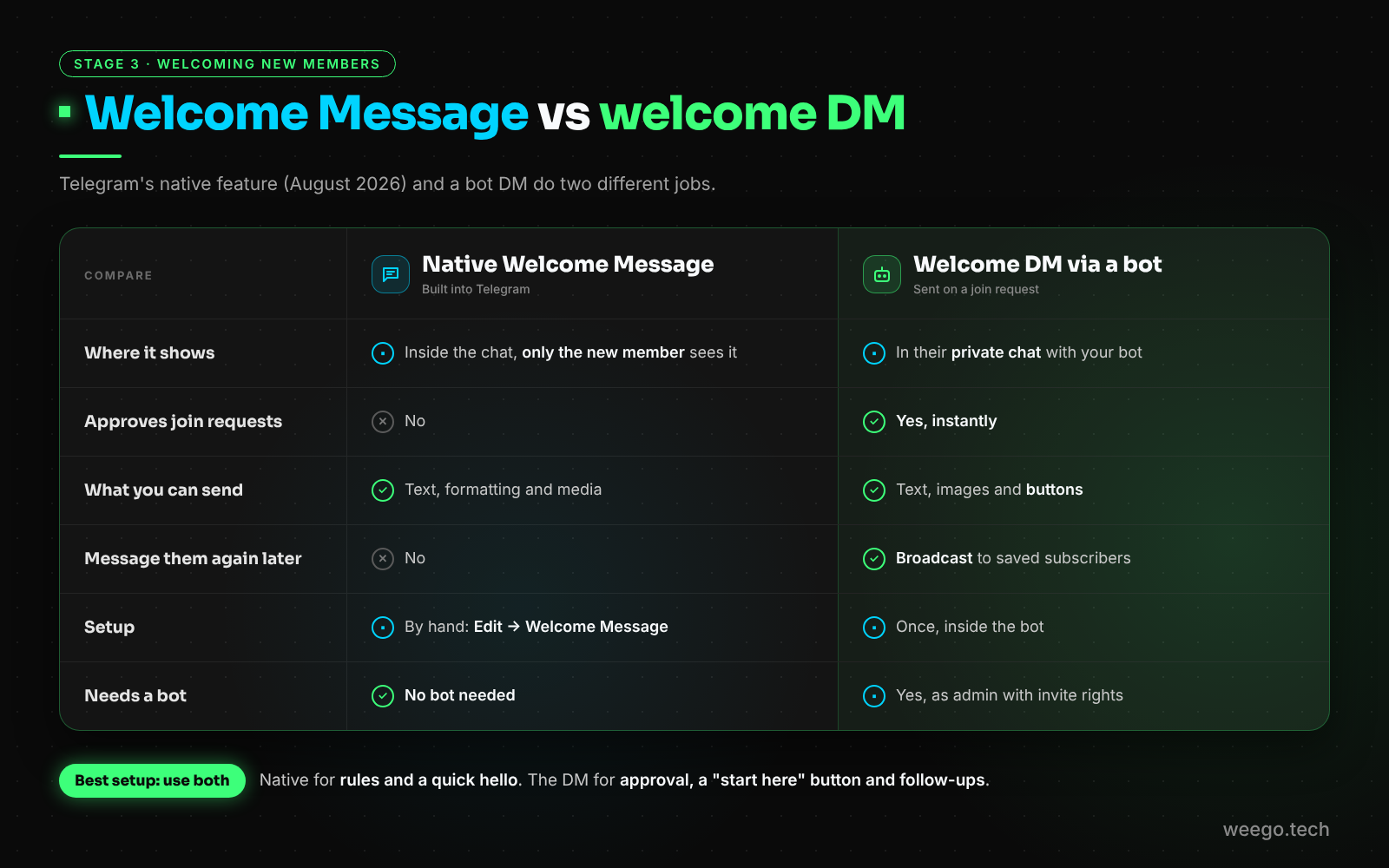
- Native Welcome Message: shows inside the chat; set by hand; doesn’t approve join requests; you can’t message the person again later.
- Welcome DM via a bot: lands in their private chat; approves requests instantly; supports buttons; and because the bot saved them as a subscriber, you can send a broadcast later.
Use both. For the details, read Telegram Welcome Messages vs Welcome Bots, or the native Welcome Message setup guide.
A milestone worth knowing: once a public channel passes 1,000 subscribers, Telegram lets the owner receive 50% of the revenue from ads shown in it. So 1,000 is also the point where your channel can start paying for its own growth.
Link your group and channel with Telegram Communities
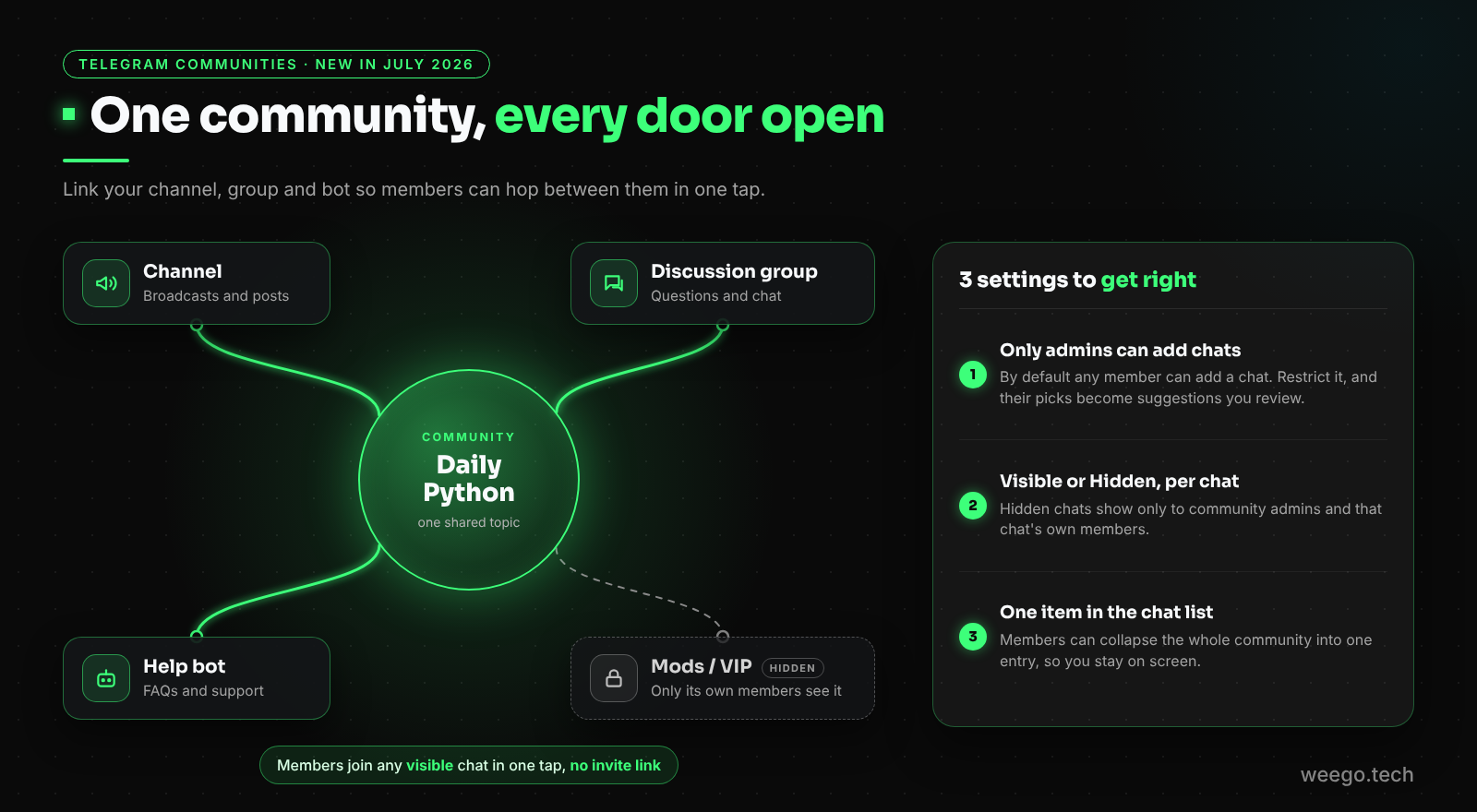
In July 2026, Telegram launched Communities, which let you link several channels, groups and bots around one topic. It’s the most useful 2026 feature for growth, and almost no guide covers it yet.
What Communities do
- Members of any linked chat can see the other chats and join them without an invite link.
- Each chat can be Visible to all members or Hidden from everyone except community admins and that chat’s own members.
- Members can choose to see the whole community as one item in their chat list.
- By default any member can add chats, but you can limit this to admins. Member suggestions then wait for your review.
How Communities help a channel grow
Before Communities, your group and your channel were two separate doors. Now each one leads to the other. Someone who joins your chatty discussion group is one tap away from your channel, and your channel subscribers can see the group where the conversation happens.
A simple setup that works:
- Your channel, for broadcasts
- A discussion group, for questions and chat
- A help bot, for FAQs and support
- A hidden group for moderators or paying members
Two tips. First, turn on only admins can add chats, or random groups will appear in your community. Second, keep comments switched on for your channel posts (via its linked discussion group), because comments give people a reason to come back.
Stage 4: 3,000 to 10,000: add paid fuel to an engine that works
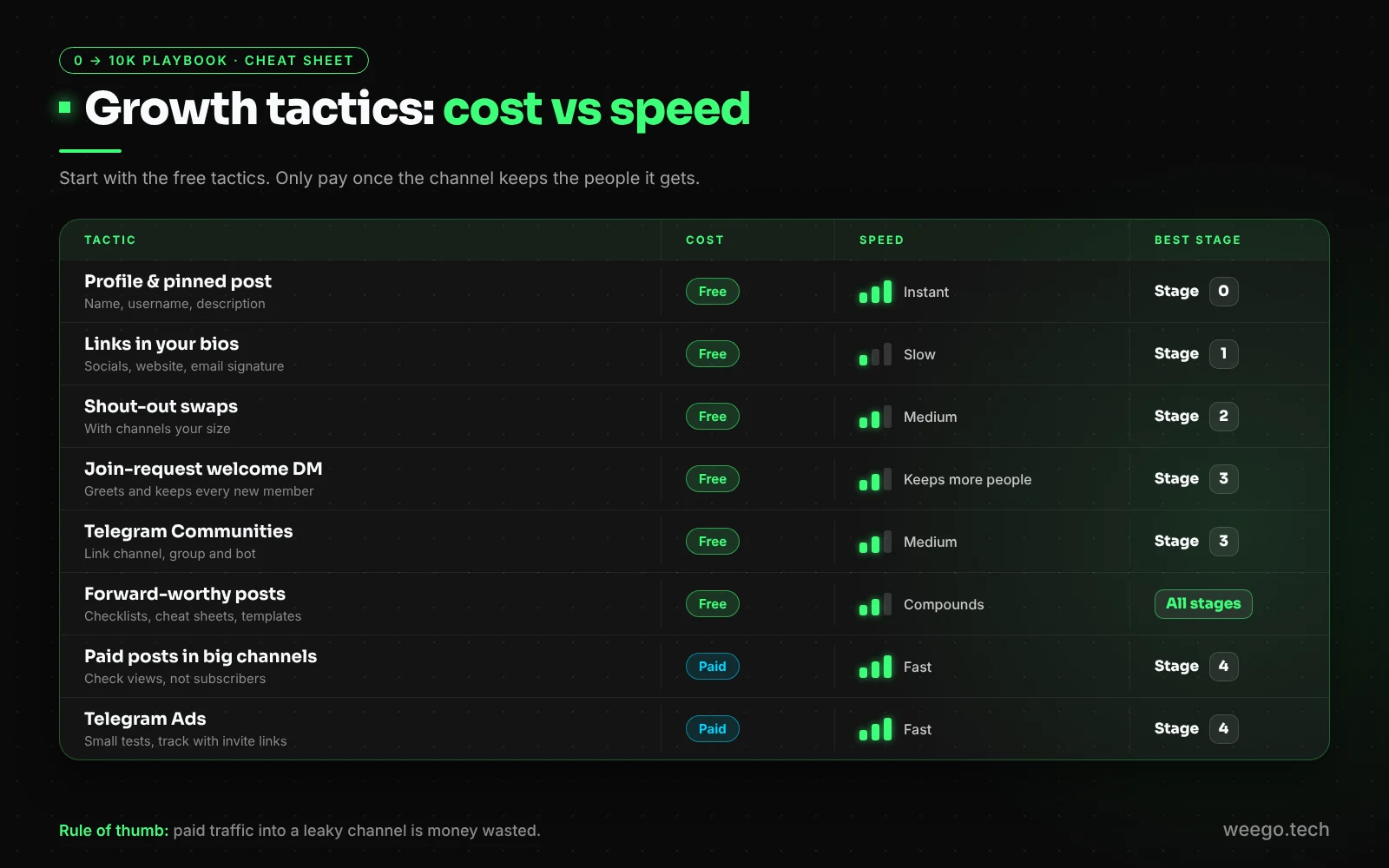
Only spend money once Stages 1 to 3 are running. Ads send people to your channel; if the channel doesn’t keep them, you’re paying to fill a leaky bucket.
Telegram Ads
Telegram Ads are small text ads shown inside large public channels. With TON-based ads, anyone can promote a channel or bot on a small budget:
- You pay per 1,000 views (CPM), and TON ads have a minimum of 0.1 TON per 1,000 views.
- Your ad must point to a Telegram destination: a channel, a bot or a post.
- Users with Telegram Premium don’t see ads, so expect smaller reach in topics where many readers pay for Premium.
How to start: fill in your channel’s avatar and description first, write 2 or 3 versions of your ad, run each on a small budget, and keep only the one that brings people who stay. Point the ad at your join-request link so every visitor gets a welcome DM, and so you can count exactly who came from the ad.
Paid posts in bigger channels
You can also pay a larger channel in your niche to post about you. Before you pay:
- Check their views per post, not their subscriber count.
- Ask for the stats of their last paid post.
- Give them a unique invite link so you can measure the result.
Build the forward loop
Forwards are free growth. Every forwarded post carries your channel’s name to someone new. The most-forwarded content is useful and easy to share: checklists, cheat sheets, templates, and “save this” style posts.
You can go further and offer a downloadable resource that requires joining your channel. Our force-join file gate playbook shows how to do it fairly.
Get found on Google
Your public channel’s t.me/s/yourname page can show up in Google. Help it along:
- Write clear first lines in your posts, since that’s the text people (and Google) see.
- Link to your channel from your website, and embed your best posts in your blog articles.
- Turn your best Telegram posts into longer blog articles that link back to the channel.
The numbers to watch: view rate, forwards and leaves
Subscriber count is the vanity number. These three tell you if you’re really growing.
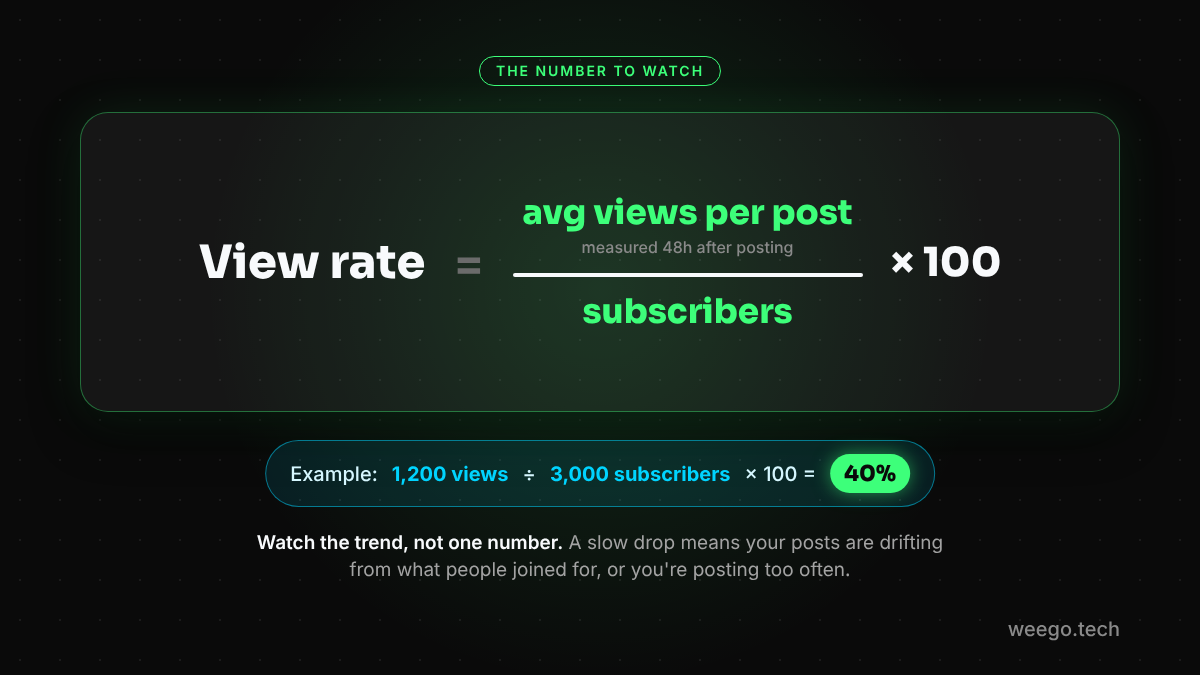
1. View rate
View rate = (average views per post ÷ subscribers) × 100
Measure each post about 48 hours after posting. Don’t chase a magic number; watch the trend. A slowly falling view rate means your content is drifting away from what people joined for, or you’re posting too often.
2. Forwards per post. Forwards are your free growth engine. Look at which posts get forwarded most, and make more of those.
3. Joins and leaves per invite link. This is why every swap and ad gets its own link. Once your channel is big enough, Telegram’s built-in Statistics page also shows joins, leaves and mutes over time. A spike in leaves right after a post tells you exactly what not to post again.
Why buying Telegram subscribers backfires
It’s tempting. Here’s what actually happens:
- Your view rate collapses. Fake accounts don’t read, so 10,000 subscribers with 300 views a post is a public red flag.
- Partners and advertisers check views. Swap partners and paid-post sellers will see the gap, and many will say no.
- The numbers don’t last. Fake accounts are regularly removed, so the count you paid for shrinks anyway.
- It pollutes your signals. Telegram picks similar channels from real subscriber overlap. Fake accounts add nothing to that, and may point Telegram at the wrong audience.
The slow way is the only way that compounds. Real subscribers forward, comment, reply to your welcome DM and bring their friends.
A weekly routine that compounds
- Every day: one post at your fixed time.
- Monday: plan the week’s posts, and include at least one that people would want to forward.
- Wednesday: send or run one shout-out swap.
- Friday: check your invite links (which ones brought people who stayed?) and your view-rate trend.
- Once a month: refresh your pinned post and description, and reply to welcome-DM answers.
- After 3,000: test one small Telegram Ads campaign a month.
Frequently asked questions
How long does it take to grow a Telegram channel to 10K subscribers?
Plan in months, not weeks. The speed depends on your niche, how consistently you post and how many shout-out swaps you run. Anyone promising 10K real subscribers in a week is selling fake ones.
Should my Telegram channel be public or private?
Public, if growth is the goal. Only public channels can be found in Telegram search, appear in the similar channels list and have a t.me/s web preview. You can still use invite links with join requests on a public channel to track promotions and send welcome DMs.
Is it safe to buy Telegram subscribers?
No. Bought subscribers don’t read your posts, so your view rate falls, which makes real partners and advertisers walk away. Many fake accounts are also removed later, so the number drops anyway.
How often should I post on a Telegram channel?
Pick a schedule you can keep for months, such as one post a day at the same time, and stick to it. Consistency matters more than volume; posting too often gets your channel muted or left.
Can a bot send a private message to people who join my channel?
Only if they join through a join request. When someone taps an invite link that needs admin approval, a bot that is an admin with invite rights can message them for a few minutes, before the request is approved or declined. People who join directly through your public username can’t be messaged this way.
What are Telegram Communities, and do they help growth?
Communities, added in July 2026, let you link channels, groups and bots around one topic. Members of any linked chat can see the others and join them without an invite link, so your group members are one tap away from your channel, and the reverse.
How much do Telegram Ads cost?
Telegram Ads are priced per 1,000 views (CPM). TON-based ads have a minimum of 0.1 TON per 1,000 views and can start on a small budget, and the ad must point to a Telegram channel, bot or post. Real costs depend on your niche and on what other advertisers bid.
Start with your stage, not with everything
You don’t need every tactic today. Find your stage and do the one or two things that matter there. If you’re at zero, fix your name, username and pinned post. At 100, start swapping. At 1,000, switch to join requests and welcome every single person.
The channels that reach 10K aren’t the ones with a secret hack. They’re the ones that kept posting, kept swapping and made every new subscriber feel noticed.
📬 Stop approving join requests by hand
Channel Guru approves every join request instantly and sends each new member your welcome DM, with buttons, images and a “start here” link. Add it as an admin; setup takes about two minutes.
Add Channel Guru free → · Read the Channel Guru guide